🌐 語言
YouTubePlayer





YouTube kotlin 多平台播放器。
YouTubePlayer 組件讓你能在 Jetpack Compose 應用程式中嵌入 YouTube 影片播放器。
捐款
如果你想感謝我或對開發進度做出貢獻,你可以捐款給我。這將幫助我更專注於這個專案。

你也可以在以下平台訂閱我,以便看到我主題的任何更新


安裝
你可以使用 Gradle 將此函式庫添加至你的專案。多平台 若要添加至多平台專案,請將依賴項加入至 common source-set:
repositories {
    mavenCentral()
}kotlin {
    sourceSets {
        commonMain {
            dependencies {
                implementation("io.github.ilyapavlovskii:youtubeplayer-compose:${latest_version}")
            }
        }
    }
}
使用方法
val coroutineScope = rememberCoroutineScope()
val hostState = remember { YouTubePlayerHostState() }when(val state = hostState.currentState) {
is YouTubePlayerState.Error -> {
Text(text = "Error: ${state.message}")
}
YouTubePlayerState.Idle -> {
// Do nothing, waiting for initialization
}
is YouTubePlayerState.Playing -> {
// Update UI button states
}
YouTubePlayerState.Ready -> coroutineScope.launch {
hostState.loadVideo(YouTubeVideoId("ufKj1sBrC4Q"))
}
}
YouTubePlayer(
modifier = Modifier
.fillMaxWidth()
.height(300.dp)
.gesturesDisabled(),
hostState = hostState,
options = SimpleYouTubePlayerOptionsBuilder.builder {
autoplay(true)
mute(true) // autoplay works only with mute for mobile devices
controls(false)
rel(false)
ivLoadPolicy(false)
ccLoadPolicy(false)
fullscreen = true
},
)
Composable 函式有以下主要參數:
options- 用於建立播放器選項。所有參數皆包裝自 官方 YouTube iframe 文件。hostState- 用於控制並追蹤 YouTube 播放器狀態及執行一次性指令的控制器
YouTubePlayerHostState
主要控制器。包含兩個主要公開元件:- currentState - 定義螢幕上實際的 YouTube 播放器狀態。可能為:Idle、Ready、Playing、Error
- executeCommand - 用於執行播放器指令的 suspend 函式。僅接收一個參數 - YouTubeExecCommand。同時也有一些額外的輔助函式,例如:
suspend fun loadVideo(videoId: YouTubeVideoId) = executeCommand(YouTubeExecCommand.LoadVideo(videoId))
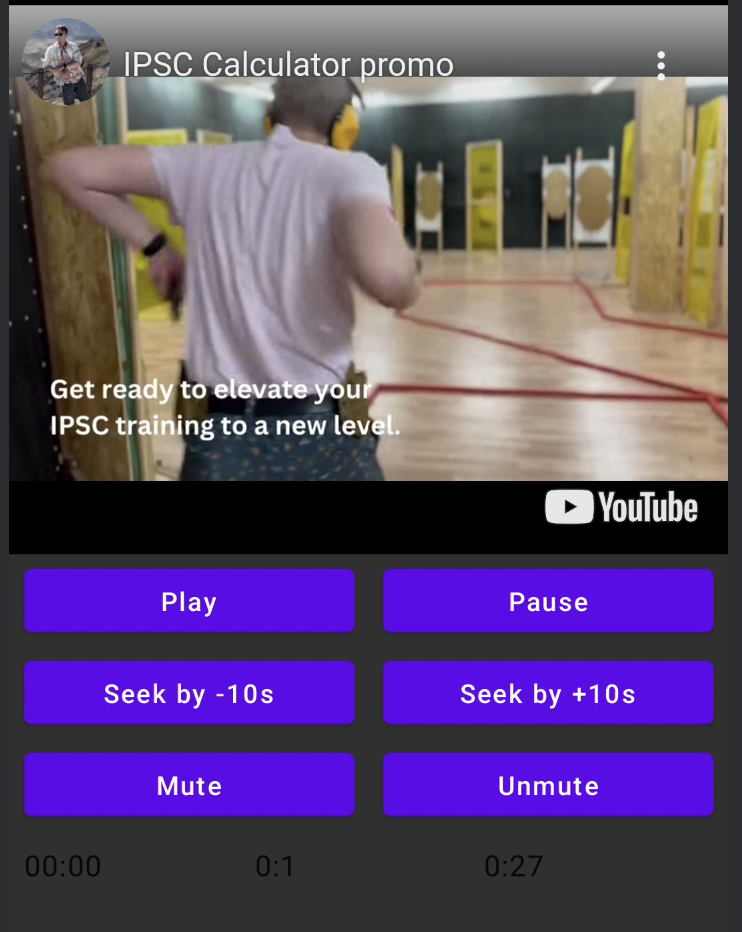
suspend fun play() = executeCommand(YouTubeExecCommand.Play)
suspend fun pause() = executeCommand(YouTubeExecCommand.Pause)
suspend fun seekTo(duration: Duration) = executeCommand(YouTubeExecCommand.SeekTo(duration))
suspend fun seekBy(duration: Duration) = executeCommand(YouTubeExecCommand.SeekBy(duration))
suspend fun mute() = executeCommand(YouTubeExecCommand.Mute)
suspend fun unMute() = executeCommand(YouTubeExecCommand.Unmute)
suspend fun setVolume(volume: Int) = executeCommand(YouTubeExecCommand.SetVolume(volume))
suspend fun setPlaybackRate(rate: Float) = executeCommand(YouTubeExecCommand.SetPlaybackRate(rate))
suspend fun toggleFullScreen() = executeCommand(YouTubeExecCommand.ToggleFullscreen)
YouTubePlayerState
YouTube 播放器狀態定義了螢幕上實際的 YouTube 播放器狀態。包含以下可能的狀態:Idle- Idle 狀態表示播放器尚未初始化Ready- 表示播放器已準備好播放Playing- 播放器正在播放影片。包含以下參數:
videoId: YouTubeVideoId - id of the video that is playing
duration: Duration - duration of the video
currentTime: Duration - current time of the video
quality: YouTubeEvent.PlaybackQualityChange.Quality - quality of the video, see [YouTubeEvent.PlaybackQualityChange.Quality]
isPlaying: Boolean - is video playingError- 定義錯誤狀態,並包含錯誤訊息。
YouTubeExecCommand
LoadVideo(val videoId: YouTubeVideoId,val startSeconds: Duration)- 透過 YouTube ID 載入影片。可選擇預設的開始時間偏移。Play- 播放影片Pause- 暫停影片SeekTo(val duration: Duration)- 將影片定位到指定時間SeekBy(val duration: Duration)- 影片快轉或倒轉指定時間Mute- 靜音Unmute- 取消靜音SetVolume(val volumePercent: Int)- 設定音量。預期參數值為 0 到 100。NextVideo- 跳至下一部影片PreviousVideo- 返回上一部影片SetLoop(val loop: Boolean)- 重複播放影片。依據參數控制。SetShuffle(val shuffle: Boolean)- 隨機播放影片。依據參數控制。
YouTubeEvent
Ready- 當 YouTube 播放器初始化完成時呼叫PlaybackQualityChange(val quality: Quality)- 播放品質變更時呼叫Error(val error: String)- 錯誤處理事件。詳情請參考參數。VideoDuration(val duration: Duration)- 影片時長初始化時呼叫StateChanged(val state: State)- 影片狀態變更時呼叫:UNSTARTED,ENDED,PLAYING,PAUSED,BUFFERING,CUED。TimeChanged(val time: Duration)- 時間戳記變更時呼叫OnVideoIdHandled(val videoId: YouTubeVideoId)- 載入影片時的回呼
範例
授權
Copyright 2026 Ilia PavlovskiiLicensed under the Apache License, Version 2.0 (the "License");
you may not use this file except in compliance with the License.
You may obtain a copy of the License at
http://www.apache.org/licenses/LICENSE-2.0
Unless required by applicable law or agreed to in writing, software
distributed under the License is distributed on an "AS IS" BASIS,
WITHOUT WARRANTIES OR CONDITIONS OF ANY KIND, either express or implied.
See the License for the specific language governing permissions and
limitations under the License.