🌐 语言
YouTubePlayer





YouTube kotlin 多平台播放器。
YouTubePlayer 组合项允许你在 Jetpack Compose 应用中嵌入一个 YouTube 视频播放器。
捐赠
如果你想感谢我或为开发工作做出贡献,可以给我捐赠。这将帮助我能更专注于该项目。

你也可以在下列平台订阅我,以便了解我话题的最新动态


安装
你可以通过 Gradle 将此库添加到你的项目中。多平台 要将其添加到多平台项目中,请在 common 源集添加依赖:
repositories {
    mavenCentral()
}kotlin {
    sourceSets {
        commonMain {
            dependencies {
                implementation("io.github.ilyapavlovskii:youtubeplayer-compose:${latest_version}")
            }
        }
    }
}
用法
val coroutineScope = rememberCoroutineScope()
val hostState = remember { YouTubePlayerHostState() }when(val state = hostState.currentState) {
is YouTubePlayerState.Error -> {
Text(text = "Error: ${state.message}")
}
YouTubePlayerState.Idle -> {
// Do nothing, waiting for initialization
}
is YouTubePlayerState.Playing -> {
// Update UI button states
}
YouTubePlayerState.Ready -> coroutineScope.launch {
hostState.loadVideo(YouTubeVideoId("ufKj1sBrC4Q"))
}
}
YouTubePlayer(
modifier = Modifier
.fillMaxWidth()
.height(300.dp)
.gesturesDisabled(),
hostState = hostState,
options = SimpleYouTubePlayerOptionsBuilder.builder {
autoplay(true)
mute(true) // autoplay works only with mute for mobile devices
controls(false)
rel(false)
ivLoadPolicy(false)
ccLoadPolicy(false)
fullscreen = true
},
)
options- 播放器选项构建器。所有参数均来自官方YouTube iframe文档。hostState- 用于跟踪YouTube播放器状态并执行一次性命令的控制器
YouTubePlayerHostState
主要控制器。包含两个主要公共组件:- currentState - 定义屏幕上实际的YouTube播放器状态。可能为:Idle、Ready、Playing、Error
- executeCommand - 用于执行播放器命令的挂起函数。仅接收一个参数 - YouTubeExecCommand。还具有一些附加的便捷函数,例如:
suspend fun loadVideo(videoId: YouTubeVideoId) = executeCommand(YouTubeExecCommand.LoadVideo(videoId))
suspend fun play() = executeCommand(YouTubeExecCommand.Play)
suspend fun pause() = executeCommand(YouTubeExecCommand.Pause)
suspend fun seekTo(duration: Duration) = executeCommand(YouTubeExecCommand.SeekTo(duration))
suspend fun seekBy(duration: Duration) = executeCommand(YouTubeExecCommand.SeekBy(duration))
suspend fun mute() = executeCommand(YouTubeExecCommand.Mute)
suspend fun unMute() = executeCommand(YouTubeExecCommand.Unmute)
suspend fun setVolume(volume: Int) = executeCommand(YouTubeExecCommand.SetVolume(volume))
suspend fun setPlaybackRate(rate: Float) = executeCommand(YouTubeExecCommand.SetPlaybackRate(rate))
suspend fun toggleFullScreen() = executeCommand(YouTubeExecCommand.ToggleFullscreen)
YouTubePlayerState
YouTube播放器状态定义屏幕上实际的YouTube播放器状态。包含以下可能的状态:Idle- 空闲状态表示播放器尚未初始化Ready- 表示播放器已准备好播放Playing- 播放器正在播放视频。包含以下参数:
videoId: YouTubeVideoId - id of the video that is playing
duration: Duration - duration of the video
currentTime: Duration - current time of the video
quality: YouTubeEvent.PlaybackQualityChange.Quality - quality of the video, see [YouTubeEvent.PlaybackQualityChange.Quality]
isPlaying: Boolean - is video playingError- 定义错误状态,包含错误信息。
YouTubeExecCommand
LoadVideo(val videoId: YouTubeVideoId,val startSeconds: Duration)- 通过 YouTube ID 加载视频。可以设置默认起始时间偏移。Play- 播放视频Pause- 暂停视频SeekTo(val duration: Duration)- 跳转视频到指定时间SeekBy(val duration: Duration)- 按指定时间跳转视频Mute- 静音Unmute- 取消静音SetVolume(val volumePercent: Int)- 设置音量。参数值应为0到100之间。NextVideo- 跳转到下一个视频PreviousVideo- 跳转到上一个视频SetLoop(val loop: Boolean)- 视频循环。由参数控制。SetShuffle(val shuffle: Boolean)- 视频随机播放。由参数控制。
YouTubeEvent
Ready- 当 YouTube 播放器初始化完成时调用PlaybackQualityChange(val quality: Quality)- 播放器质量改变时调用Error(val error: String)- 错误处理事件。详情见参数。VideoDuration(val duration: Duration)- 视频时长初始化时调用StateChanged(val state: State)- 视频状态改变时调用:UNSTARTED,ENDED,PLAYING,PAUSED,BUFFERING,CUED。TimeChanged(val time: Duration)- 时间戳变化OnVideoIdHandled(val videoId: YouTubeVideoId)- 视频加载完成回调
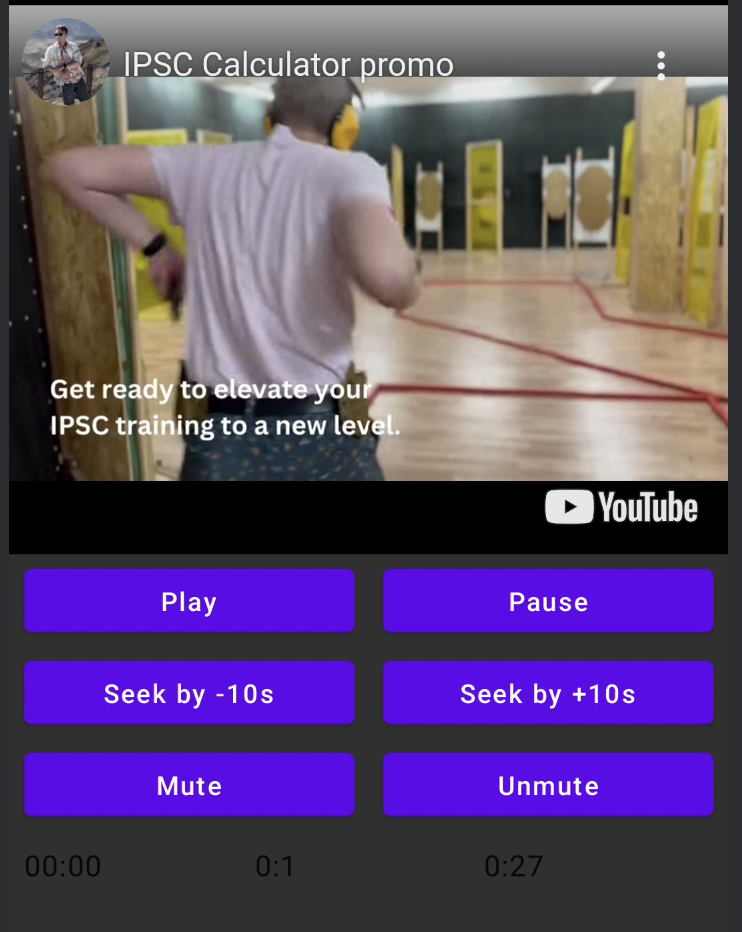
Sample
LICENSE
Copyright 2026 Ilia PavlovskiiLicensed under the Apache License, Version 2.0 (the "License");
you may not use this file except in compliance with the License.
You may obtain a copy of the License at
http://www.apache.org/licenses/LICENSE-2.0
Unless required by applicable law or agreed to in writing, software
distributed under the License is distributed on an "AS IS" BASIS,
WITHOUT WARRANTIES OR CONDITIONS OF ANY KIND, either express or implied.
See the License for the specific language governing permissions and
limitations under the License.