🌐 Ngôn ngữ
YouTubePlayer





Trình phát YouTube Kotlin đa nền tảng.
Composable YouTubePlayer cho phép bạn nhúng trình phát video YouTube vào ứng dụng Jetpack Compose của bạn.
Ủng hộ
Nếu bạn muốn cảm ơn tôi hoặc đóng góp cho việc phát triển các tính năng dự kiến, bạn có thể ủng hộ cho tôi. Điều đó giúp tôi tập trung hơn vào dự án.

Bạn cũng có thể theo dõi tôi trên các nền tảng sau để nhận các cập nhật mới về chủ đề của tôi


Cài đặt
Bạn có thể thêm thư viện này vào dự án của bạn bằng Gradle.Đa nền tảng Để thêm vào dự án đa nền tảng, hãy thêm dependency vào common source-set:
repositories {
    mavenCentral()
}kotlin {
    sourceSets {
        commonMain {
            dependencies {
                implementation("io.github.ilyapavlovskii:youtubeplayer-compose:${latest_version}")
            }
        }
    }
}
Sử dụng
val coroutineScope = rememberCoroutineScope()
val hostState = remember { YouTubePlayerHostState() }when(val state = hostState.currentState) {
is YouTubePlayerState.Error -> {
Text(text = "Error: ${state.message}")
}
YouTubePlayerState.Idle -> {
// Do nothing, waiting for initialization
}
is YouTubePlayerState.Playing -> {
// Update UI button states
}
YouTubePlayerState.Ready -> coroutineScope.launch {
hostState.loadVideo(YouTubeVideoId("ufKj1sBrC4Q"))
}
}
YouTubePlayer(
modifier = Modifier
.fillMaxWidth()
.height(300.dp)
.gesturesDisabled(),
hostState = hostState,
options = SimpleYouTubePlayerOptionsBuilder.builder {
autoplay(true)
mute(true) // autoplay works only with mute for mobile devices
controls(false)
rel(false)
ivLoadPolicy(false)
ccLoadPolicy(false)
fullscreen = true
},
)
Composable function có các tham số chính sau:
options- để xây dựng các tùy chọn cho trình phát. Tất cả các tham số được đóng gói từ tài liệu iframe youtube chính thức.hostState- bộ điều khiển để theo dõi trạng thái trình phát youtube và thực thi các lệnh một lần
YouTubePlayerHostState
Bộ điều khiển chính. Chứa 2 thành phần công khai chính:- currentState - xác định trạng thái thực tế của trình phát youtube trên màn hình. Có thể là: Idle, Ready, Playing, Error
- executeCommand - hàm treo để thực thi các lệnh trình phát. Chỉ nhận một đối số duy nhất - YouTubeExecCommand. Ngoài ra còn có các hàm bổ trợ như:
suspend fun loadVideo(videoId: YouTubeVideoId) = executeCommand(YouTubeExecCommand.LoadVideo(videoId))
suspend fun play() = executeCommand(YouTubeExecCommand.Play)
suspend fun pause() = executeCommand(YouTubeExecCommand.Pause)
suspend fun seekTo(duration: Duration) = executeCommand(YouTubeExecCommand.SeekTo(duration))
suspend fun seekBy(duration: Duration) = executeCommand(YouTubeExecCommand.SeekBy(duration))
suspend fun mute() = executeCommand(YouTubeExecCommand.Mute)
suspend fun unMute() = executeCommand(YouTubeExecCommand.Unmute)
suspend fun setVolume(volume: Int) = executeCommand(YouTubeExecCommand.SetVolume(volume))
suspend fun setPlaybackRate(rate: Float) = executeCommand(YouTubeExecCommand.SetPlaybackRate(rate))
suspend fun toggleFullScreen() = executeCommand(YouTubeExecCommand.ToggleFullscreen)
YouTubePlayerState
Trạng thái trình phát YouTube xác định trạng thái thực tế của trình phát YouTube trên màn hình. Bao gồm các trạng thái có thể sau:Idle- Trạng thái nhàn rỗi nghĩa là trình phát chưa được khởi tạoReady- Nghĩa là trình phát đã sẵn sàng để phátPlaying- trình phát đang phát video. Bao gồm các tham số sau:
videoId: YouTubeVideoId - id of the video that is playing
duration: Duration - duration of the video
currentTime: Duration - current time of the video
quality: YouTubeEvent.PlaybackQualityChange.Quality - quality of the video, see [YouTubeEvent.PlaybackQualityChange.Quality]
isPlaying: Boolean - is video playingError- Định nghĩa trạng thái lỗi với thông báo lỗi bên trong.
YouTubeExecCommand
LoadVideo(val videoId: YouTubeVideoId,val startSeconds: Duration)- tải video bằng id youtube. Có thể bắt đầu với thời gian mặc định.Play- phát videoPause- tạm dừng videoSeekTo(val duration: Duration)- tua đến thời gian xác địnhSeekBy(val duration: Duration)- tua video theo khoảng thời gian xác địnhMute- tắt âm thanhUnmute- bật âm thanhSetVolume(val volumePercent: Int)- đặt mức âm lượng. Giá trị mong đợi từ 0 đến 100.NextVideo- chuyển sang video tiếp theoPreviousVideo- quay lại video trướcSetLoop(val loop: Boolean)- lặp lại video. Quản lý bằng tham số.SetShuffle(val shuffle: Boolean)- phát ngẫu nhiên video. Quản lý bằng tham số.
YouTubeEvent
Ready- gọi khi quá trình khởi tạo trình phát youtube hoàn tấtPlaybackQualityChange(val quality: Quality)- gọi khi chất lượng phát thay đổiError(val error: String)- sự kiện xử lý lỗi. Xem tham số để biết chi tiết.VideoDuration(val duration: Duration)- gọi khi thời lượng video được khởi tạoStateChanged(val state: State)- gọi khi trạng thái video thay đổi:UNSTARTED,ENDED,PLAYING,PAUSED,BUFFERING,CUED.TimeChanged(val time: Duration)- dấu thời gian thay đổiOnVideoIdHandled(val videoId: YouTubeVideoId)- callback khi video đã tải
Ví dụ
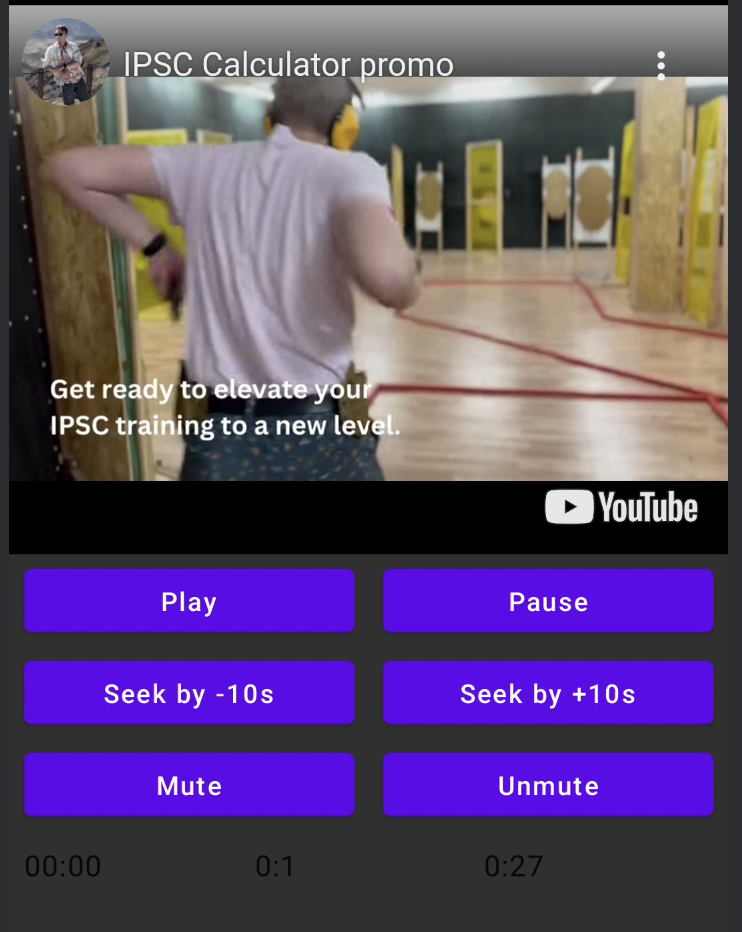
GIẤY PHÉP
Copyright 2026 Ilia PavlovskiiLicensed under the Apache License, Version 2.0 (the "License");
you may not use this file except in compliance with the License.
You may obtain a copy of the License at
http://www.apache.org/licenses/LICENSE-2.0
Unless required by applicable law or agreed to in writing, software
distributed under the License is distributed on an "AS IS" BASIS,
WITHOUT WARRANTIES OR CONDITIONS OF ANY KIND, either express or implied.
See the License for the specific language governing permissions and
limitations under the License.