🌐 ภาษา
YouTubePlayer





YouTube kotlin multiplatform player.
YouTubePlayer composable ช่วยให้คุณฝังเครื่องเล่นวิดีโอ YouTube ในแอป Jetpack Compose ของคุณได้
บริจาค
หากคุณต้องการขอบคุณหรือสนับสนุนการพัฒนารายการ backlog คุณสามารถบริจาคให้ฉันได้ นั่นจะช่วยให้ฉันมีสมาธิกับโปรเจกต์มากขึ้น

คุณยังสามารถติดตามฉันในแพลตฟอร์มต่อไปนี้เพื่อดูการอัปเดตในหัวข้อต่าง ๆ ของฉัน


การติดตั้ง
คุณสามารถเพิ่มไลบรารีนี้ลงในโปรเจกต์ของคุณได้โดยใช้ Gradleมัลติแพลตฟอร์ม หากต้องการเพิ่มในโปรเจกต์มัลติแพลตฟอร์ม ให้เพิ่ม dependency ใน common source-set:
repositories {
    mavenCentral()
}kotlin {
    sourceSets {
        commonMain {
            dependencies {
                implementation("io.github.ilyapavlovskii:youtubeplayer-compose:${latest_version}")
            }
        }
    }
}
การใช้งาน
val coroutineScope = rememberCoroutineScope()
val hostState = remember { YouTubePlayerHostState() }when(val state = hostState.currentState) {
is YouTubePlayerState.Error -> {
Text(text = "Error: ${state.message}")
}
YouTubePlayerState.Idle -> {
// Do nothing, waiting for initialization
}
is YouTubePlayerState.Playing -> {
// Update UI button states
}
YouTubePlayerState.Ready -> coroutineScope.launch {
hostState.loadVideo(YouTubeVideoId("ufKj1sBrC4Q"))
}
}
YouTubePlayer(
modifier = Modifier
.fillMaxWidth()
.height(300.dp)
.gesturesDisabled(),
hostState = hostState,
options = SimpleYouTubePlayerOptionsBuilder.builder {
autoplay(true)
mute(true) // autoplay works only with mute for mobile devices
controls(false)
rel(false)
ivLoadPolicy(false)
ccLoadPolicy(false)
fullscreen = true
},
)
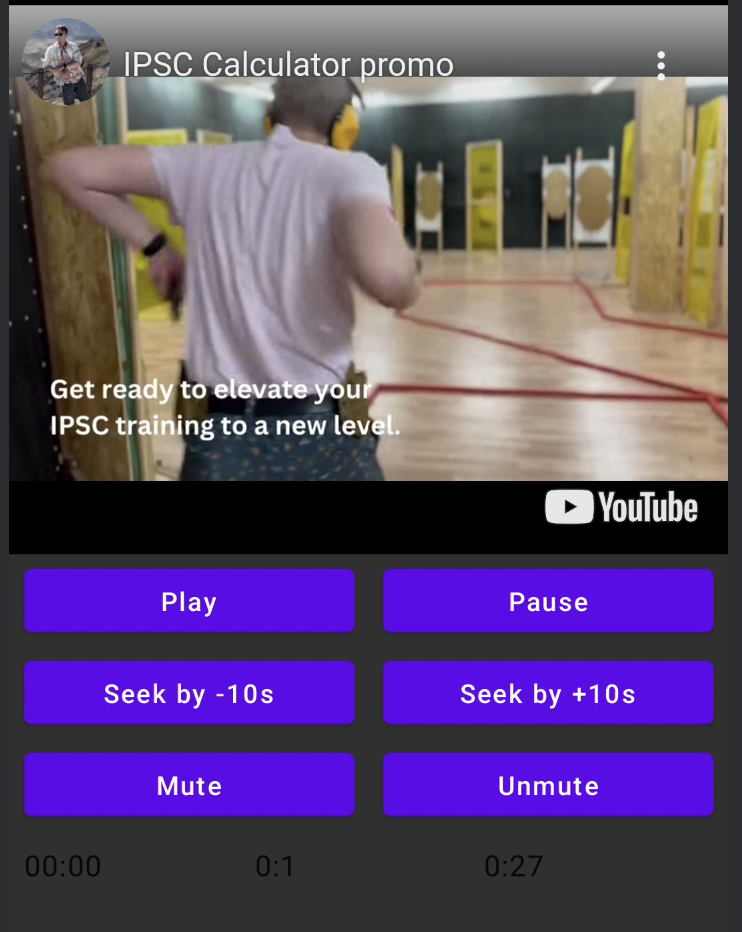
options- สำหรับตัวสร้างตัวเลือกของผู้เล่น ว่าพารามิเตอร์ทั้งหมดห่อหุ้มมาจาก เอกสารประกอบ iframe ของ YouTube อย่างเป็นทางการhostState- ตัวควบคุมสำหรับติดตามสถานะของ YouTube player และดำเนินการคำสั่งแบบหนึ่งครั้ง
YouTubePlayerHostState
ตัวควบคุมหลัก ประกอบด้วยส่วนประกอบสาธารณะหลัก 2 ส่วน:- currentState - กำหนดสถานะปัจจุบันของ YouTube player บนหน้าจอ อาจเป็น: Idle, Ready, Playing, Error
- executeCommand - ฟังก์ชัน suspend สำหรับดำเนินการคำสั่งของ player โดยรับอาร์กิวเมนต์เดียวเท่านั้น คือ YouTubeExecCommand นอกจากนี้ยังมีฟังก์ชันเสริมเพิ่มเติม เช่น:
suspend fun loadVideo(videoId: YouTubeVideoId) = executeCommand(YouTubeExecCommand.LoadVideo(videoId))
suspend fun play() = executeCommand(YouTubeExecCommand.Play)
suspend fun pause() = executeCommand(YouTubeExecCommand.Pause)
suspend fun seekTo(duration: Duration) = executeCommand(YouTubeExecCommand.SeekTo(duration))
suspend fun seekBy(duration: Duration) = executeCommand(YouTubeExecCommand.SeekBy(duration))
suspend fun mute() = executeCommand(YouTubeExecCommand.Mute)
suspend fun unMute() = executeCommand(YouTubeExecCommand.Unmute)
suspend fun setVolume(volume: Int) = executeCommand(YouTubeExecCommand.SetVolume(volume))
suspend fun setPlaybackRate(rate: Float) = executeCommand(YouTubeExecCommand.SetPlaybackRate(rate))
suspend fun toggleFullScreen() = executeCommand(YouTubeExecCommand.ToggleFullscreen)
YouTubePlayerState
สถานะของ YouTube player กำหนดสถานะของเครื่องเล่น YouTube จริงบนหน้าจอ ประกอบด้วยสถานะที่เป็นไปได้ดังต่อไปนี้:Idle- สถานะ Idle หมายถึงเครื่องเล่นยังไม่ได้ถูกเริ่มต้นใช้งานReady- หมายถึงเครื่องเล่นพร้อมที่จะเล่นแล้วPlaying- เครื่องเล่นกำลังเล่นวิดีโออยู่ ประกอบด้วยพารามิเตอร์ต่อไปนี้:
videoId: YouTubeVideoId - id of the video that is playing
duration: Duration - duration of the video
currentTime: Duration - current time of the video
quality: YouTubeEvent.PlaybackQualityChange.Quality - quality of the video, see [YouTubeEvent.PlaybackQualityChange.Quality]
isPlaying: Boolean - is video playingError- กำหนดสถานะข้อผิดพลาดพร้อมข้อความข้อผิดพลาดภายใน
YouTubeExecCommand
LoadVideo(val videoId: YouTubeVideoId,val startSeconds: Duration)- โหลดวิดีโอตามรหัส youtube สามารถเริ่มต้นด้วยค่า offset ของเวลาที่กำหนดได้Play- เล่นวิดีโอPause- หยุดชั่วคราววิดีโอSeekTo(val duration: Duration)- เลื่อนวิดีโอไปยังเวลาที่กำหนดSeekBy(val duration: Duration)- เลื่อนวิดีโอไปตามเวลาที่กำหนดMute- ปิดเสียงUnmute- เปิดเสียงSetVolume(val volumePercent: Int)- ตั้งค่าระดับเสียง ค่าพารามิเตอร์ระหว่าง 0 ถึง 100NextVideo- ไปยังวิดีโอต่อไปPreviousVideo- กลับไปยังวิดีโอก่อนหน้าSetLoop(val loop: Boolean)- วนซ้ำวิดีโอ จัดการโดยพารามิเตอร์SetShuffle(val shuffle: Boolean)- สุ่มลำดับวิดีโอ จัดการโดยพารามิเตอร์
YouTubeEvent
Ready- เรียกเมื่อการเริ่มต้น youtube player เสร็จสมบูรณ์PlaybackQualityChange(val quality: Quality)- เรียกเมื่อคุณภาพการเล่นเปลี่ยนแปลงError(val error: String)- กิจกรรมจัดการข้อผิดพลาด ดูรายละเอียดในพารามิเตอร์VideoDuration(val duration: Duration)- เรียกเมื่อระยะเวลาวิดีโอถูกกำหนดค่าแล้วStateChanged(val state: State)- เรียกเมื่อสถานะวิดีโอเปลี่ยน:UNSTARTED,ENDED,PLAYING,PAUSED,BUFFERING,CUED.TimeChanged(val time: Duration)- เปลี่ยนแปลงเวลาปัจจุบันOnVideoIdHandled(val videoId: YouTubeVideoId)- callback เมื่อโหลดวิดีโอแล้ว
ตัวอย่าง
ใบอนุญาต
Copyright 2026 Ilia PavlovskiiLicensed under the Apache License, Version 2.0 (the "License");
you may not use this file except in compliance with the License.
You may obtain a copy of the License at
http://www.apache.org/licenses/LICENSE-2.0
Unless required by applicable law or agreed to in writing, software
distributed under the License is distributed on an "AS IS" BASIS,
WITHOUT WARRANTIES OR CONDITIONS OF ANY KIND, either express or implied.
See the License for the specific language governing permissions and
limitations under the License.