🌐 Idioma
YouTubePlayer





YouTube kotlin multiplatform player.
O composable YouTubePlayer permite que você incorpore um player de vídeo do YouTube em seu aplicativo Jetpack Compose.
Doação
Se você quiser me agradecer ou contribuir para o desenvolvimento do backlog, pode fazer uma doação. Isso me ajuda a focar mais no projeto.

Você também pode me seguir nas seguintes plataformas para ver atualizações sobre meus tópicos


Instalação
Você pode adicionar esta biblioteca ao seu projeto usando o Gradle.Multiplataforma Para adicionar a um projeto multiplataforma, adicione a dependência ao source-set comum:
repositories {
    mavenCentral()
}kotlin {
    sourceSets {
        commonMain {
            dependencies {
                implementation("io.github.ilyapavlovskii:youtubeplayer-compose:${latest_version}")
            }
        }
    }
}
Uso
val coroutineScope = rememberCoroutineScope()
val hostState = remember { YouTubePlayerHostState() }when(val state = hostState.currentState) {
is YouTubePlayerState.Error -> {
Text(text = "Error: ${state.message}")
}
YouTubePlayerState.Idle -> {
// Do nothing, waiting for initialization
}
is YouTubePlayerState.Playing -> {
// Update UI button states
}
YouTubePlayerState.Ready -> coroutineScope.launch {
hostState.loadVideo(YouTubeVideoId("ufKj1sBrC4Q"))
}
}
YouTubePlayer(
modifier = Modifier
.fillMaxWidth()
.height(300.dp)
.gesturesDisabled(),
hostState = hostState,
options = SimpleYouTubePlayerOptionsBuilder.builder {
autoplay(true)
mute(true) // autoplay works only with mute for mobile devices
controls(false)
rel(false)
ivLoadPolicy(false)
ccLoadPolicy(false)
fullscreen = true
},
)
A função composable possui os seguintes parâmetros principais:
options- para o construtor de opções do player. Todos os parâmetros são encapsulados da documentação oficial do iframe do YouTube.hostState- controlador para monitorar o estado do player do YouTube e executar comandos únicos
YouTubePlayerHostState
O controlador principal. Contém 2 componentes públicos principais:- currentState - define o estado atual do player do YouTube na tela. Pode ser: Idle, Ready, Playing, Error
- executeCommand - função suspend para executar comandos do player. Recebe apenas um argumento - YouTubeExecCommand. Também possui funções auxiliares adicionais como:
suspend fun loadVideo(videoId: YouTubeVideoId) = executeCommand(YouTubeExecCommand.LoadVideo(videoId))
suspend fun play() = executeCommand(YouTubeExecCommand.Play)
suspend fun pause() = executeCommand(YouTubeExecCommand.Pause)
suspend fun seekTo(duration: Duration) = executeCommand(YouTubeExecCommand.SeekTo(duration))
suspend fun seekBy(duration: Duration) = executeCommand(YouTubeExecCommand.SeekBy(duration))
suspend fun mute() = executeCommand(YouTubeExecCommand.Mute)
suspend fun unMute() = executeCommand(YouTubeExecCommand.Unmute)
suspend fun setVolume(volume: Int) = executeCommand(YouTubeExecCommand.SetVolume(volume))
suspend fun setPlaybackRate(rate: Float) = executeCommand(YouTubeExecCommand.SetPlaybackRate(rate))
suspend fun toggleFullScreen() = executeCommand(YouTubeExecCommand.ToggleFullscreen)
YouTubePlayerState
O estado do player do YouTube define o estado real do player do YouTube na tela. Contém os seguintes estados possíveis:Idle- O estado Idle significa que o player ainda não foi inicializadoReady- Significa que o player está pronto para reproduzirPlaying- o player está reproduzindo o vídeo. Contém os seguintes parâmetros:
videoId: YouTubeVideoId - id of the video that is playing
duration: Duration - duration of the video
currentTime: Duration - current time of the video
quality: YouTubeEvent.PlaybackQualityChange.Quality - quality of the video, see [YouTubeEvent.PlaybackQualityChange.Quality]
isPlaying: Boolean - is video playingError- Define o estado de erro com mensagem de erro interna.
YouTubeExecCommand
LoadVideo(val videoId: YouTubeVideoId,val startSeconds: Duration)- carrega vídeo pelo id do YouTube. Possível iniciar com offset de tempo inicial padrão.Play- reproduzir vídeoPause- pausar vídeoSeekTo(val duration: Duration)- busca o vídeo para um tempo especificadoSeekBy(val duration: Duration)- busca o vídeo por um tempo especificadoMute- silenciar o somUnmute- ativar somSetVolume(val volumePercent: Int)- define o volume. Valor esperado do argumento de 0 a 100.NextVideo- navega para o próximo vídeoPreviousVideo- navega para o vídeo anteriorSetLoop(val loop: Boolean)- repetir vídeo. Gerenciado pelo argumento.SetShuffle(val shuffle: Boolean)- embaralhar vídeos. Gerenciado pelo argumento.
YouTubeEvent
Ready- chamado quando a inicialização do player do YouTube está completaPlaybackQualityChange(val quality: Quality)- chamado quando a qualidade do player mudaError(val error: String)- evento de tratamento de erro. Veja o argumento para detalhes.VideoDuration(val duration: Duration)- chamado quando a duração do vídeo é inicializadaStateChanged(val state: State)- chamado quando o estado do vídeo muda:UNSTARTED,ENDED,PLAYING,PAUSED,BUFFERING,CUED.TimeChanged(val time: Duration)- timestamp alteradoOnVideoIdHandled(val videoId: YouTubeVideoId)- callback quando o vídeo é carregado
Exemplo
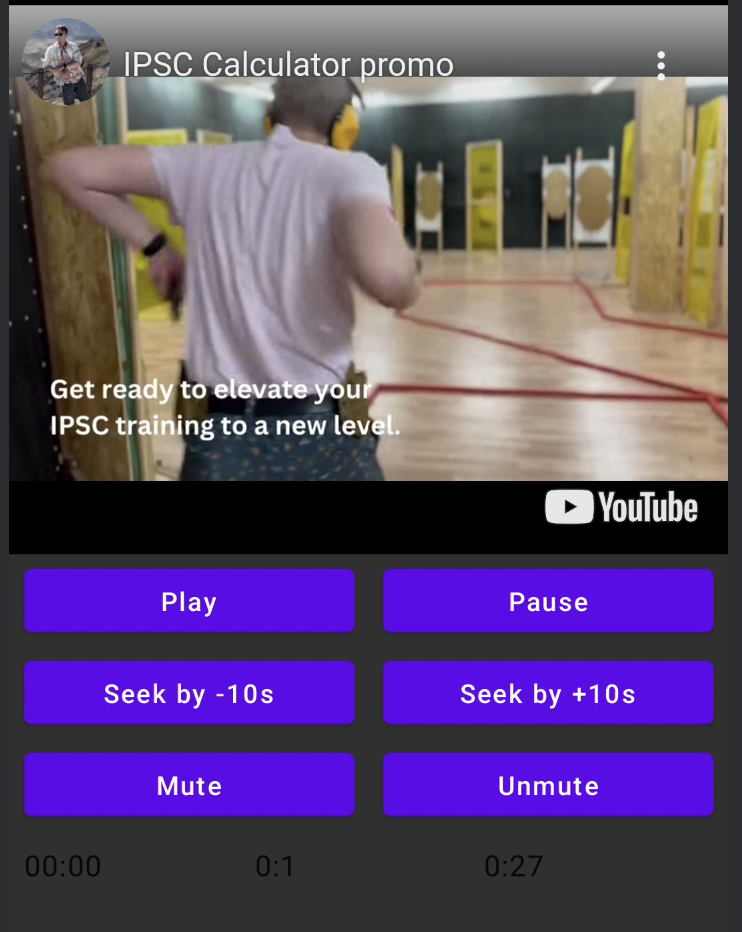
LICENÇA
Copyright 2026 Ilia PavlovskiiLicensed under the Apache License, Version 2.0 (the "License");
you may not use this file except in compliance with the License.
You may obtain a copy of the License at
http://www.apache.org/licenses/LICENSE-2.0
Unless required by applicable law or agreed to in writing, software
distributed under the License is distributed on an "AS IS" BASIS,
WITHOUT WARRANTIES OR CONDITIONS OF ANY KIND, either express or implied.
See the License for the specific language governing permissions and
limitations under the License.