🌐 Taal
YouTubePlayer





YouTube kotlin multiplatform speler.
De YouTubePlayer composable stelt je in staat om een YouTube videospeler in je Jetpack Compose-app te integreren.
Doneren
Als je mij wilt bedanken of wilt bijdragen aan de ontwikkeling van de backlog, kun je mij een donatie geven. Dat helpt mij om meer op het project te focussen.

Je kunt je ook op de volgende platformen abonneren om op de hoogte te blijven van updates over mijn onderwerpen


Installeren
Je kunt deze bibliotheek toevoegen aan je project via Gradle.Multiplatform Om toe te voegen aan een multiplatform-project, voeg je de dependency toe aan de common source-set:
repositories {
    mavenCentral()
}kotlin {
    sourceSets {
        commonMain {
            dependencies {
                implementation("io.github.ilyapavlovskii:youtubeplayer-compose:${latest_version}")
            }
        }
    }
}
Gebruik
val coroutineScope = rememberCoroutineScope()
val hostState = remember { YouTubePlayerHostState() }when(val state = hostState.currentState) {
is YouTubePlayerState.Error -> {
Text(text = "Error: ${state.message}")
}
YouTubePlayerState.Idle -> {
// Do nothing, waiting for initialization
}
is YouTubePlayerState.Playing -> {
// Update UI button states
}
YouTubePlayerState.Ready -> coroutineScope.launch {
hostState.loadVideo(YouTubeVideoId("ufKj1sBrC4Q"))
}
}
YouTubePlayer(
modifier = Modifier
.fillMaxWidth()
.height(300.dp)
.gesturesDisabled(),
hostState = hostState,
options = SimpleYouTubePlayerOptionsBuilder.builder {
autoplay(true)
mute(true) // autoplay works only with mute for mobile devices
controls(false)
rel(false)
ivLoadPolicy(false)
ccLoadPolicy(false)
fullscreen = true
},
)
Composable functie heeft de volgende belangrijke parameters:
options- voor de player options builder. Alle parameters zijn overgenomen uit de officiële YouTube iframe documentatie.hostState- controller om de status van de YouTube-speler te volgen en eenmalige commando's uit te voeren
YouTubePlayerHostState
De hoofdcontroller. Bevat 2 belangrijke publieke componenten:- currentState - definieert de actuele status van de YouTube-speler op het scherm. Kan zijn: Idle, Ready, Playing, Error
- executeCommand - suspend functie om spelercommando's uit te voeren. Ontvangt slechts één argument - YouTubeExecCommand. Heeft ook enkele extra gemaksfuncties zoals:
suspend fun loadVideo(videoId: YouTubeVideoId) = executeCommand(YouTubeExecCommand.LoadVideo(videoId))
suspend fun play() = executeCommand(YouTubeExecCommand.Play)
suspend fun pause() = executeCommand(YouTubeExecCommand.Pause)
suspend fun seekTo(duration: Duration) = executeCommand(YouTubeExecCommand.SeekTo(duration))
suspend fun seekBy(duration: Duration) = executeCommand(YouTubeExecCommand.SeekBy(duration))
suspend fun mute() = executeCommand(YouTubeExecCommand.Mute)
suspend fun unMute() = executeCommand(YouTubeExecCommand.Unmute)
suspend fun setVolume(volume: Int) = executeCommand(YouTubeExecCommand.SetVolume(volume))
suspend fun setPlaybackRate(rate: Float) = executeCommand(YouTubeExecCommand.SetPlaybackRate(rate))
suspend fun toggleFullScreen() = executeCommand(YouTubeExecCommand.ToggleFullscreen)
YouTubePlayerState
YouTube-spelerstatus definieert de daadwerkelijke status van de YouTube-speler op het scherm. Bevat de volgende mogelijke statussen:Idle- Idle status betekent dat de speler nog niet is geïnitialiseerdReady- Betekent dat de speler klaar is om af te spelenPlaying- speler is video aan het afspelen. Bevat de volgende parameters:
videoId: YouTubeVideoId - id of the video that is playing
duration: Duration - duration of the video
currentTime: Duration - current time of the video
quality: YouTubeEvent.PlaybackQualityChange.Quality - quality of the video, see [YouTubeEvent.PlaybackQualityChange.Quality]
isPlaying: Boolean - is video playingError- Definieert foutstatus met foutmelding binnenin.
YouTubeExecCommand
LoadVideo(val videoId: YouTubeVideoId,val startSeconds: Duration)- laad video via YouTube-id. Mogelijk om te starten met standaard starttijd-offset.Play- speel video afPause- pauzeer videoSeekTo(val duration: Duration)- spoel video naar een opgegeven tijdSeekBy(val duration: Duration)- spoel video vooruit/achteruit met een opgegeven tijdMute- demp geluidUnmute- zet geluid aanSetVolume(val volumePercent: Int)- stel volume in. Verwachte waarde van 0 tot 100.NextVideo- ga naar volgende videoPreviousVideo- ga naar vorige videoSetLoop(val loop: Boolean)- herhaal video. Beheerd door argument.SetShuffle(val shuffle: Boolean)- shuffle video's. Beheerd door argument.
YouTubeEvent
Ready- wordt aangeroepen wanneer de initialisatie van de YouTube-speler voltooid isPlaybackQualityChange(val quality: Quality)- wordt aangeroepen bij verandering van afspeelkwaliteitError(val error: String)- foutafhandelingsgebeurtenis. Zie argument voor details.VideoDuration(val duration: Duration)- wordt aangeroepen wanneer videoduur is geïnitialiseerdStateChanged(val state: State)- wordt aangeroepen wanneer videostatus verandert:UNSTARTED,ENDED,PLAYING,PAUSED,BUFFERING,CUED.TimeChanged(val time: Duration)- tijdstempel gewijzigdOnVideoIdHandled(val videoId: YouTubeVideoId)- callback wanneer video geladen is
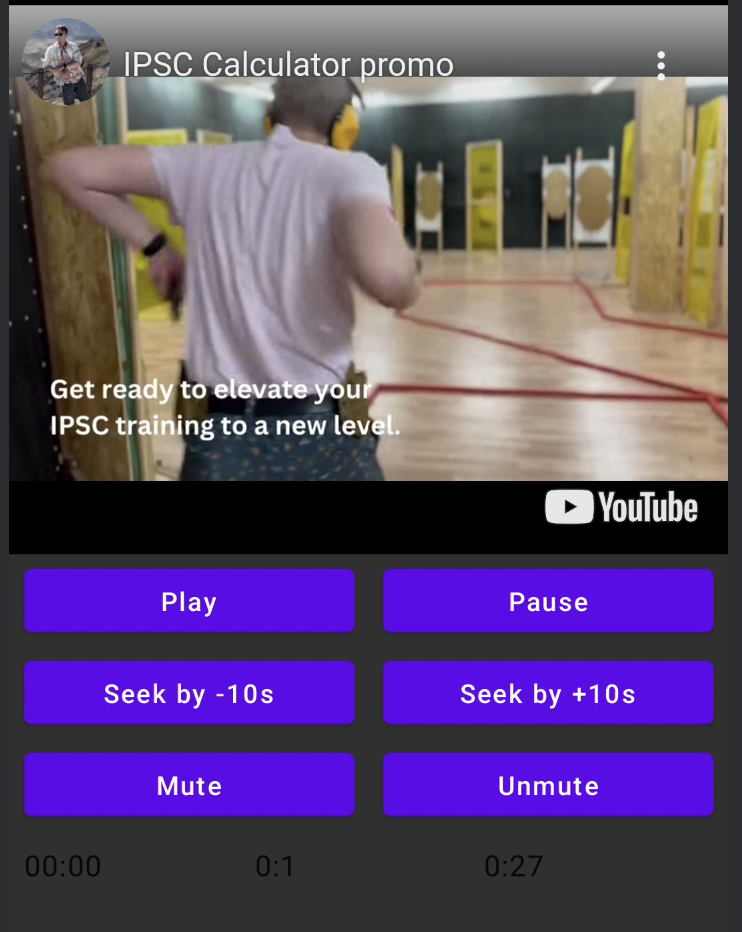
Voorbeeld
LICENTIE
Copyright 2026 Ilia PavlovskiiLicensed under the Apache License, Version 2.0 (the "License");
you may not use this file except in compliance with the License.
You may obtain a copy of the License at
http://www.apache.org/licenses/LICENSE-2.0
Unless required by applicable law or agreed to in writing, software
distributed under the License is distributed on an "AS IS" BASIS,
WITHOUT WARRANTIES OR CONDITIONS OF ANY KIND, either express or implied.
See the License for the specific language governing permissions and
limitations under the License.