🌐 언어
YouTubePlayer





YouTube 코틀린 멀티플랫폼 플레이어입니다.
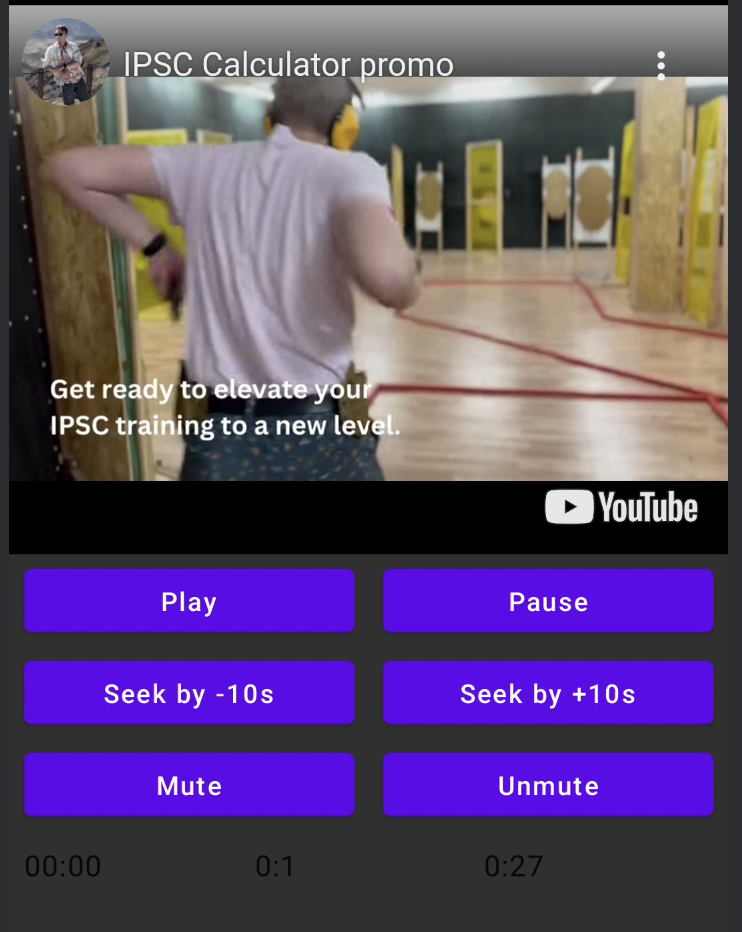
YouTubePlayer 콤포저블을 사용하면 Jetpack Compose 앱에 YouTube 동영상 플레이어를 임베드할 수 있습니다.
후원하기
저에게 감사의 뜻을 전하거나 개발에 기여하고 싶으시다면 후원해 주실 수 있습니다. 이는 제가 프로젝트에 더욱 집중할 수 있도록 도와줍니다.

아래 플랫폼에서 저를 구독하시면 주제 업데이트를 받아보실 수 있습니다.


설치
Gradle을 사용하여 이 라이브러리를 프로젝트에 추가할 수 있습니다.멀티플랫폼 멀티플랫폼 프로젝트에 추가하려면, 공통 소스셋에 의존성을 추가하세요:
repositories {
    mavenCentral()
}kotlin {
    sourceSets {
        commonMain {
            dependencies {
                implementation("io.github.ilyapavlovskii:youtubeplayer-compose:${latest_version}")
            }
        }
    }
}
사용법
val coroutineScope = rememberCoroutineScope()
val hostState = remember { YouTubePlayerHostState() }when(val state = hostState.currentState) {
is YouTubePlayerState.Error -> {
Text(text = "Error: ${state.message}")
}
YouTubePlayerState.Idle -> {
// Do nothing, waiting for initialization
}
is YouTubePlayerState.Playing -> {
// Update UI button states
}
YouTubePlayerState.Ready -> coroutineScope.launch {
hostState.loadVideo(YouTubeVideoId("ufKj1sBrC4Q"))
}
}
YouTubePlayer(
modifier = Modifier
.fillMaxWidth()
.height(300.dp)
.gesturesDisabled(),
hostState = hostState,
options = SimpleYouTubePlayerOptionsBuilder.builder {
autoplay(true)
mute(true) // autoplay works only with mute for mobile devices
controls(false)
rel(false)
ivLoadPolicy(false)
ccLoadPolicy(false)
fullscreen = true
},
)
options- 플레이어 옵션 빌더입니다. 모든 매개변수는 공식 유튜브 iframe 문서에서 래핑되었습니다.hostState- 유튜브 플레이어 상태를 추적하고 일회성 명령을 실행하는 컨트롤러입니다.
YouTubePlayerHostState
주요 컨트롤러입니다. 두 가지 주요 공개 구성 요소를 포함합니다:- currentState - 화면에 표시되는 실제 유튜브 플레이어 상태를 정의합니다. 상태는 Idle, Ready, Playing, Error일 수 있습니다.
- executeCommand - 플레이어 명령을 실행하는 suspend 함수입니다. 하나의 인수만 받으며 - YouTubeExecCommand입니다. 또한 다음과 같은 추가 편리 함수들을 포함합니다:
suspend fun loadVideo(videoId: YouTubeVideoId) = executeCommand(YouTubeExecCommand.LoadVideo(videoId))
suspend fun play() = executeCommand(YouTubeExecCommand.Play)
suspend fun pause() = executeCommand(YouTubeExecCommand.Pause)
suspend fun seekTo(duration: Duration) = executeCommand(YouTubeExecCommand.SeekTo(duration))
suspend fun seekBy(duration: Duration) = executeCommand(YouTubeExecCommand.SeekBy(duration))
suspend fun mute() = executeCommand(YouTubeExecCommand.Mute)
suspend fun unMute() = executeCommand(YouTubeExecCommand.Unmute)
suspend fun setVolume(volume: Int) = executeCommand(YouTubeExecCommand.SetVolume(volume))
suspend fun setPlaybackRate(rate: Float) = executeCommand(YouTubeExecCommand.SetPlaybackRate(rate))
suspend fun toggleFullScreen() = executeCommand(YouTubeExecCommand.ToggleFullscreen)
YouTubePlayerState
YouTube 플레이어 상태는 화면에 표시되는 실제 유튜브 플레이어 상태를 정의합니다. 다음 가능한 상태를 포함합니다:Idle- 대기 상태는 플레이어가 아직 초기화되지 않았음을 의미합니다Ready- 플레이어가 재생 준비가 되었음을 의미합니다Playing- 플레이어가 비디오를 재생 중입니다. 다음 매개변수를 포함합니다:
videoId: YouTubeVideoId - id of the video that is playing
duration: Duration - duration of the video
currentTime: Duration - current time of the video
quality: YouTubeEvent.PlaybackQualityChange.Quality - quality of the video, see [YouTubeEvent.PlaybackQualityChange.Quality]
isPlaying: Boolean - is video playingError- 오류 상태를 정의하며, 내부에 오류 메시지를 포함합니다.
YouTubeExecCommand
LoadVideo(val videoId: YouTubeVideoId,val startSeconds: Duration)- 유튜브 ID로 비디오를 로드합니다. 기본 시작 시간 오프셋으로 시작할 수 있습니다.Play- 비디오 재생Pause- 비디오 일시정지SeekTo(val duration: Duration)- 비디오를 지정된 시간으로 이동SeekBy(val duration: Duration)- 비디오를 지정된 시간만큼 이동Mute- 음소거Unmute- 음소거 해제SetVolume(val volumePercent: Int)- 볼륨 설정. 인수 값은 0에서 100 사이여야 합니다.NextVideo- 다음 비디오로 이동PreviousVideo- 이전 비디오로 이동SetLoop(val loop: Boolean)- 비디오 반복 재생. 인수로 제어됩니다.SetShuffle(val shuffle: Boolean)- 비디오 셔플 재생. 인수로 제어됩니다.
YouTubeEvent
Ready- 유튜브 플레이어 초기화 완료 시 호출PlaybackQualityChange(val quality: Quality)- 플레이어 품질 변경 시 호출Error(val error: String)- 오류 처리 이벤트. 자세한 내용은 인수를 참조하세요.VideoDuration(val duration: Duration)- 비디오 길이 초기화 시 호출StateChanged(val state: State)- 비디오 상태 변경 시 호출:UNSTARTED,ENDED,PLAYING,PAUSED,BUFFERING,CUED.TimeChanged(val time: Duration)- 타임스탬프 변경됨OnVideoIdHandled(val videoId: YouTubeVideoId)- 비디오 로드 완료 콜백
Sample
LICENSE
Copyright 2026 Ilia PavlovskiiLicensed under the Apache License, Version 2.0 (the "License");
you may not use this file except in compliance with the License.
You may obtain a copy of the License at
http://www.apache.org/licenses/LICENSE-2.0
Unless required by applicable law or agreed to in writing, software
distributed under the License is distributed on an "AS IS" BASIS,
WITHOUT WARRANTIES OR CONDITIONS OF ANY KIND, either express or implied.
See the License for the specific language governing permissions and
limitations under the License.