🌐 言語
YouTubePlayer





YouTube kotlin マルチプラットフォームプレイヤー。
YouTubePlayer コンポーザブルを使うことで、Jetpack Compose アプリに YouTube 動画プレイヤーを埋め込むことができます。
寄付のお願い
もし感謝の気持ちや、今後の開発に貢献したいと思っていただける場合は、ご寄付をお願いします。それによってプロジェクトにより集中できます。

また、以下のプラットフォームで私をフォローしていただければ、トピックの最新情報を見ることができます


インストール
このライブラリは Gradle を使ってプロジェクトに追加できます。マルチプラットフォーム マルチプラットフォームプロジェクトに追加する場合は、common ソースセットに依存関係を追加してください。
repositories {
    mavenCentral()
}kotlin {
    sourceSets {
        commonMain {
            dependencies {
                implementation("io.github.ilyapavlovskii:youtubeplayer-compose:${latest_version}")
            }
        }
    }
}
使用方法
val coroutineScope = rememberCoroutineScope()
val hostState = remember { YouTubePlayerHostState() }when(val state = hostState.currentState) {
is YouTubePlayerState.Error -> {
Text(text = "Error: ${state.message}")
}
YouTubePlayerState.Idle -> {
// Do nothing, waiting for initialization
}
is YouTubePlayerState.Playing -> {
// Update UI button states
}
YouTubePlayerState.Ready -> coroutineScope.launch {
hostState.loadVideo(YouTubeVideoId("ufKj1sBrC4Q"))
}
}
YouTubePlayer(
modifier = Modifier
.fillMaxWidth()
.height(300.dp)
.gesturesDisabled(),
hostState = hostState,
options = SimpleYouTubePlayerOptionsBuilder.builder {
autoplay(true)
mute(true) // autoplay works only with mute for mobile devices
controls(false)
rel(false)
ivLoadPolicy(false)
ccLoadPolicy(false)
fullscreen = true
},
)
Composable関数には次の主要なパラメータがあります:
options- プレイヤーオプションビルダー。すべてのパラメータは公式YouTube iframeドキュメントからラップされています。hostState- YouTubeプレイヤーの状態を追跡し、一度だけコマンドを実行するためのコントローラー
YouTubePlayerHostState
メインのコントローラー。2つの主要な公開コンポーネントを含みます:- currentState - 画面上の実際のYouTubeプレイヤーの状態を定義します。Idle、Ready、Playing、Errorのいずれかです
- executeCommand - プレイヤーコマンドを実行するためのサスペンド関数。引数は1つだけ受け取ります - YouTubeExecCommand。また、以下のような追加の便利関数も備えています:
suspend fun loadVideo(videoId: YouTubeVideoId) = executeCommand(YouTubeExecCommand.LoadVideo(videoId))
suspend fun play() = executeCommand(YouTubeExecCommand.Play)
suspend fun pause() = executeCommand(YouTubeExecCommand.Pause)
suspend fun seekTo(duration: Duration) = executeCommand(YouTubeExecCommand.SeekTo(duration))
suspend fun seekBy(duration: Duration) = executeCommand(YouTubeExecCommand.SeekBy(duration))
suspend fun mute() = executeCommand(YouTubeExecCommand.Mute)
suspend fun unMute() = executeCommand(YouTubeExecCommand.Unmute)
suspend fun setVolume(volume: Int) = executeCommand(YouTubeExecCommand.SetVolume(volume))
suspend fun setPlaybackRate(rate: Float) = executeCommand(YouTubeExecCommand.SetPlaybackRate(rate))
suspend fun toggleFullScreen() = executeCommand(YouTubeExecCommand.ToggleFullscreen)
YouTubePlayerState
YouTubeプレーヤーの状態は、画面上の実際のYouTubeプレーヤーの状態を定義します。次の可能な状態を含みます:Idle- Idle状態はプレーヤーがまだ初期化されていないことを意味しますReady- プレーヤーが再生準備完了であることを意味しますPlaying- プレーヤーが動画を再生中です。次のパラメータを含みます:
videoId: YouTubeVideoId - id of the video that is playing
duration: Duration - duration of the video
currentTime: Duration - current time of the video
quality: YouTubeEvent.PlaybackQualityChange.Quality - quality of the video, see [YouTubeEvent.PlaybackQualityChange.Quality]
isPlaying: Boolean - is video playingError- エラーメッセージを含むエラー状態を定義します。
YouTubeExecCommand
LoadVideo(val videoId: YouTubeVideoId,val startSeconds: Duration)- YouTube IDで動画を読み込みます。デフォルトの開始時間オフセットを指定可能です。Play- 動画を再生しますPause- 動画を一時停止しますSeekTo(val duration: Duration)- 指定した時間に動画をシークしますSeekBy(val duration: Duration)- 指定した時間分だけ動画をシークしますMute- 音声をミュートしますUnmute- ミュート解除しますSetVolume(val volumePercent: Int)- 音量を設定します。引数は0から100の範囲を想定しています。NextVideo- 次の動画に移動しますPreviousVideo- 前の動画に移動しますSetLoop(val loop: Boolean)- 動画のリピートを設定します。引数で管理します。SetShuffle(val shuffle: Boolean)- 動画のシャッフルを設定します。引数で管理します。
YouTubeEvent
Ready- YouTubeプレイヤーの初期化完了時に呼ばれますPlaybackQualityChange(val quality: Quality)- プレイヤーの画質が変更された時に呼ばれますError(val error: String)- エラー処理イベント。詳細は引数を参照してください。VideoDuration(val duration: Duration)- 動画の長さが初期化された時に呼ばれますStateChanged(val state: State)- 動画の状態が変化した時に呼ばれます:UNSTARTED,ENDED,PLAYING,PAUSED,BUFFERING,CUED。TimeChanged(val time: Duration)- タイムスタンプが変更されましたOnVideoIdHandled(val videoId: YouTubeVideoId)- 動画の読み込みが完了した時のコールバック
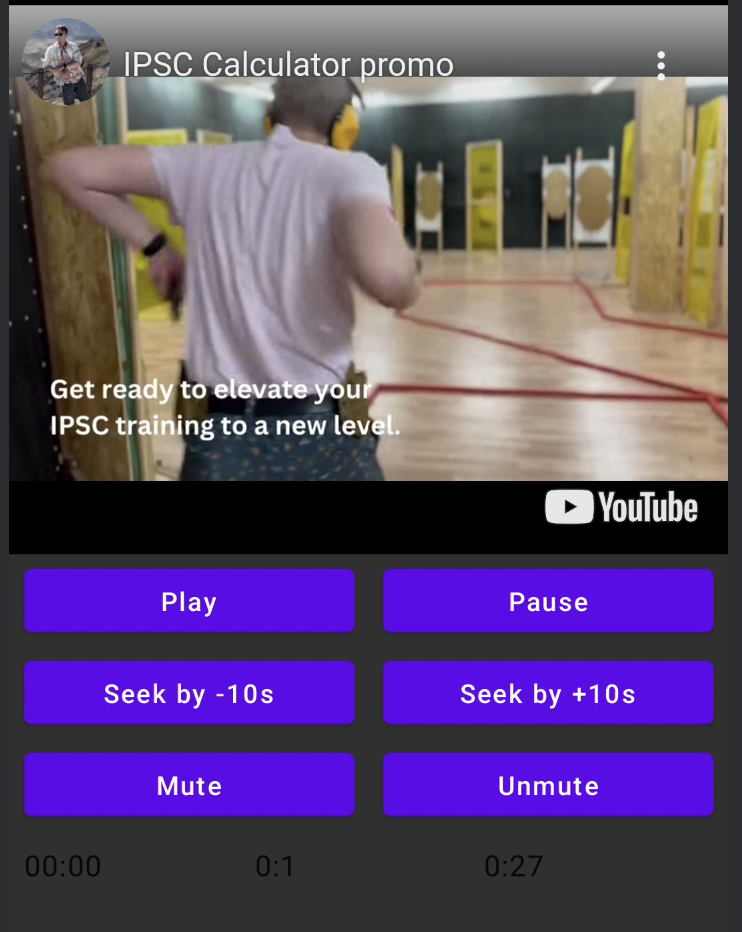
Sample
LICENSE
Copyright 2026 Ilia PavlovskiiLicensed under the Apache License, Version 2.0 (the "License");
you may not use this file except in compliance with the License.
You may obtain a copy of the License at
http://www.apache.org/licenses/LICENSE-2.0
Unless required by applicable law or agreed to in writing, software
distributed under the License is distributed on an "AS IS" BASIS,
WITHOUT WARRANTIES OR CONDITIONS OF ANY KIND, either express or implied.
See the License for the specific language governing permissions and
limitations under the License.