🌐 Lingua
YouTubePlayer





YouTube kotlin multiplatform player.
Il composable YouTubePlayer ti permette di incorporare un lettore video YouTube nella tua app Jetpack Compose.
Dona
Se vuoi ringraziarmi o contribuire allo sviluppo del backlog, puoi donarmi. Questo mi aiuta a concentrarmi di più sul progetto.

Puoi anche seguirmi sulle seguenti piattaforme per vedere eventuali aggiornamenti sui miei argomenti


Installazione
Puoi aggiungere questa libreria al tuo progetto usando Gradle.Multiplatform Per aggiungere a un progetto multiplatform, aggiungi la dipendenza al source-set comune:
repositories {
    mavenCentral()
}kotlin {
    sourceSets {
        commonMain {
            dependencies {
                implementation("io.github.ilyapavlovskii:youtubeplayer-compose:${latest_version}")
            }
        }
    }
}
Utilizzo
val coroutineScope = rememberCoroutineScope()
val hostState = remember { YouTubePlayerHostState() }when(val state = hostState.currentState) {
is YouTubePlayerState.Error -> {
Text(text = "Error: ${state.message}")
}
YouTubePlayerState.Idle -> {
// Do nothing, waiting for initialization
}
is YouTubePlayerState.Playing -> {
// Update UI button states
}
YouTubePlayerState.Ready -> coroutineScope.launch {
hostState.loadVideo(YouTubeVideoId("ufKj1sBrC4Q"))
}
}
YouTubePlayer(
modifier = Modifier
.fillMaxWidth()
.height(300.dp)
.gesturesDisabled(),
hostState = hostState,
options = SimpleYouTubePlayerOptionsBuilder.builder {
autoplay(true)
mute(true) // autoplay works only with mute for mobile devices
controls(false)
rel(false)
ivLoadPolicy(false)
ccLoadPolicy(false)
fullscreen = true
},
)
La funzione Composable ha i seguenti parametri principali:
options- per il builder delle opzioni del player. Tutti i parametri sono derivati dalla documentazione ufficiale dell'iframe di YouTube.hostState- controller per monitorare lo stato del player YouTube e eseguire comandi una tantum
YouTubePlayerHostState
Il controller principale. Contiene 2 componenti pubblici principali:- currentState - definisce lo stato attuale del player YouTube sullo schermo. Può essere: Idle, Ready, Playing, Error
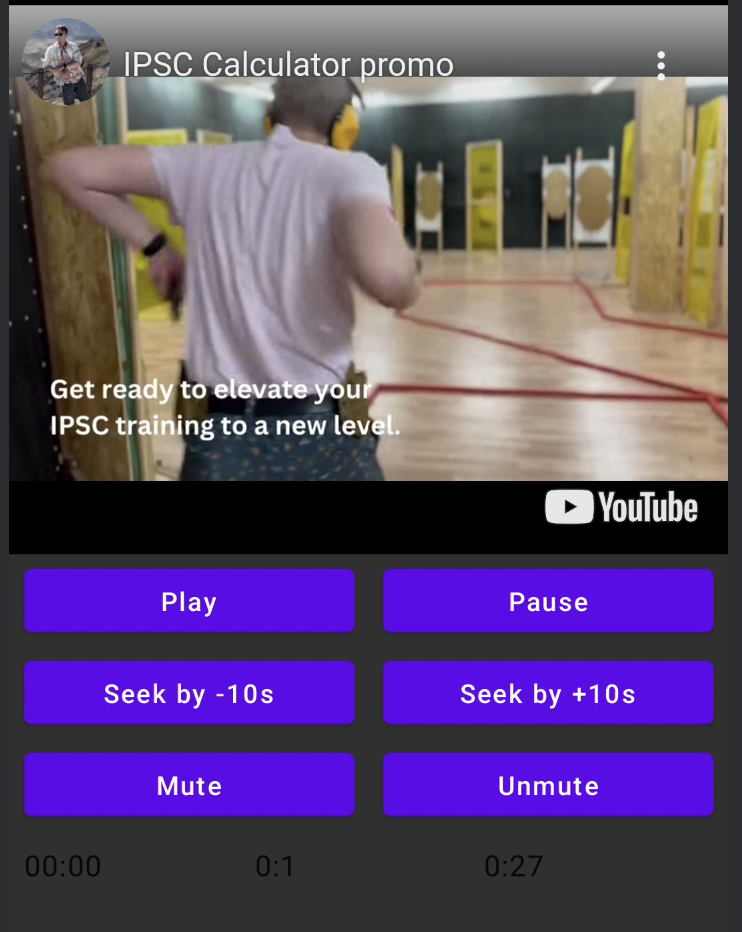
- executeCommand - funzione sospesa per eseguire comandi del player. Riceve solo un argomento - YouTubeExecCommand. Ha anche funzioni di supporto aggiuntive come:
suspend fun loadVideo(videoId: YouTubeVideoId) = executeCommand(YouTubeExecCommand.LoadVideo(videoId))
suspend fun play() = executeCommand(YouTubeExecCommand.Play)
suspend fun pause() = executeCommand(YouTubeExecCommand.Pause)
suspend fun seekTo(duration: Duration) = executeCommand(YouTubeExecCommand.SeekTo(duration))
suspend fun seekBy(duration: Duration) = executeCommand(YouTubeExecCommand.SeekBy(duration))
suspend fun mute() = executeCommand(YouTubeExecCommand.Mute)
suspend fun unMute() = executeCommand(YouTubeExecCommand.Unmute)
suspend fun setVolume(volume: Int) = executeCommand(YouTubeExecCommand.SetVolume(volume))
suspend fun setPlaybackRate(rate: Float) = executeCommand(YouTubeExecCommand.SetPlaybackRate(rate))
suspend fun toggleFullScreen() = executeCommand(YouTubeExecCommand.ToggleFullscreen)
YouTubePlayerState
Lo stato del player YouTube definisce lo stato effettivo del player YouTube sullo schermo. Contiene i seguenti stati possibili:Idle- Lo stato Idle significa che il player non è ancora inizializzatoReady- Significa che il player è pronto a riprodurrePlaying- Il player sta riproducendo il video. Contiene i seguenti parametri:
videoId: YouTubeVideoId - id of the video that is playing
duration: Duration - duration of the video
currentTime: Duration - current time of the video
quality: YouTubeEvent.PlaybackQualityChange.Quality - quality of the video, see [YouTubeEvent.PlaybackQualityChange.Quality]
isPlaying: Boolean - is video playingError- Definisce lo stato di errore con messaggio di errore all'interno.
YouTubeExecCommand
LoadVideo(val videoId: YouTubeVideoId,val startSeconds: Duration)- carica il video tramite id youtube. Possibile avviare con tempo di inizio predefinito.Play- avvia la riproduzione del videoPause- mette in pausa il videoSeekTo(val duration: Duration)- porta il video ad un tempo specificatoSeekBy(val duration: Duration)- manda avanti o indietro il video di un tempo specificatoMute- disattiva l'audioUnmute- riattiva l'audioSetVolume(val volumePercent: Int)- imposta il volume. Valore previsto da 0 a 100.NextVideo- passa al video successivoPreviousVideo- torna al video precedenteSetLoop(val loop: Boolean)- ripete il video. Gestito dall'argomento.SetShuffle(val shuffle: Boolean)- mescola i video. Gestito dall'argomento.
YouTubeEvent
Ready- chiamato al termine dell'inizializzazione del player youtubePlaybackQualityChange(val quality: Quality)- chiamato quando la qualità del player cambiaError(val error: String)- evento di gestione errore. Consulta l'argomento per i dettagli.VideoDuration(val duration: Duration)- chiamato quando la durata del video viene inizializzataStateChanged(val state: State)- chiamato quando lo stato del video cambia:UNSTARTED,ENDED,PLAYING,PAUSED,BUFFERING,CUED.TimeChanged(val time: Duration)- il timestamp è cambiatoOnVideoIdHandled(val videoId: YouTubeVideoId)- callback quando il video è stato caricato
Esempio
LICENZA
Copyright 2026 Ilia PavlovskiiLicensed under the Apache License, Version 2.0 (the "License");
you may not use this file except in compliance with the License.
You may obtain a copy of the License at
http://www.apache.org/licenses/LICENSE-2.0
Unless required by applicable law or agreed to in writing, software
distributed under the License is distributed on an "AS IS" BASIS,
WITHOUT WARRANTIES OR CONDITIONS OF ANY KIND, either express or implied.
See the License for the specific language governing permissions and
limitations under the License.