🌐 भाषा
YouTubePlayer





YouTube kotlin मल्टीप्लेटफॉर्म प्लेयर।
YouTubePlayer कॉम्पोज़ेबल आपको अपने Jetpack Compose ऐप में YouTube वीडियो प्लेयर एम्बेड करने की अनुमति देता है।
दान करें
यदि आप मुझे धन्यवाद देना चाहते हैं या बैकलॉग के विकास में योगदान देना चाहते हैं, तो आप मुझे दान कर सकते हैं। इससे मुझे परियोजना पर अधिक ध्यान केंद्रित करने में मदद मिलती है।

आप मुझे अगले प्लेटफार्मों पर भी सब्सक्राइब कर सकते हैं ताकि मेरी विषयों के किसी भी अपडेट को देख सकें


इंस्टॉल करें
आप इस लाइब्रेरी को अपने प्रोजेक्ट में Gradle का उपयोग करके जोड़ सकते हैं।मल्टीप्लेटफॉर्म मल्टीप्लेटफॉर्म प्रोजेक्ट में जोड़ने के लिए, डिपेंडेंसी को कॉमन सोर्स-सेट में जोड़ें:
repositories {
    mavenCentral()
}kotlin {
    sourceSets {
        commonMain {
            dependencies {
                implementation("io.github.ilyapavlovskii:youtubeplayer-compose:${latest_version}")
            }
        }
    }
}
उपयोग
val coroutineScope = rememberCoroutineScope()
val hostState = remember { YouTubePlayerHostState() }when(val state = hostState.currentState) {
is YouTubePlayerState.Error -> {
Text(text = "Error: ${state.message}")
}
YouTubePlayerState.Idle -> {
// Do nothing, waiting for initialization
}
is YouTubePlayerState.Playing -> {
// Update UI button states
}
YouTubePlayerState.Ready -> coroutineScope.launch {
hostState.loadVideo(YouTubeVideoId("ufKj1sBrC4Q"))
}
}
YouTubePlayer(
modifier = Modifier
.fillMaxWidth()
.height(300.dp)
.gesturesDisabled(),
hostState = hostState,
options = SimpleYouTubePlayerOptionsBuilder.builder {
autoplay(true)
mute(true) // autoplay works only with mute for mobile devices
controls(false)
rel(false)
ivLoadPolicy(false)
ccLoadPolicy(false)
fullscreen = true
},
)
कंपोज़ेबल फ़ंक्शन के मुख्य प्रमुख पैरामीटर हैं:
options- प्लेयर विकल्प बिल्डर के लिए। सभी पैरामीटर आधिकारिक यूट्यूब आईफ्रेम दस्तावेज़ से लिए गए हैं।hostState- यूट्यूब प्लेयर की स्थिति को ट्रैक करने और एक बार के कमांड निष्पादित करने के लिए नियंत्रक
YouTubePlayerHostState
मुख्य नियंत्रक। इसमें दो मुख्य सार्वजनिक घटक शामिल हैं:- currentState - स्क्रीन पर यूट्यूब प्लेयर की वास्तविक स्थिति को परिभाषित करता है। यह हो सकता है: Idle, Ready, Playing, Error
- executeCommand - प्लेयर कमांड निष्पादित करने के लिए सस्पेंड फ़ंक्शन। केवल एक आर्गुमेंट प्राप्त करता है - YouTubeExecCommand। साथ ही इसमें कुछ अतिरिक्त सहायक फ़ंक्शन भी हैं जैसे:
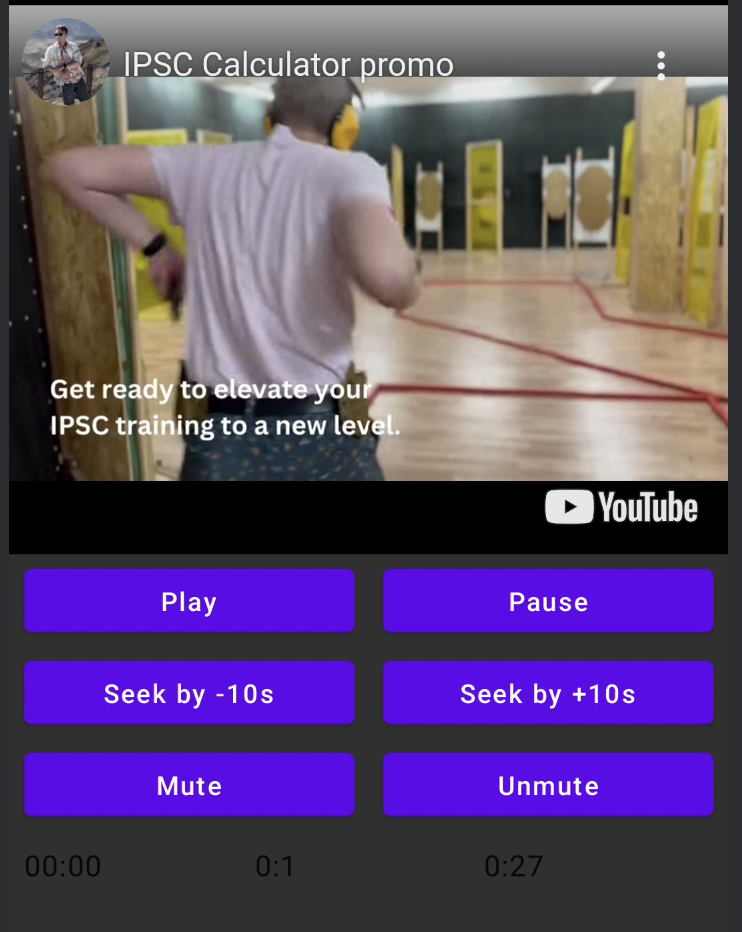
suspend fun loadVideo(videoId: YouTubeVideoId) = executeCommand(YouTubeExecCommand.LoadVideo(videoId))
suspend fun play() = executeCommand(YouTubeExecCommand.Play)
suspend fun pause() = executeCommand(YouTubeExecCommand.Pause)
suspend fun seekTo(duration: Duration) = executeCommand(YouTubeExecCommand.SeekTo(duration))
suspend fun seekBy(duration: Duration) = executeCommand(YouTubeExecCommand.SeekBy(duration))
suspend fun mute() = executeCommand(YouTubeExecCommand.Mute)
suspend fun unMute() = executeCommand(YouTubeExecCommand.Unmute)
suspend fun setVolume(volume: Int) = executeCommand(YouTubeExecCommand.SetVolume(volume))
suspend fun setPlaybackRate(rate: Float) = executeCommand(YouTubeExecCommand.SetPlaybackRate(rate))
suspend fun toggleFullScreen() = executeCommand(YouTubeExecCommand.ToggleFullscreen)
YouTubePlayerState
YouTube प्लेयर स्थिति स्क्रीन पर वास्तविक यूट्यूब प्लेयर की स्थिति को परिभाषित करती है। इसमें निम्नलिखित संभावित स्थितियां होती हैं:Idle- Idle स्थिति का अर्थ है कि प्लेयर अभी तक प्रारंभ नहीं हुआ हैReady- इसका अर्थ है कि प्लेयर चलाने के लिए तैयार हैPlaying- प्लेयर वीडियो चला रहा है। इसमें निम्नलिखित पैरामीटर होते हैं:
videoId: YouTubeVideoId - id of the video that is playing
duration: Duration - duration of the video
currentTime: Duration - current time of the video
quality: YouTubeEvent.PlaybackQualityChange.Quality - quality of the video, see [YouTubeEvent.PlaybackQualityChange.Quality]
isPlaying: Boolean - is video playingError- त्रुटि स्थिति को परिभाषित करता है जिसमें त्रुटि संदेश शामिल है।
YouTubeExecCommand
LoadVideo(val videoId: YouTubeVideoId,val startSeconds: Duration)- यूट्यूब आईडी द्वारा वीडियो लोड करें। डिफ़ॉल्ट प्रारंभ समय ऑफसेट के साथ शुरू करना संभव है।Play- वीडियो चलाएंPause- वीडियो रोकेंSeekTo(val duration: Duration)- वीडियो को निर्दिष्ट समय पर ले जाएंSeekBy(val duration: Duration)- वीडियो को निर्दिष्ट समय से आगे या पीछे करेंMute- ध्वनि बंद करेंUnmute- ध्वनि चालू करेंSetVolume(val volumePercent: Int)- वॉल्यूम सेट करें। अपेक्षित मान 0 से 100 के बीच।NextVideo- अगले वीडियो पर जाएंPreviousVideo- पिछले वीडियो पर जाएंSetLoop(val loop: Boolean)- वीडियो दोहराएं। तर्क द्वारा नियंत्रित।SetShuffle(val shuffle: Boolean)- वीडियो यादृच्छिक करें। तर्क द्वारा नियंत्रित।
YouTubeEvent
Ready- जब यूट्यूब प्लेयर की इनिशियलाइज़ेशन पूर्ण हो जाती है, तब कॉल होता हैPlaybackQualityChange(val quality: Quality)- जब प्लेयर की गुणवत्ता बदलती है, तब कॉल होता हैError(val error: String)- त्रुटि हैंडल इवेंट। विवरण के लिए तर्क देखें।VideoDuration(val duration: Duration)- जब वीडियो की अवधि इनिशियलाइज़ हो जाती है, तब कॉल होता हैStateChanged(val state: State)- जब वीडियो की स्थिति बदलती है, तब कॉल होता है:UNSTARTED,ENDED,PLAYING,PAUSED,BUFFERING,CUED।TimeChanged(val time: Duration)- टाइमस्टैम्प बदला गयाOnVideoIdHandled(val videoId: YouTubeVideoId)- जब वीडियो लोड हो जाता है, तब कॉलबैक
उदाहरण
लाइसेंस
Copyright 2026 Ilia PavlovskiiLicensed under the Apache License, Version 2.0 (the "License");
you may not use this file except in compliance with the License.
You may obtain a copy of the License at
http://www.apache.org/licenses/LICENSE-2.0
Unless required by applicable law or agreed to in writing, software
distributed under the License is distributed on an "AS IS" BASIS,
WITHOUT WARRANTIES OR CONDITIONS OF ANY KIND, either express or implied.
See the License for the specific language governing permissions and
limitations under the License.