🌐 Langue
YouTubePlayer





Lecteur multiplateforme YouTube Kotlin.
Le composant YouTubePlayer vous permet d'intégrer un lecteur vidéo YouTube dans votre application Jetpack Compose.
Faire un don
Si vous souhaitez me remercier ou contribuer au développement du projet, vous pouvez me faire un don. Cela m'aide à me concentrer davantage sur ce projet.

Vous pouvez également vous abonner à moi sur les plateformes suivantes pour suivre les mises à jour de mes sujets


Installation
Vous pouvez ajouter cette bibliothèque à votre projet en utilisant Gradle.Multiplateforme Pour l'ajouter à un projet multiplateforme, ajoutez la dépendance au jeu de sources commun :
repositories {
    mavenCentral()
}kotlin {
    sourceSets {
        commonMain {
            dependencies {
                implementation("io.github.ilyapavlovskii:youtubeplayer-compose:${latest_version}")
            }
        }
    }
}
Utilisation
val coroutineScope = rememberCoroutineScope()
val hostState = remember { YouTubePlayerHostState() }when(val state = hostState.currentState) {
is YouTubePlayerState.Error -> {
Text(text = "Error: ${state.message}")
}
YouTubePlayerState.Idle -> {
// Do nothing, waiting for initialization
}
is YouTubePlayerState.Playing -> {
// Update UI button states
}
YouTubePlayerState.Ready -> coroutineScope.launch {
hostState.loadVideo(YouTubeVideoId("ufKj1sBrC4Q"))
}
}
YouTubePlayer(
modifier = Modifier
.fillMaxWidth()
.height(300.dp)
.gesturesDisabled(),
hostState = hostState,
options = SimpleYouTubePlayerOptionsBuilder.builder {
autoplay(true)
mute(true) // autoplay works only with mute for mobile devices
controls(false)
rel(false)
ivLoadPolicy(false)
ccLoadPolicy(false)
fullscreen = true
},
)
La fonction composable a les paramètres principaux suivants :
options- pour le constructeur d'options du lecteur. Tous les paramètres sont issus de la documentation officielle de l'iframe YouTube.hostState- contrôleur pour suivre l'état du lecteur YouTube et exécuter des commandes ponctuelles
YouTubePlayerHostState
Le contrôleur principal. Contient 2 composants publics majeurs :- currentState - définit l'état actuel du lecteur YouTube à l'écran. Peut être : Idle, Ready, Playing, Error
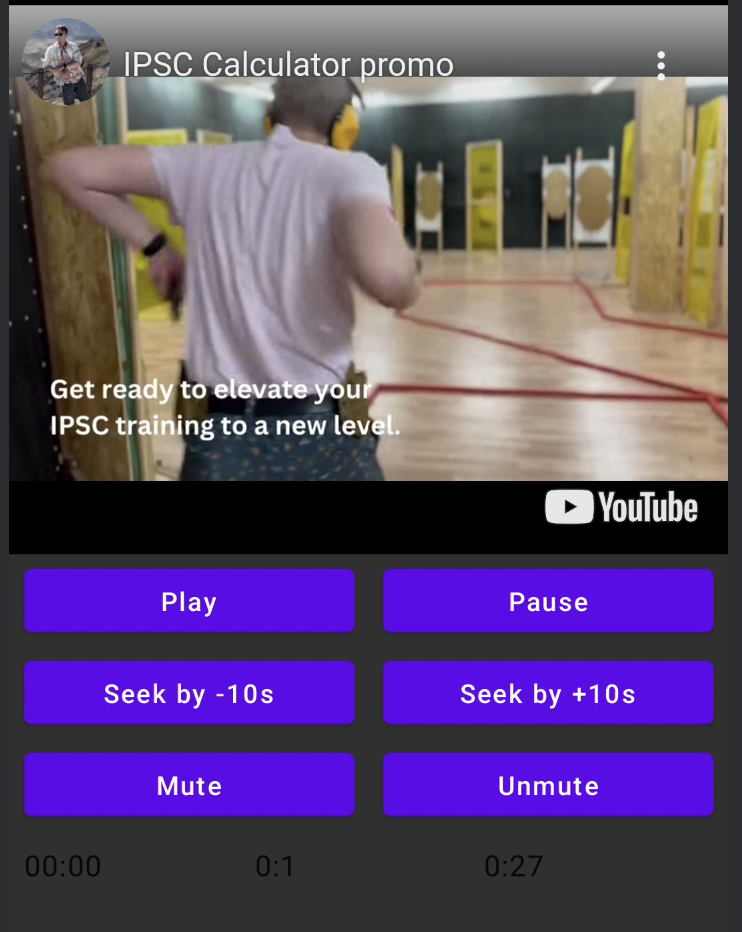
- executeCommand - fonction suspendue pour exécuter des commandes du lecteur. Reçoit un seul argument - YouTubeExecCommand. Dispose également de fonctions supplémentaires comme :
suspend fun loadVideo(videoId: YouTubeVideoId) = executeCommand(YouTubeExecCommand.LoadVideo(videoId))
suspend fun play() = executeCommand(YouTubeExecCommand.Play)
suspend fun pause() = executeCommand(YouTubeExecCommand.Pause)
suspend fun seekTo(duration: Duration) = executeCommand(YouTubeExecCommand.SeekTo(duration))
suspend fun seekBy(duration: Duration) = executeCommand(YouTubeExecCommand.SeekBy(duration))
suspend fun mute() = executeCommand(YouTubeExecCommand.Mute)
suspend fun unMute() = executeCommand(YouTubeExecCommand.Unmute)
suspend fun setVolume(volume: Int) = executeCommand(YouTubeExecCommand.SetVolume(volume))
suspend fun setPlaybackRate(rate: Float) = executeCommand(YouTubeExecCommand.SetPlaybackRate(rate))
suspend fun toggleFullScreen() = executeCommand(YouTubeExecCommand.ToggleFullscreen)
YouTubePlayerState
L'état du lecteur YouTube définit l'état actuel du lecteur YouTube à l'écran. Contient les états possibles suivants :Idle- L'état inactif signifie que le lecteur n'est pas encore initialiséReady- Signifie que le lecteur est prêt à jouerPlaying- le lecteur joue la vidéo. Contient les paramètres suivants :
videoId: YouTubeVideoId - id of the video that is playing
duration: Duration - duration of the video
currentTime: Duration - current time of the video
quality: YouTubeEvent.PlaybackQualityChange.Quality - quality of the video, see [YouTubeEvent.PlaybackQualityChange.Quality]
isPlaying: Boolean - is video playingError- Définit un état d'erreur avec un message d'erreur à l'intérieur.
YouTubeExecCommand
LoadVideo(val videoId: YouTubeVideoId,val startSeconds: Duration)- charger une vidéo par identifiant YouTube. Possibilité de commencer avec un décalage de temps de départ par défaut.Play- lire la vidéoPause- mettre la vidéo en pauseSeekTo(val duration: Duration)- déplacer la vidéo à un temps spécifiéSeekBy(val duration: Duration)- déplacer la vidéo de la durée spécifiéeMute- couper le sonUnmute- rétablir le sonSetVolume(val volumePercent: Int)- régler le volume. Valeur attendue de 0 à 100.NextVideo- passer à la vidéo suivantePreviousVideo- revenir à la vidéo précédenteSetLoop(val loop: Boolean)- répéter la vidéo. Géré par l'argument.SetShuffle(val shuffle: Boolean)- mélanger les vidéos. Géré par l'argument.
YouTubeEvent
Ready- appelé lorsque l'initialisation du lecteur YouTube est terminéePlaybackQualityChange(val quality: Quality)- appelé lorsque la qualité du lecteur changeError(val error: String)- événement de gestion d'erreur. Voir l'argument pour les détails.VideoDuration(val duration: Duration)- appelé lorsque la durée de la vidéo est initialiséeStateChanged(val state: State)- appelé lorsque l'état de la vidéo change :UNSTARTED,ENDED,PLAYING,PAUSED,BUFFERING,CUED.TimeChanged(val time: Duration)- changement d'horodatageOnVideoIdHandled(val videoId: YouTubeVideoId)- rappel lorsque la vidéo est chargée
Sample
LICENSE
Copyright 2026 Ilia PavlovskiiLicensed under the Apache License, Version 2.0 (the "License");
you may not use this file except in compliance with the License.
You may obtain a copy of the License at
http://www.apache.org/licenses/LICENSE-2.0
Unless required by applicable law or agreed to in writing, software
distributed under the License is distributed on an "AS IS" BASIS,
WITHOUT WARRANTIES OR CONDITIONS OF ANY KIND, either express or implied.
See the License for the specific language governing permissions and
limitations under the License.