🌐 Idioma
YouTubePlayer





YouTube kotlin multiplataforma reproductor.
El composable YouTubePlayer te permite incrustar un reproductor de videos de YouTube en tu aplicación Jetpack Compose.
Donar
Si quieres agradecerme o contribuir al desarrollo del backlog, puedes donarme. Eso me ayuda a concentrarme más en el proyecto.

También puedes suscribirte a mí en las siguientes plataformas para ver cualquier actualización de mis temas


Instalación
Puedes agregar esta librería a tu proyecto usando Gradle.Multiplataforma Para añadirlo a un proyecto multiplataforma, agrega la dependencia al common source-set:
repositories {
    mavenCentral()
}kotlin {
    sourceSets {
        commonMain {
            dependencies {
                implementation("io.github.ilyapavlovskii:youtubeplayer-compose:${latest_version}")
            }
        }
    }
}
Uso
val coroutineScope = rememberCoroutineScope()
val hostState = remember { YouTubePlayerHostState() }when(val state = hostState.currentState) {
is YouTubePlayerState.Error -> {
Text(text = "Error: ${state.message}")
}
YouTubePlayerState.Idle -> {
// Do nothing, waiting for initialization
}
is YouTubePlayerState.Playing -> {
// Update UI button states
}
YouTubePlayerState.Ready -> coroutineScope.launch {
hostState.loadVideo(YouTubeVideoId("ufKj1sBrC4Q"))
}
}
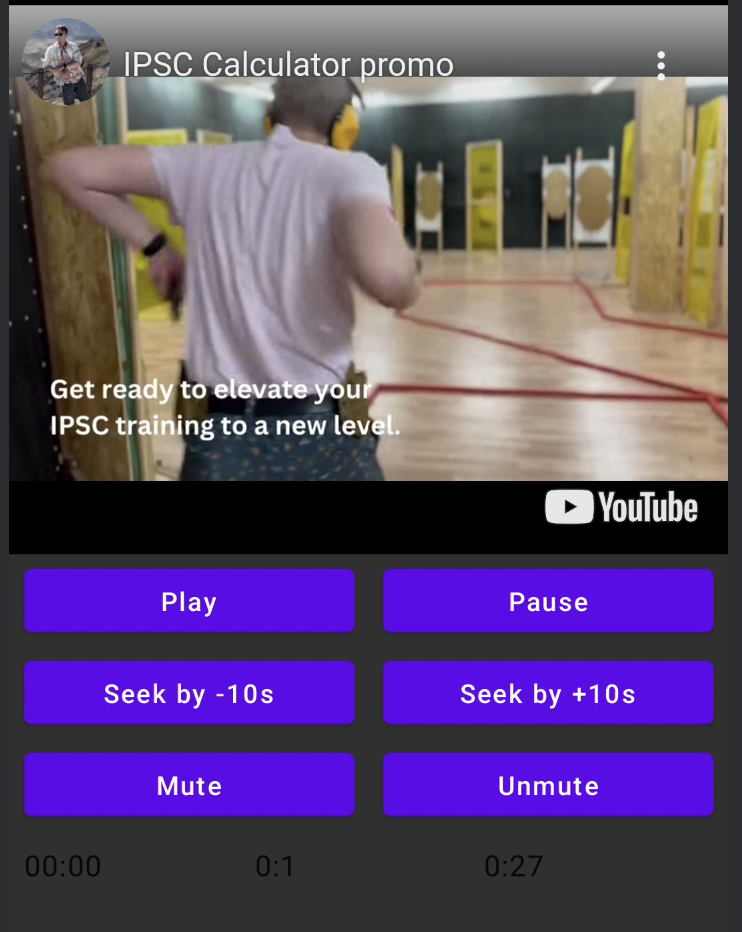
YouTubePlayer(
modifier = Modifier
.fillMaxWidth()
.height(300.dp)
.gesturesDisabled(),
hostState = hostState,
options = SimpleYouTubePlayerOptionsBuilder.builder {
autoplay(true)
mute(true) // autoplay works only with mute for mobile devices
controls(false)
rel(false)
ivLoadPolicy(false)
ccLoadPolicy(false)
fullscreen = true
},
)
La función composable tiene los siguientes parámetros principales:
options- para el constructor de opciones del reproductor. Todos los parámetros están tomados de la documentación oficial del iframe de YouTube.hostState- controlador para rastrear el estado del reproductor de YouTube y ejecutar comandos de una sola vez
YouTubePlayerHostState
El controlador principal. Contiene 2 componentes públicos principales:- currentState - define el estado actual del reproductor de YouTube en la pantalla. Puede ser: Idle, Ready, Playing, Error
- executeCommand - función suspendida para ejecutar comandos del reproductor. Recibe solo un argumento - YouTubeExecCommand. También tiene funciones auxiliares adicionales como:
suspend fun loadVideo(videoId: YouTubeVideoId) = executeCommand(YouTubeExecCommand.LoadVideo(videoId))
suspend fun play() = executeCommand(YouTubeExecCommand.Play)
suspend fun pause() = executeCommand(YouTubeExecCommand.Pause)
suspend fun seekTo(duration: Duration) = executeCommand(YouTubeExecCommand.SeekTo(duration))
suspend fun seekBy(duration: Duration) = executeCommand(YouTubeExecCommand.SeekBy(duration))
suspend fun mute() = executeCommand(YouTubeExecCommand.Mute)
suspend fun unMute() = executeCommand(YouTubeExecCommand.Unmute)
suspend fun setVolume(volume: Int) = executeCommand(YouTubeExecCommand.SetVolume(volume))
suspend fun setPlaybackRate(rate: Float) = executeCommand(YouTubeExecCommand.SetPlaybackRate(rate))
suspend fun toggleFullScreen() = executeCommand(YouTubeExecCommand.ToggleFullscreen)
EstadoDelReproductorYouTube
El estado del reproductor de YouTube define el estado actual del reproductor de YouTube en la pantalla. Contiene los siguientes estados posibles:Idle- El estado Idle significa que el reproductor aún no está inicializadoReady- Significa que el reproductor está listo para reproducirPlaying- el reproductor está reproduciendo video. Contiene los siguientes parámetros:
videoId: YouTubeVideoId - id of the video that is playing
duration: Duration - duration of the video
currentTime: Duration - current time of the video
quality: YouTubeEvent.PlaybackQualityChange.Quality - quality of the video, see [YouTubeEvent.PlaybackQualityChange.Quality]
isPlaying: Boolean - is video playingError- Define el estado de error con un mensaje de error dentro.
YouTubeExecCommand
LoadVideo(val videoId: YouTubeVideoId,val startSeconds: Duration)- cargar video por ID de YouTube. Posible comenzar con un tiempo de inicio por defecto.Play- reproducir videoPause- pausar videoSeekTo(val duration: Duration)- buscar el video a un tiempo especificadoSeekBy(val duration: Duration)- buscar el video por un tiempo especificadoMute- silenciar sonidoUnmute- activar sonidoSetVolume(val volumePercent: Int)- establecer volumen. Valor esperado del argumento de 0 a 100.NextVideo- navegar al siguiente videoPreviousVideo- navegar al video anteriorSetLoop(val loop: Boolean)- repetir video. Controlado por argumento.SetShuffle(val shuffle: Boolean)- mezclar videos. Controlado por argumento.
YouTubeEvent
Ready- se llama cuando la inicialización del reproductor de YouTube se completaPlaybackQualityChange(val quality: Quality)- se llama cuando cambia la calidad del reproductorError(val error: String)- evento para manejar errores. Ver detalles en el argumento.VideoDuration(val duration: Duration)- se llama cuando se inicializa la duración del videoStateChanged(val state: State)- se llama cuando cambia el estado del video:UNSTARTED,ENDED,PLAYING,PAUSED,BUFFERING,CUED.TimeChanged(val time: Duration)- cambia la marca de tiempoOnVideoIdHandled(val videoId: YouTubeVideoId)- callback cuando el video se carga
Sample
LICENSE
Copyright 2026 Ilia PavlovskiiLicensed under the Apache License, Version 2.0 (the "License");
you may not use this file except in compliance with the License.
You may obtain a copy of the License at
http://www.apache.org/licenses/LICENSE-2.0
Unless required by applicable law or agreed to in writing, software
distributed under the License is distributed on an "AS IS" BASIS,
WITHOUT WARRANTIES OR CONDITIONS OF ANY KIND, either express or implied.
See the License for the specific language governing permissions and
limitations under the License.