🌐 ভাষা
YouTubePlayer





YouTube kotlin মল্টিপ্লেটফৰ্ম প্লেয়াৰ।
YouTubePlayer কম্প'জেবলটো Jetpack Compose এপত YouTube ভিডিঅ' প্লেয়াৰ এম্বেড কৰিবলৈ ব্যৱহাৰ কৰিব পৰা যায়।
অনুদান দিয়ক
যদি আপুনি মোক ধন্যবাদ জনাব বিচাৰে বা ব্যাকলগ উন্নয়নত অৱদান ৰাখিব বিচাৰে, তেন্তে মোক অনুদান দিব পাৰে। এইটো মোক প্ৰকল্পটোত অধিক মনোযোগ দিবলৈ সহায় কৰে।

আপুনি তলত উল্লেখ কৰা প্লাটফৰ্মসমূহত মোক চাবস্ক্ৰাইবো কৰিব পাৰে যাতে মোৰ যিকোনো আপডেট চাব পাৰে


ইনষ্টল কৰক
আপুনি এই লাইব্রেৰিটো আপোনাৰ প্ৰকল্পত Gradle ব্যৱহাৰ কৰি যোগ কৰিব পাৰে।মল্টিপ্লেটফৰ্ম এটা মল্টিপ্লেটফৰ্ম প্ৰকল্পত যোগ কৰিবলৈ, কমন সোর্স-ছেটত ডিপেণ্ডেন্সিটো যোগ কৰক:
repositories {
    mavenCentral()
}kotlin {
    sourceSets {
        commonMain {
            dependencies {
                implementation("io.github.ilyapavlovskii:youtubeplayer-compose:${latest_version}")
            }
        }
    }
}
ব্যৱহাৰ
val coroutineScope = rememberCoroutineScope()
val hostState = remember { YouTubePlayerHostState() }when(val state = hostState.currentState) {
is YouTubePlayerState.Error -> {
Text(text = "Error: ${state.message}")
}
YouTubePlayerState.Idle -> {
// Do nothing, waiting for initialization
}
is YouTubePlayerState.Playing -> {
// Update UI button states
}
YouTubePlayerState.Ready -> coroutineScope.launch {
hostState.loadVideo(YouTubeVideoId("ufKj1sBrC4Q"))
}
}
YouTubePlayer(
modifier = Modifier
.fillMaxWidth()
.height(300.dp)
.gesturesDisabled(),
hostState = hostState,
options = SimpleYouTubePlayerOptionsBuilder.builder {
autoplay(true)
mute(true) // autoplay works only with mute for mobile devices
controls(false)
rel(false)
ivLoadPolicy(false)
ccLoadPolicy(false)
fullscreen = true
},
)
Composable ফাংচনে তলত উল্লেখ কৰা মুখ্য পাৰামিটাৰসমূহ থাকে:
options- প্লেয়াৰ অপশ্যনছ বিল্ডাৰলৈ। সকলো পাৰামিটাৰ অফিচিয়েল youtube আইফ্ৰেইম ডকুমেন্টেশ্যন ৰ পৰা ৰেপ কৰা।hostState- youtube প্লেয়াৰ ষ্টেট ট্ৰেক কৰিবলৈ আৰু একবাৰীয়াকৈ কমাণ্ড এক্সিকিউট কৰিবলৈ কণ্ট্ৰোলাৰ
YouTubePlayerHostState
প্ৰধান কণ্ট্ৰোলাৰ। ইয়াত ২টা মুখ্য পাব্লিক কম্পোনেণ্ট থাকে:- currentState - স্ক্ৰীনত ইউটিউব প্লেয়াৰৰ বাস্তৱিক অৱস্থা সংজ্ঞায়িত কৰে। সম্ভৱ: Idle, Ready, Playing, Error
- executeCommand - প্লেয়াৰ কমাণ্ড এক্সিকিউট কৰিবলৈ ছাছপেণ্ড ফাংচন। কেৱল এটা আৰ্গুমেণ্ট গ্ৰহণ কৰে - YouTubeExecCommand। লগতে কিছু অতিৰিক্ত চুগাৰ ফাংচনো থাকে:
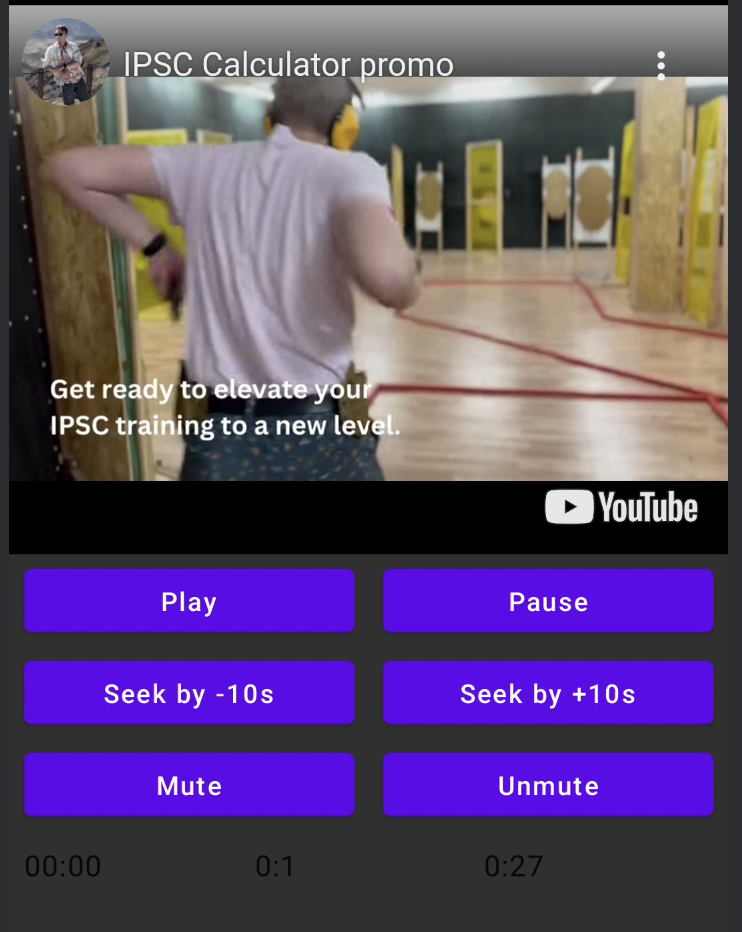
suspend fun loadVideo(videoId: YouTubeVideoId) = executeCommand(YouTubeExecCommand.LoadVideo(videoId))
suspend fun play() = executeCommand(YouTubeExecCommand.Play)
suspend fun pause() = executeCommand(YouTubeExecCommand.Pause)
suspend fun seekTo(duration: Duration) = executeCommand(YouTubeExecCommand.SeekTo(duration))
suspend fun seekBy(duration: Duration) = executeCommand(YouTubeExecCommand.SeekBy(duration))
suspend fun mute() = executeCommand(YouTubeExecCommand.Mute)
suspend fun unMute() = executeCommand(YouTubeExecCommand.Unmute)
suspend fun setVolume(volume: Int) = executeCommand(YouTubeExecCommand.SetVolume(volume))
suspend fun setPlaybackRate(rate: Float) = executeCommand(YouTubeExecCommand.SetPlaybackRate(rate))
suspend fun toggleFullScreen() = executeCommand(YouTubeExecCommand.ToggleFullscreen)
YouTubePlayerState
YouTube প্লেয়াৰ স্থিতি স্ক্ৰীনত প্ৰকৃত YouTube প্লেয়াৰ স্থিতি নিৰ্ধাৰণ কৰে। ইয়াত তলত উল্লেখ কৰা সম্ভৱপৰ স্থিতিসমূহ থাকে:Idle- Idle স্থিতি মানে প্লেয়াৰ এতিয়াও আৰম্ভ কৰা হোৱা নাইReady- মানে প্লেয়াৰ খেলিবলৈ সাজু হৈছেPlaying- প্লেয়াৰ ভিডিঅ' চলাই আছে। ইয়াত তলত উল্লেখ কৰা পাৰামিটাৰসমূহ থাকে:
videoId: YouTubeVideoId - id of the video that is playing
duration: Duration - duration of the video
currentTime: Duration - current time of the video
quality: YouTubeEvent.PlaybackQualityChange.Quality - quality of the video, see [YouTubeEvent.PlaybackQualityChange.Quality]
isPlaying: Boolean - is video playingError- ত্ৰুটি অৱস্থাৰ সংজ্ঞা দিয়া হৈছে ত্ৰুটি বার্তা ভিতৰত।
YouTubeExecCommand
LoadVideo(val videoId: YouTubeVideoId,val startSeconds: Duration)- ইউটিউব আইডি দ্বাৰা ভিডিঅ' লোড কৰক। ডিফল্ট আৰম্ভণি সময়ৰ অফসেটৰ সৈতে আৰম্ভ কৰিব পাৰি।Play- ভিডিঅ' চলাওPause- ভিডিঅ' ৰোকাSeekTo(val duration: Duration)- নিৰ্দিষ্ট সময়ত ভিডিঅ'ক আগবঢ়াওSeekBy(val duration: Duration)- নিৰ্দিষ্ট সময়ত ভিডিঅ'ক আগ বা পিছু কৰাMute- শব্দ বন্ধ কৰাUnmute- শব্দ পুনৰ চালু কৰাSetVolume(val volumePercent: Int)- ভলিউম স্থাপন কৰক। ০ৰ পৰা ১০০লৈ মান আশা কৰা হয়।NextVideo- পৰৱৰ্তী ভিডিঅ'লৈ যাওকPreviousVideo- আগৰ ভিডিঅ'লৈ যাওকSetLoop(val loop: Boolean)- ভিডিঅ' পুনৰাবৃত্তি কৰক। আর্গুমেন্টে নিয়ন্ত্ৰণ কৰে।SetShuffle(val shuffle: Boolean)- ভিডিঅ'সমূহ এলোমেলো কৰক। আর্গুমেন্টে নিয়ন্ত্ৰণ কৰে।
YouTubeEvent
Ready- ইউটিউব প্লেয়াৰ আৰম্ভণি সম্পূৰ্ণ হ'লে কল হয়PlaybackQualityChange(val quality: Quality)- প্লেয়াৰৰ গুণমান সলনি হ'লে কল হয়Error(val error: String)- ত্ৰুটি হেণ্ডল ইভেন্ট। আর্গুমেন্টত বিৱৰণ চাওক।VideoDuration(val duration: Duration)- ভিডিঅ'ৰ সময় initialized হ'লে কল হয়StateChanged(val state: State)- ভিডিঅ'ৰ অৱস্থা সলনি হ'লে কল হয়:UNSTARTED,ENDED,PLAYING,PAUSED,BUFFERING,CUED.TimeChanged(val time: Duration)- টাইমষ্টাম্প সলনি হ'লOnVideoIdHandled(val videoId: YouTubeVideoId)- ভিডিঅ' লোড হ'লে ক'লব্যাক
Sample
LICENSE
Copyright 2026 Ilia PavlovskiiLicensed under the Apache License, Version 2.0 (the "License");
you may not use this file except in compliance with the License.
You may obtain a copy of the License at
http://www.apache.org/licenses/LICENSE-2.0
Unless required by applicable law or agreed to in writing, software
distributed under the License is distributed on an "AS IS" BASIS,
WITHOUT WARRANTIES OR CONDITIONS OF ANY KIND, either express or implied.
See the License for the specific language governing permissions and
limitations under the License.