VIGIL
リアルタイム端末電力モニター — CPU · GPU · RAM · ネットワーク · プロセス




概要
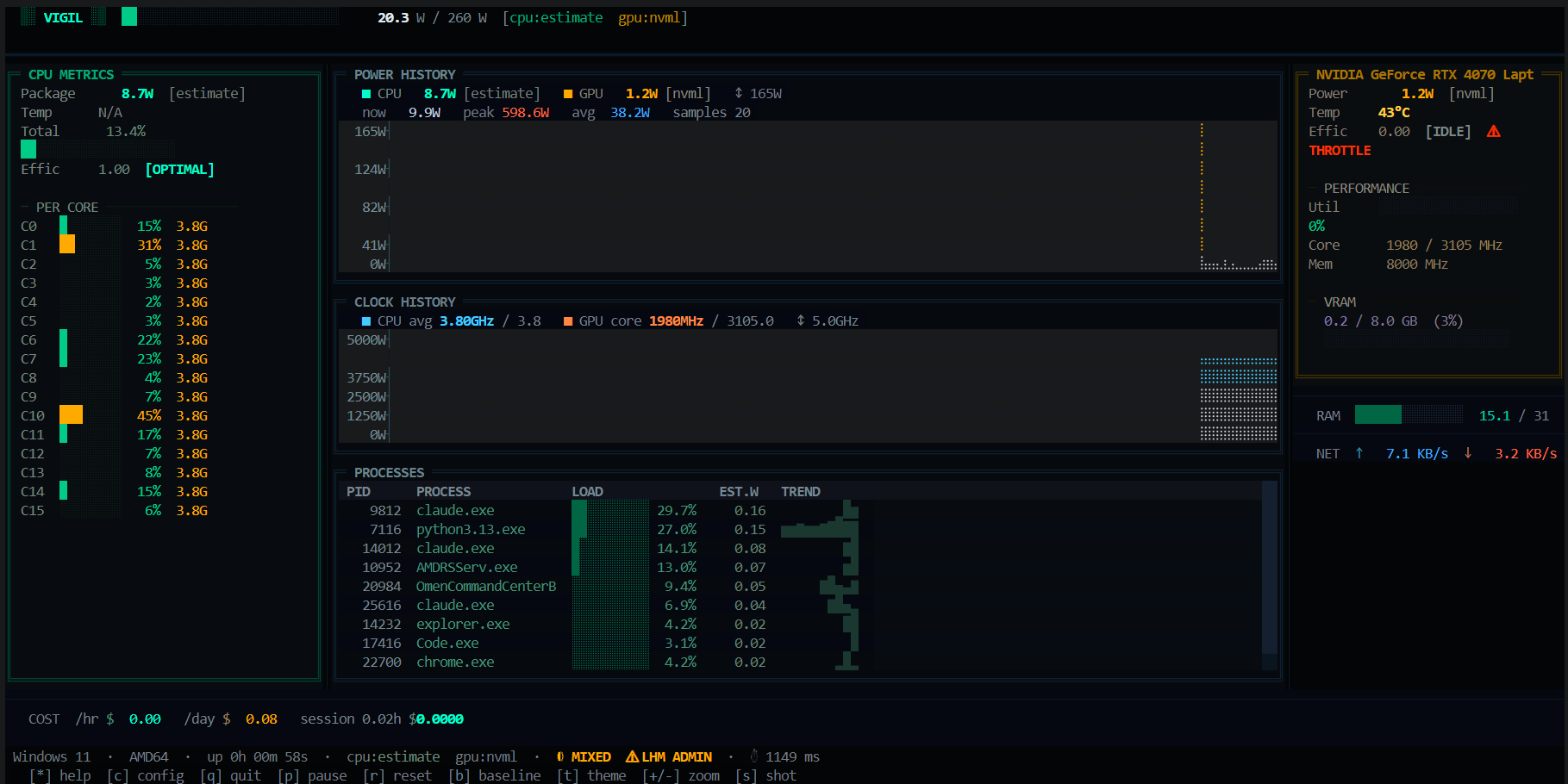
vigil は高解像度の端末ダッシュボードで、ライブワット数、熱、クロックスピード、効率スコア、電気代を主要コンポーネントごとに表示します — ブラウザ不要、バックグラウンドサービス不要、テレメトリなしで全て端末内で完結。
ハードウェアセンサー(hwmon、RAPL、LibreHardwareMonitor、NVML)から直接読み取り、センサーが利用できない場合は自動的にフォールバックします。各パネルはリアルタイムで更新され、全ては単一の vigil コマンドで動作します。
特徴
電力と熱管理
- CPUパッケージ電力 — hwmon (k10temp / zenpower / amd_energy) → RAPL → LibreHardwareMonitor WMI → CPU% × TDP 推定値
- GPU電力 — NVIDIA NVML: ワット数、温度、使用率、コア/メモリクロック、VRAM、ファンスピード
- RAM消費電力 — DDR4電力モデル(スロット数 × 使用率)
- スロットル検出 — CPUまたはGPUの熱スロットル時に点滅する
THROTTLEバッジ
チャートと可視化
- 電力履歴 — 高解像度の点字エリアチャート、CPU + GPU オーバーレイ
- クロック履歴 — CPU平均周波数 + GPUコアクロック(ブースト上限マーカー付き)
- コアごとのバー — 各コアの使用率% + ライブ周波数
プロセスインテリジェンス
- プロセステーブル — 推定ワット数寄与度でランク付け
- スパークライントレンド — プロセスごとのワット履歴ミニチャート
- EST.W カラム — CPU% シェアから導出したプロセスごとのワット数
効率とコスト
- 効率スコア —
OPTIMAL·NORMAL·LOW EFF·THROTTLE - 電気料金 — /時, /日, セッション合計(設定可能なkWh単価+通貨)
- ベースラインモード — スナップショットアイドル状態、リアルタイムでライブ差分を比較
アラートとログ
- Webhookアラート — CPU温度または電力閾値超過時にHTTP POST送信
- セッションログ — オプションのJSONLティックログ(
--logフラグ) - SVGスクリーンショット —
sでダッシュボード全体をエクスポート
テーマとUX
- TacticalCyberpunk(ダーク) — ニアブラック上の緑 / アンバー / シアン
- GhostWhite(ライト) — 高コントラストモノクローム
- セットアップウィザード — 初回起動時のTDP+kWh設定ガイド
- ライブアクセント再カラー — 再起動なしでサイドバーの色を調整可能
プラットフォームサポート
| プラットフォーム | CPU電力 | CPU温度 | GPU電力 | GPU温度 | |---|---|---|---|---| | Linux | hwmon · RAPL · 推定 | hwmon | NVML | NVML | | Windows 11 / 10 | LibreHardwareMonitor · 推定 | LHM | NVML | NVML | | macOS | 推定のみ | — | NVML(存在する場合) | NVML |
Windows — 正確なCPU読み取り
vigilはLibreHardwareMonitor (MPL-2.0)のWMIインターフェースを介して実際のCPUワット数を読み取ります。これがない場合は、自動的にCPU% × TDPの推定値にフォールバックします。
- LibreHardwareMonitorをダウンロード
- 管理者権限で実行
- vigilを起動 — LHMは自動検出されます
Installation
Requirements: Python 3.11+
# Clone
git clone https://github.com/GIN-SYSTEMS/vigil-tui
cd vigil-tuiLinux / macOS
pip install .Windows (includes WMI + pywin32 for LHM support)
pip install ".[windows]"
Run:
vigil           # launch dashboard
vigil --log     # launch + write JSONL tick log
vigil --help    # all options
キーバインディング
| キー | アクション |
|-----|--------|
| * / ? | ヘルプオーバーレイの切り替え |
| q / Ctrl+C | 終了 |
| p | サンプリングの一時停止 / 再開 |
| r | チャート履歴のリセット |
| + / - | Y軸のズームイン / ズームアウト |
| b | ベースラインのスナップショット — 再度押すとクリア |
| s | SVGスクリーンショットの保存 |
| t | テーマの切り替え(ダーク ↔ ライト) |
| c | 設定 / セットアップウィザードを開く |
設定
初回起動時に ~/.config/vigil/config.toml を作成します:
[hardware]
cpu_tdp_watts = 65.0 # CPU TDP ceiling for estimation
gpu_tdp_watts = 165.0 # GPU TDP ceiling
update_interval = 1.0 # seconds between ticks
history_len = 120 # chart ring-buffer depth[cost]
kwh_price = 2.0 # electricity price per kWh
currency_symbol = "₺"
[alerts]
webhook_url = "" # HTTP POST endpoint — empty = disabled
cpu_temp_thresh = 90 # °C
cpu_watt_thresh_pct = 90 # % of TDP
[ui]
theme = "tactical" # "tactical" or "ghost"
How the power waterfall works
vigil starts
│
├─ Linux?
│   ├─ hwmon sysfs (k10temp / zenpower / amd_energy)   ← real sensor
│   ├─ RAPL powercap energy_uj delta                   ← kernel counter
│   └─ CPU% × TDP estimate                             ← always available
│
└─ Windows?
    ├─ LibreHardwareMonitor WMI (requires Admin + LHM) ← real sensor
    └─ CPU% × TDP estimate                             ← always availableGPU → NVML (pynvml) on all platforms
     if no NVIDIA GPU: panel shows "unavailable", no crash
Project Structure
vigil-tui/
├── src/vigil/
│   ├── app.py                   # Textual app, layout, tick loop
│   ├── config.py                # Static constants
│   ├── config_manager.py        # TOML config loader/writer
│   ├── session.py               # Cost tracking, webhooks, JSONL logging
│   ├── collectors/
│   │   ├── base.py              # Collector ABC + SensorReading
│   │   ├── cpu.py               # hwmon → RAPL → LHM → estimate
│   │   ├── gpu.py               # NVIDIA NVML
│   │   ├── ram.py               # RAM wattage model
│   │   ├── netdisk.py           # Network + disk I/O rates
│   │   └── system.py            # Orchestrator → SystemSnapshot
│   └── widgets/
│       ├── power_header.py      # Top bar: wordmark + gauge
│       ├── cpu_panel.py         # Left: CPU + per-core bars
│       ├── braille_chart.py     # Center: power history
│       ├── clock_chart.py       # Center: clock history
│       ├── process_table.py     # Center: process ranking
│       ├── gpu_panel.py         # Right: GPU metrics
│       ├── financial_widget.py  # Cost display
│       ├── netdisk_widget.py    # Network + disk rates
│       ├── status_bar.py        # Footer
│       ├── boot_screen.py       # Splash screen
│       ├── help_overlay.py      # Key bindings overlay
│       └── setup_wizard.py      # First-run wizard
├── .github/workflows/ci.yml
├── pyproject.toml
├── requirements.txt
└── LICENSE
依存関係
| パッケージ | 用途 |
|---------|---------|
| textual >= 0.80 | TUIフレームワーク |
| psutil >= 5.9.8 | CPU%、プロセスリスト、ネット/ディスクI/O |
| pynvml >= 11.5.0 | NVIDIA GPU メトリクス |
| wmi >= 1.5.1 (Windows) | LHM WMIブリッジ |
| pywin32 >= 306 (Windows) | Windows COM/WMIサポート |
ライセンス
MIT — 無料で使用、修正、配布可能。
--- Tranlated By Open Ai Tx | Last indexed: 2026-07-17 ---