ThinkSound
🌐 English | 簡體中文 | 繁體中文 | Español | Français | 日本語





如果您覺得這個專案有用,
歡迎在 GitHub 上給我們一顆星 ⭐!
專案目錄結構
這個 ThinkSound GitHub 儲存庫在不同分支上託管了兩個相關專案:
| 分支 | 專案 | 文件 |
|--------|---------|----------------|
| master | ThinkSound (NeurIPS 2025) — 統一的 Any2Audio 生成,結合 CoT 引導的 flow matching | 本文件:README.md |
| prismaudio | PrismAudio — 續作 (ICLR 2026),以多維 CoT-RL 實現影像轉音訊 | prismaudio 分支下的 README.md |
ThinkSound 請使用 master 分支(本 README)。如需 PrismAudio,請切換到 prismaudio 分支並參閱該分支的 README.md。
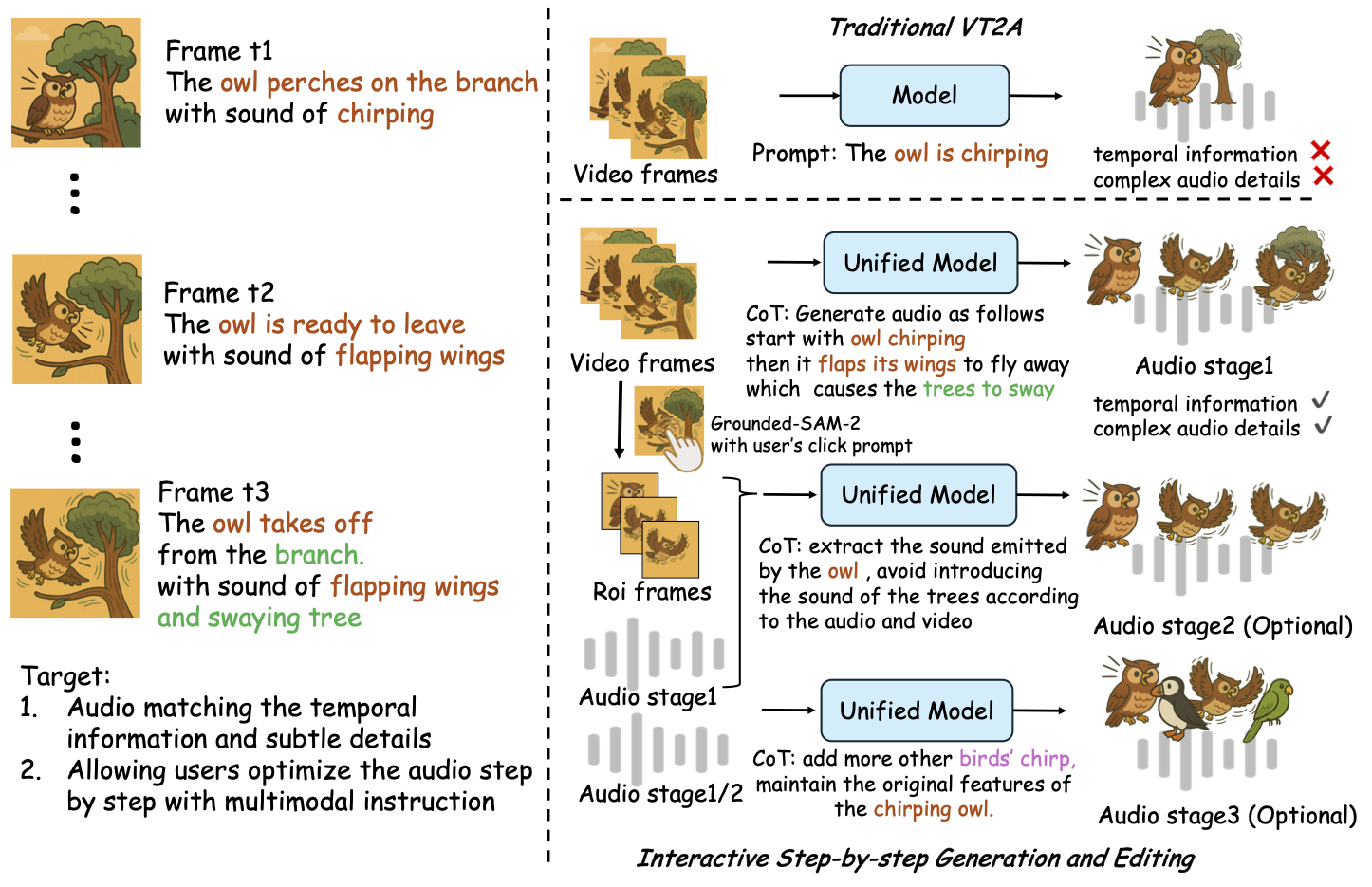
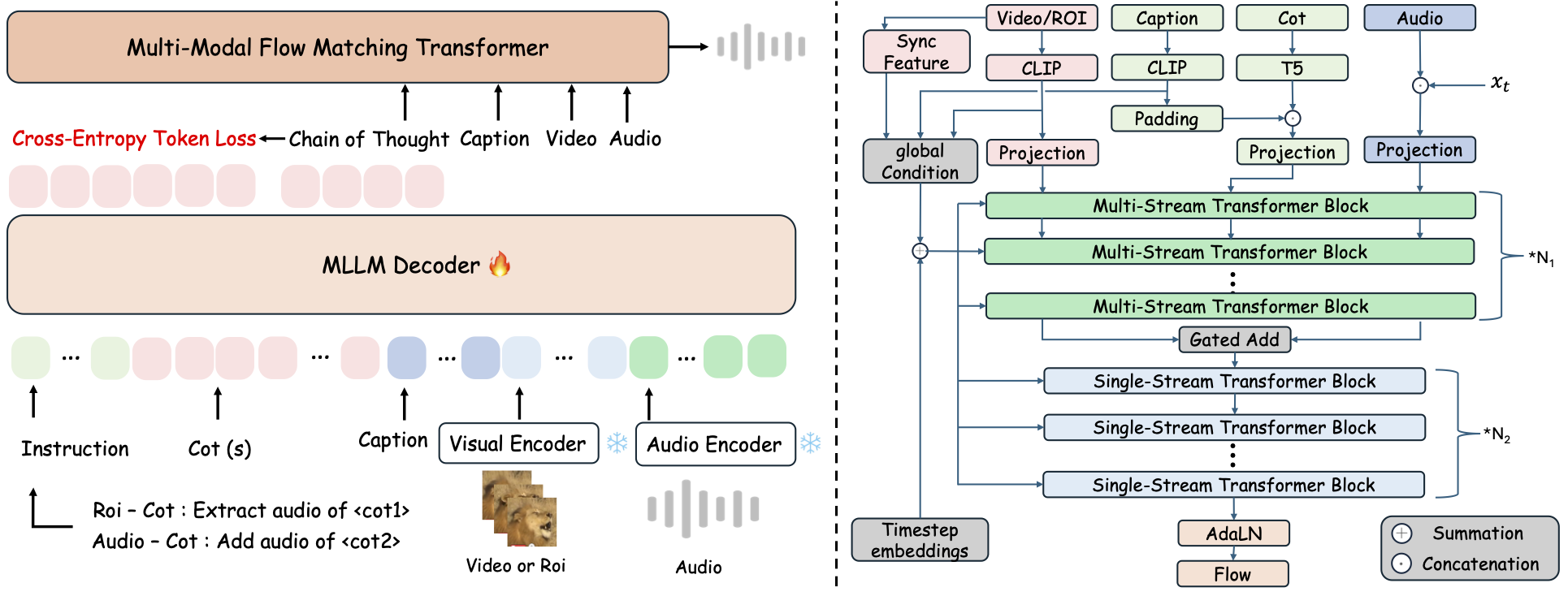
ThinkSound 是一個統一的 Any2Audio 生成框架,採用 Chain-of-Thought (CoT) 推理引導的 flow matching。
PyTorch 實現的多模態音訊生成與編輯:可從影像、文字、音訊生成或編輯音訊,並由多模態大型語言模型(MLLMs)逐步推理驅動。
📰 最新消息
- 2026.03.24 🔥 PrismAudio 已於本倉庫
prismaudio分支釋出 — 請參閱該分支README.md以瞭解安裝與模型。 - 2026.01.26 🎉 PrismAudio 入選 ICLR 2026 主會議(程式碼及文件於
prismaudio分支)。 - 2025.11.25 🔥 PrismAudio 線上展示 已上線。
- 2025.11.25 🔥 PrismAudio 論文 發佈於 arXiv — 以多維 CoT-RL 實現影像轉音訊。
- 2025.09.19 🎉 ThinkSound 入選 NeurIPS 2025 主會議!
- 2025.09.01 我們的 AudioCoT 數據集現已開源,歡迎於 Hugging Face 下載!
- 2025.07.17 🧠 支援微調:訓練及微調程式碼公開,並附有清楚使用說明,助您以自有資料自訂與擴充 ThinkSound。
- 2025.07.15 📦 安裝與使用流程簡化:依賴包已上架 PyPI,輕鬆跨平台安裝;Windows
.bat腳本自動建立環境並執行腳本。 - 2025.07.08 🔧 重大更新:模型輕量化,並優化記憶體與 GPU 使用,支援大規模高吞吐量音訊生成!
- 2025.07.01 線上展示於 Hugging Face Spaces 及 ModelScope,可互動體驗!
- 2025.07.01 已釋出推論腳本及網頁介面;
- 2025.06 ThinkSound 論文 發佈於 arXiv!
- 2025.06 線上展示 上線 — 歡迎立即體驗!
續作:PrismAudio(同倉庫,prismaudio 分支)
PrismAudio 是 ThinkSound(ICLR 2026)的後繼版本,以新名稱開發,但仍保存在此存儲庫的 prismaudio 分支。安裝、檢查點和引用資訊請參見該分支下的 README.md。👉 git checkout prismaudio 或在 GitHub 上開啟該分支。
🚀 功能特點
- Any2Audio:從任意模態(影片、文字、音訊或其組合)生成音訊。
- Video-to-Audio SOTA:在多個 V2A 基準上達到最先進成果。
- CoT 驅動推理:透過 MLLM 進行 Chain-of-Thought 推理,實現組合性與可控的音訊生成。
- 互動式物件導向編輯:透過點擊視覺物件或文字指令,精細編輯特定聲音事件。
- 統一框架:一個基礎模型支援生成、編輯與互動式工作流程。
✨ 方法概述
ThinkSound 將音訊生成與編輯分解為三個互動階段,全部由基於 MLLM 的 Chain-of-Thought(CoT)推理引導:
- Foley 生成: 從影片生成語義與時間一致的基礎聲景。
- 物件導向精細化: 透過點擊或影片中的區域,為指定物件精細化或添加聲音。
- 目標音訊編輯: 使用高階自然語言指令修改生成的音訊。
⚡ 快速開始
環境準備:
# ThinkSound code: branch master. PrismAudio: clone with -b prismaudio (see README.md on that branch).
git clone -b master https://github.com/liuhuadai/ThinkSound.git
cd ThinkSound
conda create -n thinksound python=3.10
conda activate thinksound
pip install thinksound
conda install -y -c conda-forge 'ffmpeg<7'
Download pretrained weights https://huggingface.co/liuhuadai/ThinkSound to Directory ckpts/
model weights can be also downloaded from https://www.modelscope.cn/models/iic/ThinkSound
git lfs install
git clone https://huggingface.co/liuhuadai/ThinkSound ckpts
To improve inference and training speed, you may optionally install a FlashAttention backend compatible with your system and PyTorch version.
✅ Windows 提示:
Windows 使用者只需執行 setup_windows.bat(或雙擊它)即可自動建立 conda 環境、安裝所有依賴(包括 FFmpeg),並下載預訓練模型——無需手動設置。
在執行腳本前,請確保conda和git已經安裝並且可在系統 PATH 中使用。
▶️ 執行示範
#### Linux/macOS
chmod +x scripts/demo.sh
./scripts/demo.sh   <CoT description> [use-half]</code></pre>
#### <strong>Windows</strong></p><p>您也可以改用提供的 <code>.bat</code> 腳本:</p><pre><code class="language-bash">.\scripts\demo.bat <path-to-your-demo-video> <title> <CoT description> [use-half]</code></pre>
<strong>注意:</strong></p><ul><li><code><path-to-your-demo-video></code>:單一影片的路徑</li>
<li><code>[use-half]</code>(可選):在結尾加上 use-half 以啟用半精度特徵提取。</li></p><p></ul>---</p><h3>📦 批次推論</h3></p><p>#### <strong>Linux/macOS</strong></p><pre><code class="language-bash">chmod +x scripts/eval_batch.sh
./scripts/eval_batch.sh <video_path> <csv_path> <save_path (optional)> [use-half]</code></pre>
#### <strong>Windows</strong></p><p>請使用等效的 <code>.bat</code> 腳本:</p><pre><code class="language-bash">.\scripts\eval_batch.bat <video_path> <csv_path> <save_path (optional)> [use-half]</code></pre>
<strong>注意:</strong></p><ul><li><code><video_path></code>:包含所有待處理 .mp4 影片的根目錄路徑(所有影片必須長度相同)。</li>
<li><code><csv_path></code>:每個影片的文字提示 CSV 檔案(格式請參考 <code>demo_test.csv</code>)。</li>
<li><code><save_path></code>(可選):產生的音訊儲存位置。預設為 <code>results/features</code>。</li>
<li><code>[use-half]</code>(可選):最後加上 use-half,可啟用半精度特徵擷取。</li></p><p></ul>---</p><h3>網頁介面使用方式</h3></p><p>若需互動式操作,可啟動 Gradio 網頁介面:</p><pre><code class="language-bash">python app.py</code></pre>
<h2>🏋️ 訓練模型</h2></p><p>請參閱 <a href="https://raw.githubusercontent.com/FunAudioLLM/ThinkSound/master/docs/Training.md" target="_blank" rel="noopener noreferrer"><code>Training.md</code></a></p><hr></p><h2>📄 授權條款</h2></p><p>本專案依照 Apache 2.0 授權條款釋出。</p><blockquote><strong>注意:</strong></blockquote>
<blockquote>程式碼、模型與資料集<strong>僅供學術研究與教育用途</strong>。</blockquote>
<blockquote><strong>禁止商業用途。</strong></blockquote>
<blockquote>若需商業授權,請聯絡作者。</blockquote></p><p><strong>📦 第三方元件</strong></p><ul><li><strong>Stable Audio Open VAE</strong>(由 Stability AI 提供):</li>
  </ul>本倉庫包含經微調的 VAE,來自 <a href="https://huggingface.co/stabilityai/stable-audio-open-1.0/" target="_blank" rel="noopener noreferrer">Stable Audio Open</a>,並依據 <a href="https://raw.githubusercontent.com/FunAudioLLM/ThinkSound/master/./third_party/LICENSE_StabilityAI.md" target="_blank" rel="noopener noreferrer">Stability AI Community License</a> 授權。
  <strong>商業使用與再發佈需事先取得 Stability AI 的許可。</strong></p><ul><li>📘 <strong>其他所有程式碼與模型</strong>均依據 Apache License 2.0 授權釋出。</li></p><p></ul>---</p><h2>鳴謝</h2></p><p>特別感謝:</p><ul><li><strong>stable-audio-tools</strong>(由 Stability AI 提供):</li>
</ul>感謝其提供易於使用的音訊生成框架,以及 VAE 模組與權重。
<ul><li><strong>MMAudio</strong>:</li>
  </ul>感謝其在音訊領域實現 MM-DiT 主幹模型。</p><hr></p><h2>📖 引用</h2></p><p>如果您在研究或工作中發現我們的專案有用,請引用我們的論文:</p><pre><code class="language-bibtex">@misc{liu2025thinksoundchainofthoughtreasoningmultimodal,
      title={ThinkSound: Chain-of-Thought Reasoning in Multimodal Large Language Models for Audio Generation and Editing},
      author={Huadai Liu and Jialei Wang and Kaicheng Luo and Wen Wang and Qian Chen and Zhou Zhao and Wei Xue},
      year={2025},
      eprint={2506.21448},
      archivePrefix={arXiv},
      primaryClass={eess.AS},
      url={https://arxiv.org/abs/2506.21448},
}
@misc{liu2025prismaudiodecomposedchainofthoughtsmultidimensional,
          title={PrismAudio: Decomposed Chain-of-Thoughts and Multi-dimensional Rewards for Video-to-Audio Generation},
          author={Huadai Liu and Kaicheng Luo and Wen Wang and Qian Chen and Peiwen Sun and Rongjie Huang and Xiangang Li and Jieping Ye and Wei Xue},
          year={2025},
          eprint={2511.18833},
          archivePrefix={arXiv},
          primaryClass={cs.SD},
          url={https://arxiv.org/abs/2511.18833},
    }</code></pre></p><hr></p><h2>📬 Contact</h2></p><p>
✨ Feel free to <a href="https://github.com/liuhuadai/ThinkSound/issues" target="_blank" rel="noopener noreferrer">open an issue</a> or contact us via email (<a href="https://raw.githubusercontent.com/FunAudioLLM/ThinkSound/master/mailto:liuhuadai@zju.edu.cn" target="_blank" rel="noopener noreferrer">liuhuadai@zju.edu.cn</a>) if you have any questions or suggestions!</p><p>


---


Tranlated By <a href="https://github.com/OpenAiTx/OpenAiTx" target="_blank" rel="noopener noreferrer">Open Ai Tx</a> | Last indexed: 2026-04-20


---</p>
        </div>

        <div class="original-link">
            <strong>Original README:</strong> <a href="https://raw.githubusercontent.com/FunAudioLLM/ThinkSound/master/README.md" target="_blank" rel="noopener noreferrer">View on GitHub</a>
        </div>
    </div>

    <div class="footer">
        <p>Translated by <a href="https://github.com/OpenAiTx/OpenAiTx" target="_blank" rel="noopener noreferrer">OpenAiTx</a> |
        Last updated: 2026-04-20
    </div>

</body>
</html>