ThinkSound
🌐 English | 简体中文 | 繁體中文 | Español | Français | 日本語





如果你觉得这个项目有用,
在 GitHub 上点一个星⭐将不胜感激!
代码库结构
该 ThinkSound GitHub 仓库在不同分支上托管了两个相关项目:| 分支 | 项目 | 文档 |
|--------|---------|----------------|
| master | ThinkSound(NeurIPS 2025)— 基于CoT引导流匹配的统一Any2Audio生成 | 本文件:README.md |
| prismaudio | PrismAudio — 后续工作(ICLR 2026),基于多维CoT-RL的视频转音频 | prismaudio 分支的 README.md |
如需使用 ThinkSound,请使用 master 分支(本README)。如需 PrismAudio,请切换至 prismaudio 分支并参阅对应 README.md。
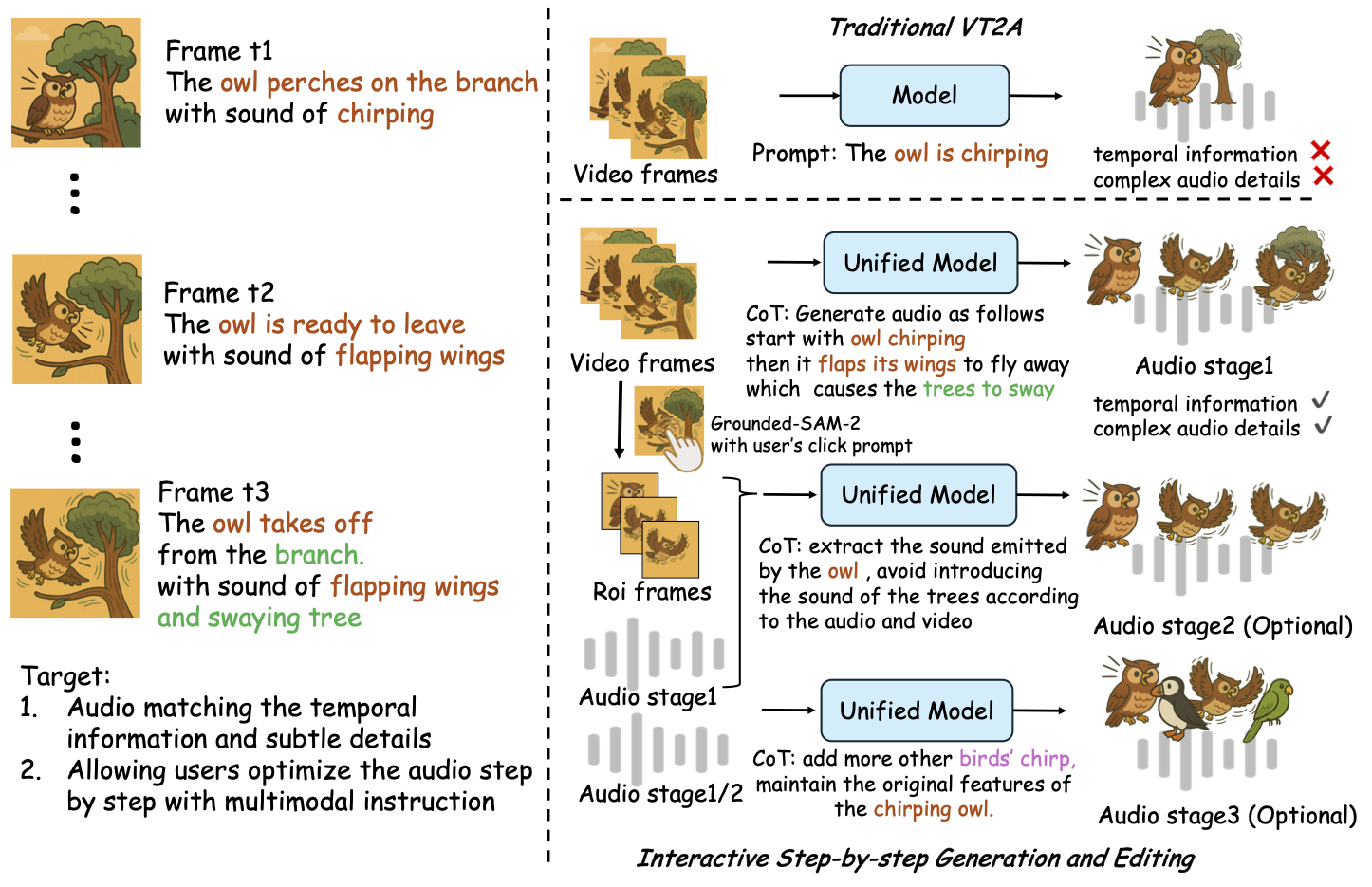
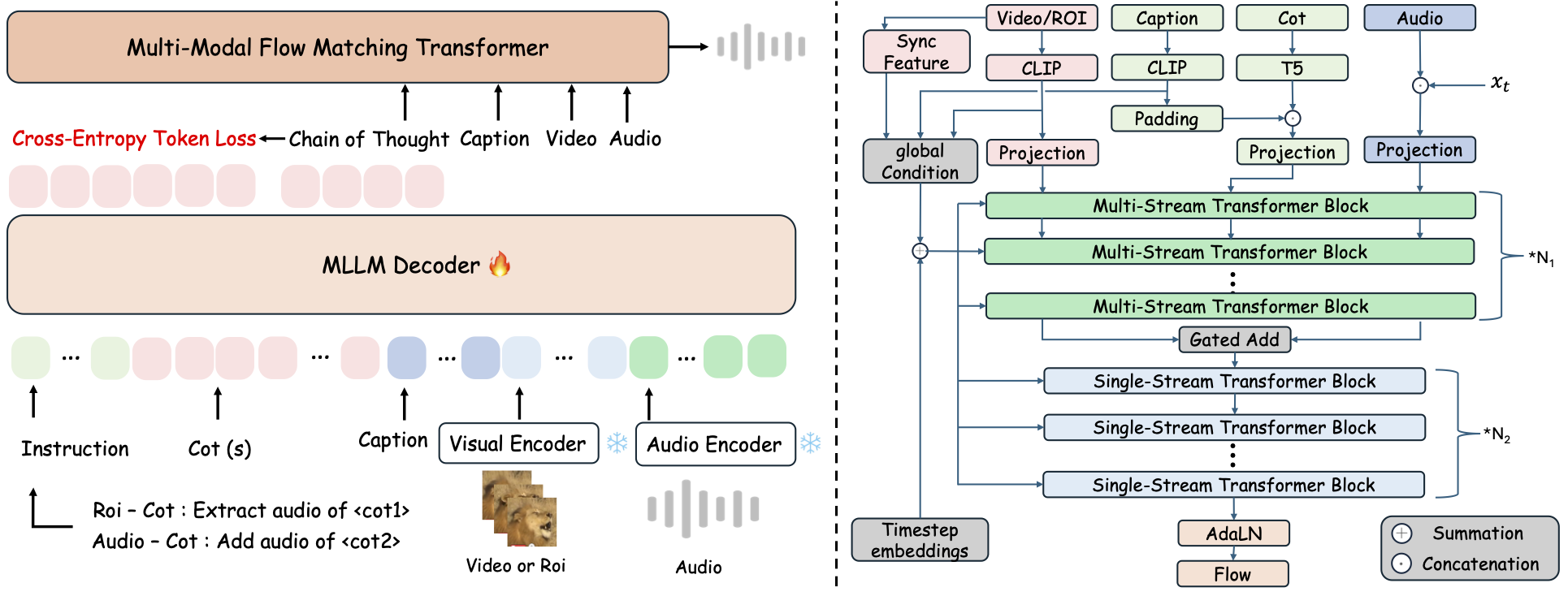
ThinkSound 是一个统一的Any2Audio生成框架,采用链式思维(CoT)推理引导的流匹配。
PyTorch实现的多模态音频生成与编辑工具:可从视频、文本、音频生成或编辑音频,依托多模态大语言模型(MLLM)逐步推理。
📰 新闻
- 2026.03.24 🔥 PrismAudio 已在本仓库
prismaudio分支发布 — 安装与模型请见该分支README.md。 - 2026.01.26 🎉 PrismAudio 被 ICLR 2026主会 接收(代码/文档见
prismaudio)。 - 2025.11.25 🔥 在线 PrismAudio 演示 上线。
- 2025.11.25 🔥 PrismAudio 论文 已上arXiv — 多维CoT-RL用于视频转音频。
- 2025.09.19 🎉 ThinkSound 被 NeurIPS 2025主会 接收!
- 2025.09.01 我们的 AudioCoT 数据集现已开源并可在 Hugging Face 获取!
- 2025.07.17 🧠 支持微调:训练与微调代码已公开,配有详细使用说明,助力你自定义并扩展ThinkSound。
- 2025.07.15 📦 安装与使用更便捷:依赖已上传至PyPI,支持跨平台快捷部署;Windows
.bat脚本自动创建环境并运行脚本。 - 2025.07.08 🔧 重大更新:模型更轻量,优化内存与GPU使用,现支持大规模高吞吐音频生成!
- 2025.07.01 在线演示已上线 Hugging Face Spaces 和 ModelScope!
- 2025.07.01 推出推理脚本及网页界面;
- 2025.06 ThinkSound 论文 发布在arXiv!
- 2025.06 在线演示 已上线 — 立即体验!
后续工作:PrismAudio(同仓库,prismaudio 分支)
PrismAudio 是 ThinkSound (ICLR 2026) 的继任者,以新名称开发,但保留在本仓库的 prismaudio 分支中。安装、检查点和引用信息见该分支的 README.md。
👉 git checkout prismaudio 或在 GitHub 上打开该分支。
🚀 功能
- Any2Audio:从任意模态(视频、文本、音频或其组合)生成音频。
- 视频转音频 SOTA:在多项 V2A 基准测试中取得最先进的结果。
- CoT 驱动的推理:通过 MLLMs 实现链式推理,实现可组合、可控的音频生成。
- 交互式以对象为中心的编辑:通过点击视觉对象或文本指令细化或编辑特定声音事件。
- 统一框架:一个基础模型支持生成、编辑和交互式工作流。
✨ 方法概述
ThinkSound 将音频生成和编辑分解为三个交互阶段,均由基于 MLLM 的链式推理(CoT)指导:
- 拟音生成: 从视频中生成语义和时间对齐的基础音景。
- 以对象为中心的细化: 通过点击或视频中的区域,为用户指定的对象细化或添加声音。
- 目标音频编辑: 使用高级自然语言指令修改生成的音频。
⚡ 快速开始
环境准备:
# ThinkSound code: branch master. PrismAudio: clone with -b prismaudio (see README.md on that branch).
git clone -b master https://github.com/liuhuadai/ThinkSound.git
cd ThinkSound
conda create -n thinksound python=3.10
conda activate thinksound
pip install thinksound
conda install -y -c conda-forge 'ffmpeg<7'
Download pretrained weights https://huggingface.co/liuhuadai/ThinkSound to Directory ckpts/
model weights can be also downloaded from https://www.modelscope.cn/models/iic/ThinkSound
git lfs install
git clone https://huggingface.co/liuhuadai/ThinkSound ckpts
To improve inference and training speed, you may optionally install a FlashAttention backend compatible with your system and PyTorch version.
✅ Windows 提示:
Windows 用户只需运行 setup_windows.bat(或双击它),即可自动创建 conda 环境、安装所有依赖项(包括 FFmpeg),并下载预训练模型——无需手动设置。
在运行脚本前,请确保已安装conda和git并且它们已添加到系统 PATH 中。
▶️ 运行演示
#### Linux/macOS
chmod +x scripts/demo.sh
./scripts/demo.sh   <CoT description> [use-half]</code></pre>
#### <strong>Windows</strong></p><p>你也可以使用提供的 <code>.bat</code> 脚本来代替:</p><pre><code class="language-bash">.\scripts\demo.bat <path-to-your-demo-video> <title> <CoT description> [use-half]</code></pre>
<strong>注意:</strong></p><ul><li><code><path-to-your-demo-video></code>:单个视频的路径</li>
<li><code>[use-half]</code>(可选):在末尾添加 use-half 以启用半精度特征提取功能。</li></p><p></ul>---</p><h3>📦 批量推理</h3></p><p>#### <strong>Linux/macOS</strong></p><pre><code class="language-bash">chmod +x scripts/eval_batch.sh
./scripts/eval_batch.sh <video_path> <csv_path> <save_path (optional)> [use-half]</code></pre>
#### <strong>Windows</strong></p><p>请使用等效的 <code>.bat</code> 脚本:</p><pre><code class="language-bash">.\scripts\eval_batch.bat <video_path> <csv_path> <save_path (optional)> [use-half]</code></pre>
<strong>注意:</strong></p><ul><li><code><video_path></code>:包含所有待处理 .mp4 视频的根目录路径(所有视频必须时长相同)。</li>
<li><code><csv_path></code>:为每个视频提供文本提示的 CSV 文件(格式参考 <code>demo_test.csv</code>)。</li>
<li><code><save_path></code>(可选):生成音频的保存位置。默认为 <code>results/features</code>。</li>
<li><code>[use-half]</code>(可选):在末尾添加 use-half 以启用半精度特征提取。</li></p><p></ul>---</p><h3>网页界面使用方法</h3></p><p>如需交互式体验,可启动 Gradio 网页界面:</p><pre><code class="language-bash">python app.py</code></pre>
<h2>🏋️ 训练模型</h2></p><p>参见 <a href="https://raw.githubusercontent.com/FunAudioLLM/ThinkSound/master/docs/Training.md" target="_blank" rel="noopener noreferrer"><code>Training.md</code></a></p><hr></p><h2>📄 许可证</h2></p><p>本项目采用 Apache 2.0 许可证发布。</p><blockquote><strong>注意:</strong></blockquote>
<blockquote>本代码、模型和数据集<strong>仅供科研与教育用途</strong>。</blockquote>
<blockquote><strong>禁止商业用途。</strong></blockquote>
<blockquote>如需商业授权,请联系作者。</blockquote></p><p><strong>📦 第三方组件</strong></p><ul><li><strong>Stable Audio Open VAE</strong>(由 Stability AI 提供):</li>
  </ul>本仓库包含来自 <a href="https://huggingface.co/stabilityai/stable-audio-open-1.0/" target="_blank" rel="noopener noreferrer">Stable Audio Open</a> 的微调 VAE,遵循 <a href="https://raw.githubusercontent.com/FunAudioLLM/ThinkSound/master/./third_party/LICENSE_StabilityAI.md" target="_blank" rel="noopener noreferrer">Stability AI 社区许可证</a>。
  <strong>商业使用和再分发需事先获得 Stability AI 许可。</strong></p><ul><li>📘 <strong>所有其他代码和模型</strong> 均按照 Apache License 2.0 发布。</li></p><p></ul>---</p><h2>鸣谢</h2></p><p>特别感谢:</p><ul><li><strong>stable-audio-tools</strong>(由 Stability AI 提供):</li>
  </ul>提供了音频生成易用的开发框架,以及 VAE 模块和权重。
<ul><li><strong>MMAudio</strong>:</li>
  </ul>在音频领域实现了 MM-DiT 主干网络。</p><hr></p><h2>📖 引用</h2></p><p>如果您在研究或工作中发现我们的项目有用,请引用我们的论文:</p><pre><code class="language-bibtex">@misc{liu2025thinksoundchainofthoughtreasoningmultimodal,
      title={ThinkSound: Chain-of-Thought Reasoning in Multimodal Large Language Models for Audio Generation and Editing},
      author={Huadai Liu and Jialei Wang and Kaicheng Luo and Wen Wang and Qian Chen and Zhou Zhao and Wei Xue},
      year={2025},
      eprint={2506.21448},
      archivePrefix={arXiv},
      primaryClass={eess.AS},
      url={https://arxiv.org/abs/2506.21448},
}
@misc{liu2025prismaudiodecomposedchainofthoughtsmultidimensional,
          title={PrismAudio: Decomposed Chain-of-Thoughts and Multi-dimensional Rewards for Video-to-Audio Generation},
          author={Huadai Liu and Kaicheng Luo and Wen Wang and Qian Chen and Peiwen Sun and Rongjie Huang and Xiangang Li and Jieping Ye and Wei Xue},
          year={2025},
          eprint={2511.18833},
          archivePrefix={arXiv},
          primaryClass={cs.SD},
          url={https://arxiv.org/abs/2511.18833},
    }</code></pre></p><hr></p><h2>📬 Contact</h2></p><p>
✨ Feel free to <a href="https://github.com/liuhuadai/ThinkSound/issues" target="_blank" rel="noopener noreferrer">open an issue</a> or contact us via email (<a href="https://raw.githubusercontent.com/FunAudioLLM/ThinkSound/master/mailto:liuhuadai@zju.edu.cn" target="_blank" rel="noopener noreferrer">liuhuadai@zju.edu.cn</a>) if you have any questions or suggestions!</p><p>


---


Tranlated By <a href="https://github.com/OpenAiTx/OpenAiTx" target="_blank" rel="noopener noreferrer">Open Ai Tx</a> | Last indexed: 2026-04-20


---</p>
        </div>

        <div class="original-link">
            <strong>Original README:</strong> <a href="https://raw.githubusercontent.com/FunAudioLLM/ThinkSound/master/README.md" target="_blank" rel="noopener noreferrer">View on GitHub</a>
        </div>
    </div>

    <div class="footer">
        <p>Translated by <a href="https://github.com/OpenAiTx/OpenAiTx" target="_blank" rel="noopener noreferrer">OpenAiTx</a> |
        Last updated: 2026-04-20
    </div>

</body>
</html>