ThinkSound
🌐 English | 简体中文 | 繁體中文 | Español | Français | 日本語





หากคุณพบว่าโปรเจกต์นี้มีประโยชน์,
การให้ดาว ⭐ บน GitHub จะเป็นที่ชื่นชมอย่างยิ่ง!
โครงสร้างของ Repository
ที่เก็บ GitHub ThinkSound นี้เป็นที่รวมสองโปรเจกต์ที่เกี่ยวข้องกันอยู่บนสาขาแยกต่างหาก:| สาขา | โปรเจกต์ | เอกสารประกอบ |
|------|----------|--------------|
| master | ThinkSound (NeurIPS 2025) — การสร้าง Any2Audio แบบรวมด้วยการจับคู่โฟลว์ที่นำโดย CoT | ไฟล์นี้: README.md |
| prismaudio | PrismAudio — งานต่อยอด (ICLR 2026) สำหรับ video-to-audio ด้วย CoT-RL หลายมิติ | README.md ในสาขา prismaudio |
สำหรับ ThinkSound ให้ใช้สาขา master (README นี้) สำหรับ PrismAudio ให้ checkout สาขา prismaudio และอ่าน README.md ที่นั่น
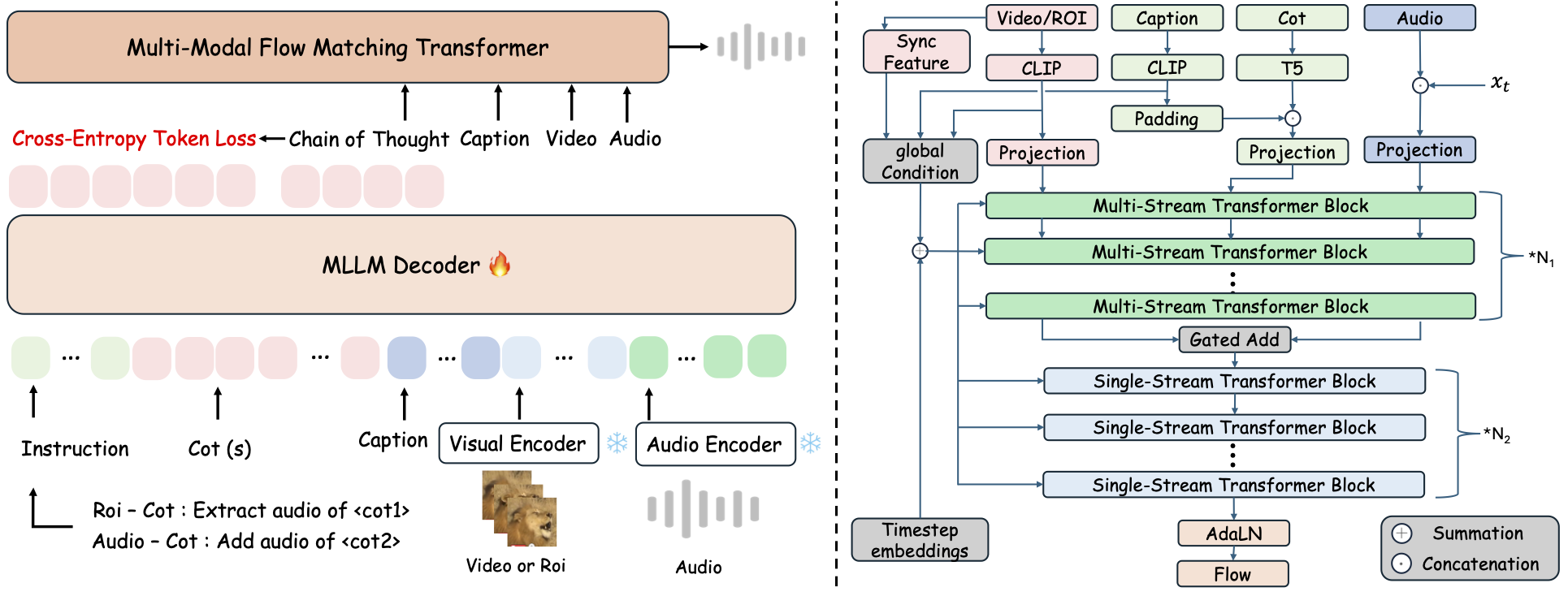
ThinkSound คือกรอบการสร้าง Any2Audio แบบรวมด้วยการจับคู่โฟลว์ที่นำโดยการให้เหตุผลแบบ Chain-of-Thought (CoT)
การใช้งาน PyTorch สำหรับสร้างและแก้ไขเสียงแบบมัลติโหมด: สร้างหรือแก้ไขเสียงจากวิดีโอ ข้อความ และเสียง ด้วยการให้เหตุผลทีละขั้นจาก Multimodal Large Language Models (MLLMs)
📰 ข่าวสาร
- 2026.03.24 🔥 PrismAudio เปิดตัวใน repo เดียวกันบนสาขา
prismaudio— ดูREADME.mdที่นั่นสำหรับการติดตั้งและโมเดล - 2026.01.26 🎉 PrismAudio ได้รับการตอบรับเข้าสู่ ICLR 2026 Main Conference (code/docs อยู่ที่
prismaudio) - 2025.11.25 🔥 PrismAudio Demo ออนไลน์ เปิดให้ใช้งานแล้ว
- 2025.11.25 🔥 PrismAudio paper บน arXiv — CoT-RL หลายมิติสำหรับ video-to-audio
- 2025.09.19 🎉 ThinkSound ได้รับการตอบรับเข้าสู่ NeurIPS 2025 Main Conference!
- 2025.09.01 ชุดข้อมูล AudioCoT เปิดโอเพนซอร์สแล้วและมีให้ใช้งานที่ Hugging Face!
- 2025.07.17 🧠 เปิดใช้งานการ finetuning: โค้ดสำหรับเทรนและ finetune พร้อมใช้งานสาธารณะ พร้อมคำแนะนำใช้งานที่ชัดเจนเพื่อปรับแต่งและขยาย ThinkSound ด้วยข้อมูลของคุณเอง
- 2025.07.15 📦 การติดตั้งและใช้งานง่ายขึ้น: dependency บน PyPI สำหรับการตั้งค่าข้ามแพลตฟอร์มง่าย ๆ; สคริปต์ Windows
.batอัตโนมัติสร้าง environment และรันสคริปต์ - 2025.07.08 🔧 อัปเดตครั้งใหญ่: โมเดลน้ำหนักเบาขึ้นและปรับแต่งการใช้หน่วยความจำและ GPU รองรับการสร้างเสียงแบบ throughput สูงในระดับใหญ่!
- 2025.07.01 เดโมออนไลน์ที่ Hugging Face Spaces และ ModelScope เพื่อประสบการณ์แบบ interactive!
- 2025.07.01 เปิดตัวสคริปต์ inference และเว็บอินเทอร์เฟซ;
- 2025.06 ThinkSound paper เผยแพร่บน arXiv!
- 2025.06 เดโมออนไลน์ เปิดให้ใช้งานแล้ว - ลองเลย!
งานต่อยอด: PrismAudio (repo เดียวกัน, สาขา prismaudio)
PrismAudio คือผู้สืบทอดของ ThinkSound (ICLR 2026) ที่พัฒนาภายใต้ชื่อใหม่ แต่ยังคงอยู่ในที่เก็บนี้บน branch prismaudio การติดตั้ง, checkpoints, และการอ้างอิง อยู่ใน README.md บนสาขานั้น
👉 git checkout prismaudio หรือเปิด branch นี้บน GitHub
🚀 คุณสมบัติ
- Any2Audio: สร้างเสียงจากรูปแบบอินพุตใดก็ได้ — วิดีโอ, ข้อความ, เสียง หรือการผสมผสานกัน
- Video-to-Audio SOTA: ได้ผลลัพธ์ระดับ state-of-the-art ในหลายมาตรฐาน V2A
- CoT-Driven Reasoning: การให้เหตุผลแบบ Chain-of-Thought สำหรับการสร้างเสียงที่ประกอบและควบคุมได้ด้วย MLLMs
- Interactive Object-centric Editing: ปรับแต่งหรือแก้ไขเหตุการณ์เสียงเฉพาะโดยคลิกที่วัตถุในภาพหรือใช้คำสั่งข้อความ
- Unified Framework: โมเดลรากฐานเดียวรองรับการสร้าง, แก้ไข และเวิร์กโฟลว์แบบโต้ตอบ
✨ ภาพรวมวิธีการ
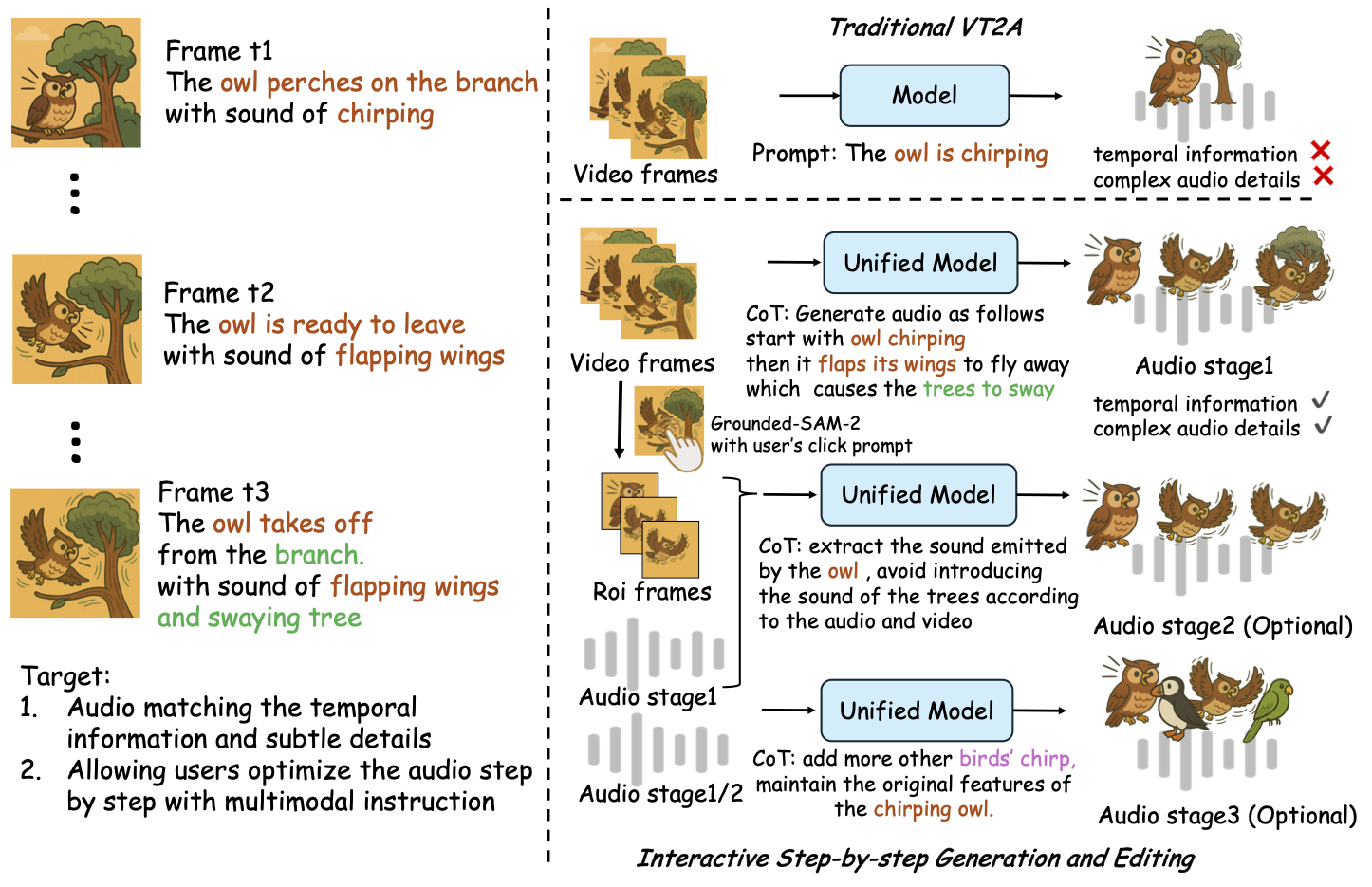
ThinkSound แยกการสร้างและแก้ไขเสียงออกเป็น 3 ขั้นตอนแบบโต้ตอบ ทั้งหมดขับเคลื่อนโดยการให้เหตุผลแบบ Chain-of-Thought (CoT) ที่อิงกับ MLLM:
- Foley Generation: สร้างซาวด์สเคปพื้นฐานที่สอดคล้องกันในเชิงความหมายและเวลา จากวิดีโอ
- Object-Centric Refinement: ปรับแต่งหรือเพิ่มเสียงสำหรับวัตถุที่ผู้ใช้กำหนดผ่านการคลิกหรือเลือกบริเวณในวิดีโอ
- Targeted Audio Editing: แก้ไขเสียงที่สร้างขึ้นโดยใช้คำสั่งภาษาธรรมชาติระดับสูง
⚡ เริ่มต้นอย่างรวดเร็ว
การเตรียมสภาพแวดล้อม:
# ThinkSound code: branch master. PrismAudio: clone with -b prismaudio (see README.md on that branch).
git clone -b master https://github.com/liuhuadai/ThinkSound.git
cd ThinkSound
conda create -n thinksound python=3.10
conda activate thinksound
pip install thinksound
conda install -y -c conda-forge 'ffmpeg<7'
Download pretrained weights https://huggingface.co/liuhuadai/ThinkSound to Directory ckpts/
model weights can be also downloaded from https://www.modelscope.cn/models/iic/ThinkSound
git lfs install
git clone https://huggingface.co/liuhuadai/ThinkSound ckpts
To improve inference and training speed, you may optionally install a FlashAttention backend compatible with your system and PyTorch version.
✅ เคล็ดลับสำหรับ Windows:
ผู้ใช้ Windows สามารถรัน setup_windows.bat (หรือดับเบิลคลิกไฟล์นี้) เพื่อสร้างสภาพแวดล้อม conda ติดตั้งทุก dependency (รวมถึง FFmpeg) และดาวน์โหลดโมเดลที่ผ่านการฝึกมาแล้วโดยอัตโนมัติ — ไม่ต้องตั้งค่าด้วยตนเอง
ตรวจสอบให้แน่ใจว่าได้ติดตั้งcondaและgitและทั้งสองอยู่ใน PATH ของระบบก่อนรันสคริปต์นี้
▶️ รันเดโม
#### Linux/macOS
chmod +x scripts/demo.sh
./scripts/demo.sh   <CoT description> [use-half]</code></pre>
#### <strong>Windows</strong></p><p>คุณสามารถใช้สคริปต์ <code>.bat</code> ที่ให้มาแทนได้:</p><pre><code class="language-bash">.\scripts\demo.bat <path-to-your-demo-video> <title> <CoT description> [use-half]</code></pre>
<strong>หมายเหตุ:</strong></p><ul><li><code><path-to-your-demo-video></code>: เส้นทางไปยังวิดีโอตัวอย่างของคุณ</li>
<li><code>[use-half]</code> (ไม่บังคับ): เพิ่ม use-half ต่อท้ายเพื่อเปิดใช้งานการดึงคุณลักษณะแบบ half precision</li></p><p></ul>---</p><h3>📦 การทำนายแบบกลุ่ม</h3></p><p>#### <strong>Linux/macOS</strong></p><pre><code class="language-bash">chmod +x scripts/eval_batch.sh
./scripts/eval_batch.sh <video_path> <csv_path> <save_path (optional)> [use-half]</code></pre>
#### <strong>Windows</strong></p><p>ใช้สคริปต์ <code>.bat</code> ที่เทียบเท่า:</p><pre><code class="language-bash">.\scripts\eval_batch.bat <video_path> <csv_path> <save_path (optional)> [use-half]</code></pre>
<strong>หมายเหตุ:</strong></p><ul><li><code><video_path></code>: เส้นทางไปยังไดเรกทอรีหลักที่มีไฟล์วิดีโอ .mp4 ทั้งหมดที่จะประมวลผล (วิดีโอทั้งหมดต้องมีระยะเวลาเท่ากัน)</li>
<li><code><csv_path></code>: ไฟล์ CSV ที่มีข้อความพรอมต์สำหรับแต่ละวิดีโอ (ดูรูปแบบได้ที่ <code>demo_test.csv</code>)</li>
<li><code><save_path></code> (ไม่บังคับ): ตำแหน่งที่จะบันทึกไฟล์เสียงที่สร้างขึ้น ค่าเริ่มต้นคือ <code>results/features</code></li>
<li><code>[use-half]</code> (ไม่บังคับ): เพิ่ม use-half ต่อท้ายเพื่อเปิดใช้งานการสกัดคุณลักษณะด้วยความแม่นยำครึ่งหนึ่ง</li></p><p></ul>---</p><h3>การใช้งานผ่านเว็บอินเทอร์เฟซ</h3></p><p>สำหรับประสบการณ์แบบโต้ตอบ ให้เปิดใช้งาน Gradio web interface:</p><pre><code class="language-bash">python app.py</code></pre></p><h2>🏋️ ฝึกสอนโมเดล</h2></p><p>ดูที่ <a href="https://raw.githubusercontent.com/FunAudioLLM/ThinkSound/master/docs/Training.md" target="_blank" rel="noopener noreferrer"><code>Training.md</code></a></p><hr></p><h2>📄 ใบอนุญาต</h2></p><p>โปรเจกต์นี้เผยแพร่ภายใต้ใบอนุญาต Apache 2.0</p><blockquote><strong>หมายเหตุ:</strong></blockquote>
<blockquote>โค้ด โมเดล และชุดข้อมูลนี้ <strong>สำหรับการวิจัยและการศึกษาเท่านั้น</strong></blockquote>
<blockquote><strong>ไม่อนุญาตให้ใช้เชิงพาณิชย์</strong></blockquote>
<blockquote>หากต้องการขออนุญาตใช้เชิงพาณิชย์ กรุณาติดต่อผู้เขียน</blockquote></p><p><strong>📦 คอมโพเนนต์จากบุคคลที่สาม</strong></p><ul><li><strong>Stable Audio Open VAE</strong> (โดย Stability AI):</li>
  </ul>ที่เก็บนี้รวม VAE ที่ปรับแต่งแล้วจาก <a href="https://huggingface.co/stabilityai/stable-audio-open-1.0/" target="_blank" rel="noopener noreferrer">Stable Audio Open</a> ซึ่งอยู่ภายใต้ <a href="https://raw.githubusercontent.com/FunAudioLLM/ThinkSound/master/./third_party/LICENSE_StabilityAI.md" target="_blank" rel="noopener noreferrer">Stability AI Community License</a>
  <strong>การใช้เชิงพาณิชย์และการแจกจ่ายซ้ำต้องได้รับอนุญาตล่วงหน้าจาก Stability AI</strong></p><ul><li>📘 <strong>โค้ดและโมเดลอื่น ๆ ทั้งหมด</strong> เผยแพร่ภายใต้ Apache License 2.0</li></p><p></ul>---</p><h2>คำขอบคุณ</h2></p><p>ขอขอบคุณเป็นอย่างยิ่งแก่:</p><ul><li><strong>stable-audio-tools</strong> (โดย Stability AI):</li>
</ul>สำหรับเฟรมเวิร์กที่ใช้งานง่ายสำหรับการสร้างเสียง ตลอดจนโมดูล VAE และน้ำหนักโมเดล
<ul><li><strong>MMAudio</strong>:</li>
  </ul>สำหรับการพัฒนา MM-DiT backbone ในด้านเสียง</p><hr></p><h2>📖 การอ้างอิง</h2></p><p>หากคุณพบว่าโครงการของเรามีประโยชน์ในการวิจัยหรือการทำงานของคุณ กรุณาอ้างอิงบทความของเรา:</p><pre><code class="language-bibtex">@misc{liu2025thinksoundchainofthoughtreasoningmultimodal,
      title={ThinkSound: Chain-of-Thought Reasoning in Multimodal Large Language Models for Audio Generation and Editing},
      author={Huadai Liu and Jialei Wang and Kaicheng Luo and Wen Wang and Qian Chen and Zhou Zhao and Wei Xue},
      year={2025},
      eprint={2506.21448},
      archivePrefix={arXiv},
      primaryClass={eess.AS},
      url={https://arxiv.org/abs/2506.21448},
}
@misc{liu2025prismaudiodecomposedchainofthoughtsmultidimensional,
          title={PrismAudio: Decomposed Chain-of-Thoughts and Multi-dimensional Rewards for Video-to-Audio Generation},
          author={Huadai Liu and Kaicheng Luo and Wen Wang and Qian Chen and Peiwen Sun and Rongjie Huang and Xiangang Li and Jieping Ye and Wei Xue},
          year={2025},
          eprint={2511.18833},
          archivePrefix={arXiv},
          primaryClass={cs.SD},
          url={https://arxiv.org/abs/2511.18833},
    }</code></pre></p><hr></p><h2>📬 Contact</h2></p><p>
✨ Feel free to <a href="https://github.com/liuhuadai/ThinkSound/issues" target="_blank" rel="noopener noreferrer">open an issue</a> or contact us via email (<a href="https://raw.githubusercontent.com/FunAudioLLM/ThinkSound/master/mailto:liuhuadai@zju.edu.cn" target="_blank" rel="noopener noreferrer">liuhuadai@zju.edu.cn</a>) if you have any questions or suggestions!</p><p>


---


Tranlated By <a href="https://github.com/OpenAiTx/OpenAiTx" target="_blank" rel="noopener noreferrer">Open Ai Tx</a> | Last indexed: 2026-04-20


---</p>
        </div>

        <div class="original-link">
            <strong>Original README:</strong> <a href="https://raw.githubusercontent.com/FunAudioLLM/ThinkSound/master/README.md" target="_blank" rel="noopener noreferrer">View on GitHub</a>
        </div>
    </div>

    <div class="footer">
        <p>Translated by <a href="https://github.com/OpenAiTx/OpenAiTx" target="_blank" rel="noopener noreferrer">OpenAiTx</a> |
        Last updated: 2026-04-20
    </div>

</body>
</html>