ThinkSound
🌐 English | 简体中文 | 繁體中文 | Español | Français | 日本語





このプロジェクトが役に立ったと感じたら、
GitHubでスター ⭐ を付けていただけると嬉しいです!
リポジトリ構成
この ThinkSound GitHubリポジトリは、2つの関連プロジェクトを別々のブランチでホストしています:| ブランチ | プロジェクト | ドキュメント |
|--------|---------|----------------|
| master | ThinkSound (NeurIPS 2025) — CoTガイド付きフローマッチングによる統一型Any2Audio生成 | 本ファイル:README.md |
| prismaudio | PrismAudio — マルチディメンショナルCoT-RLによるビデオから音声への後続研究(ICLR 2026) | prismaudioブランチのREADME.md |
ThinkSoundの場合は、masterブランチ(このREADME)を使用してください。PrismAudioの場合は、prismaudioをチェックアウトし、そちらのREADME.mdに従ってください。
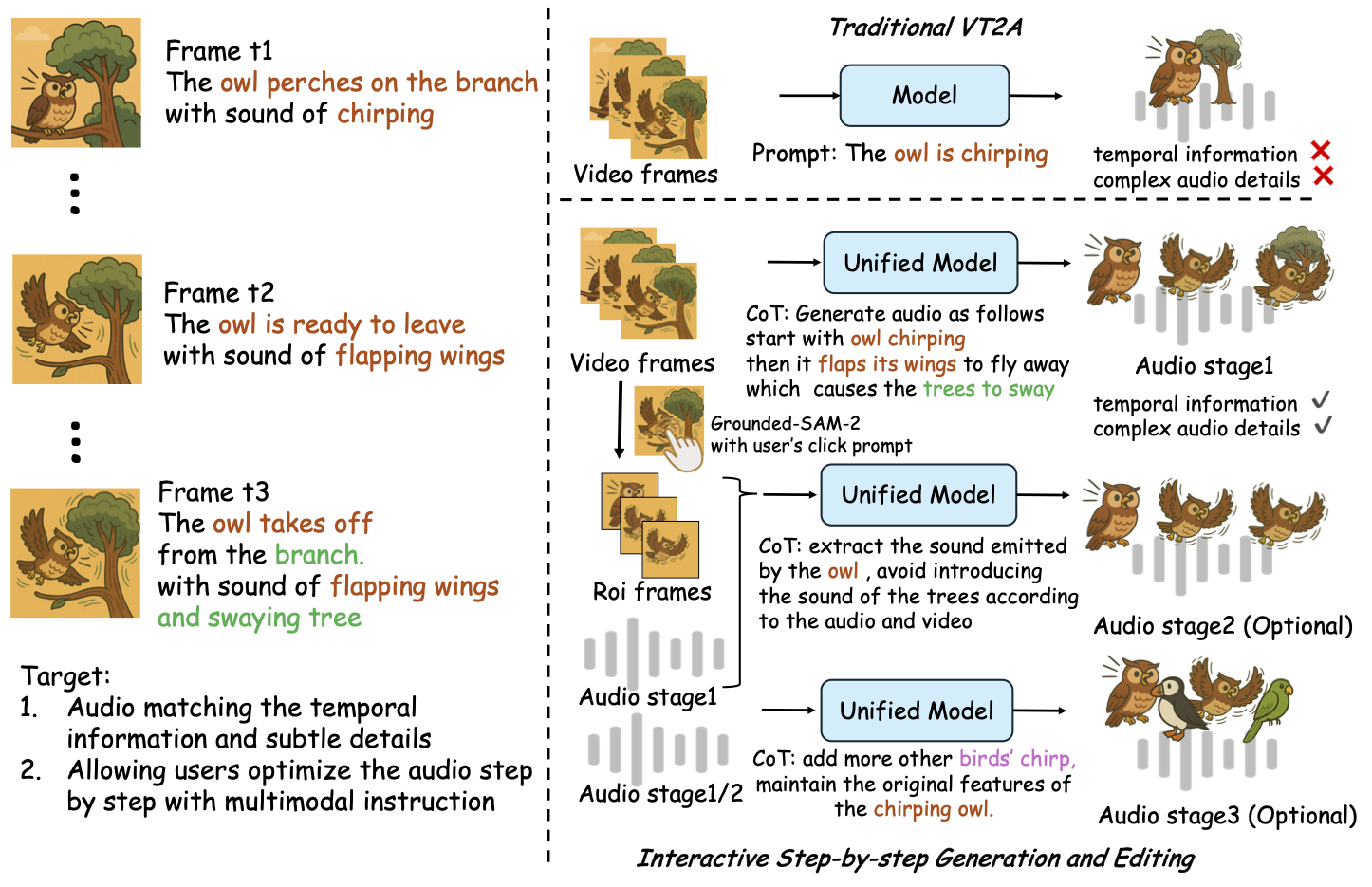
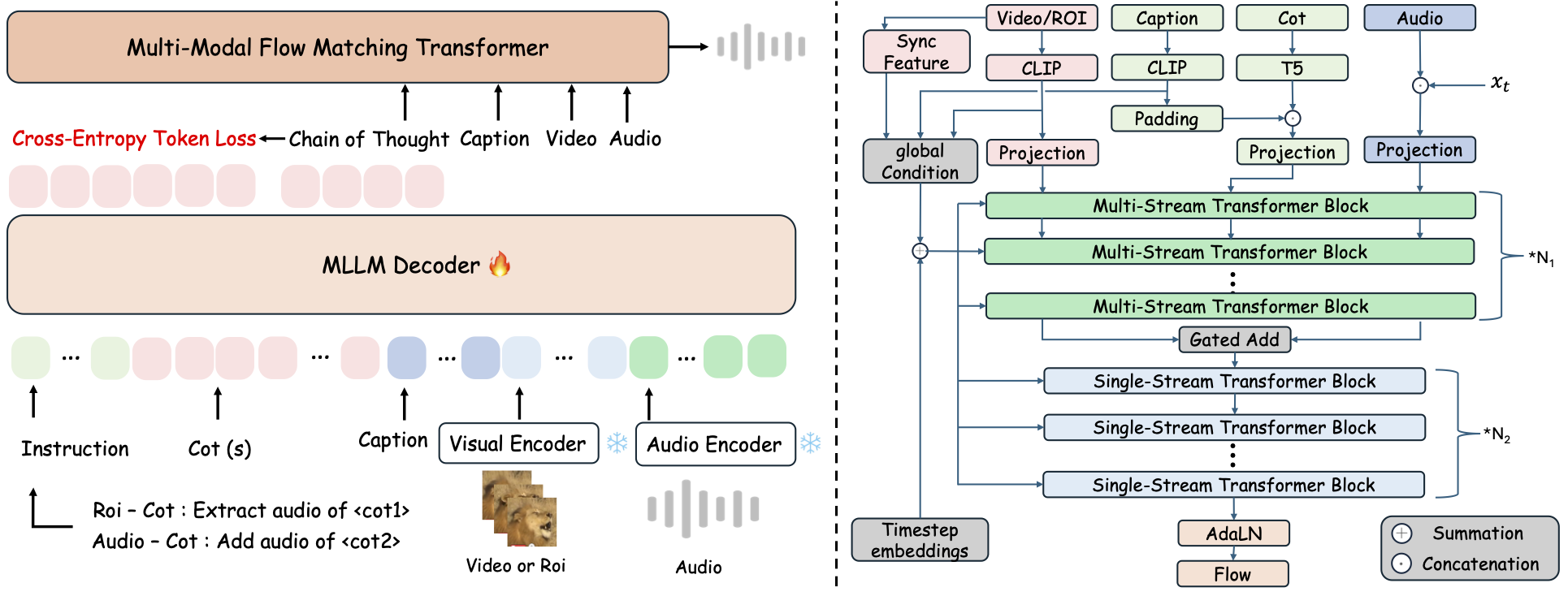
ThinkSoundはChain-of-Thought(CoT)推論によりガイドされたフローマッチングを特徴とする統一Any2Audio生成フレームワークです。
PyTorch実装によるマルチモーダル音声生成および編集:ビデオ・テキスト・音声からの生成/編集に対応し、マルチモーダル大規模言語モデル(MLLM)によるステップバイステップ推論を活用します。
📰 ニュース
- 2026.03.24 🔥 PrismAudioが同リポジトリの
prismaudioブランチで公開 — セットアップとモデルはREADME.mdを参照。 - 2026.01.26 🎉 PrismAudioがICLR 2026 メインカンファレンスに採択(
prismaudioでコード/ドキュメント公開)。 - 2025.11.25 🔥 オンラインPrismAudioデモが公開。
- 2025.11.25 🔥 PrismAudio論文がarXivに公開 — ビデオから音声へのマルチディメンショナルCoT-RL。
- 2025.09.19 🎉 ThinkSoundがNeurIPS 2025 メインカンファレンスに採択!
- 2025.09.01 当社のAudioCoTデータセットがHugging Faceでオープンソース化されました!
- 2025.07.17 🧠 ファインチューニング対応:トレーニングとファインチューニング用コードが一般公開され、独自データでThinkSoundをカスタマイズ・拡張するための明確な使い方ガイドも付属。
- 2025.07.15 📦 インストールと使いやすさを簡素化:PyPI依存関係によるクロスプラットフォームセットアップ対応、Windows用.batスクリプトで環境構築やスクリプト実行を自動化。
- 2025.07.08 🔧 大幅アップデート:モデルの軽量化とメモリ・GPU使用量を最適化、大規模な高スループット音声生成に対応!
- 2025.07.01 Hugging Face SpacesおよびModelScopeでオンラインデモ公開、インタラクティブ体験可能!
- 2025.07.01 推論スクリプトとWebインターフェースを公開;
- 2025.06 ThinkSound論文をarXivで公開!
- 2025.06 オンラインデモが公開中 - ぜひお試しください!
フォローアップ:PrismAudio(同リポジトリ、prismaudioブランチ)
PrismAudio は ThinkSound (ICLR 2026) の後継であり、新しい名称で開発されましたが、このリポジトリの prismaudio ブランチ上で管理されています。インストール、チェックポイント、引用については そのブランチのREADME.md を参照してください。
👉 git checkout prismaudio またはGitHub上でブランチを開いてください。
🚀 特徴
- Any2Audio: 任意のモダリティ(動画、テキスト、音声、またはその組み合わせ)から音声を生成。
- Video-to-Audio SOTA: 複数のV2Aベンチマークで最先端の結果を達成。
- CoT駆動推論: MLLMによる連鎖的思考(Chain-of-Thought)推論で構成的かつ制御可能な音声生成を実現。
- インタラクティブなオブジェクト中心編集: 視覚的なオブジェクトをクリック、またはテキスト指示で特定の音声イベントを修正・編集可能。
- 統一フレームワーク: 1つの基盤モデルが生成・編集・インタラクティブなワークフローをサポート。
✨ メソッド概要
ThinkSoundは、音声生成と編集をMLLMベースの連鎖的思考推論により、3つのインタラクティブな段階に分解します:
- フォリー生成: 動画から意味的・時間的に整合した基礎的なサウンドスケープを生成。
- オブジェクト中心のリファインメント: ユーザー指定オブジェクトに対してクリックや領域指定で音を追加・精緻化。
- ターゲット音声編集: 高レベルの自然言語指示で生成音声を編集。
⚡ クイックスタート
環境準備:
# ThinkSound code: branch master. PrismAudio: clone with -b prismaudio (see README.md on that branch).
git clone -b master https://github.com/liuhuadai/ThinkSound.git
cd ThinkSound
conda create -n thinksound python=3.10
conda activate thinksound
pip install thinksound
conda install -y -c conda-forge 'ffmpeg<7'
Download pretrained weights https://huggingface.co/liuhuadai/ThinkSound to Directory ckpts/
model weights can be also downloaded from https://www.modelscope.cn/models/iic/ThinkSound
git lfs install
git clone https://huggingface.co/liuhuadai/ThinkSound ckpts
To improve inference and training speed, you may optionally install a FlashAttention backend compatible with your system and PyTorch version.
✅ Windowsのヒント:
Windowsユーザーは、setup_windows.bat を実行(またはダブルクリック)するだけで、自動的にconda環境が作成され、すべての依存関係(FFmpegを含む)がインストールされ、学習済みモデルがダウンロードされます — 手動でのセットアップは不要です。
スクリプトを実行する前に、condaおよびgitがインストールされており、システムPATHに追加されていることを確認してください。
▶️ デモの実行
#### Linux/macOS
chmod +x scripts/demo.sh
./scripts/demo.sh   <CoT description> [use-half]</code></pre>
#### <strong>Windows</strong></p><p>代わりに、用意された <code>.bat</code> スクリプトを使用できます。</p><pre><code class="language-bash">.\scripts\demo.bat <path-to-your-demo-video> <title> <CoT description> [use-half]</code></pre>
<strong>注意:</strong></p><ul><li><code><path-to-your-demo-video></code>: 単一ビデオへのパス</li>
<li><code>[use-half]</code>(オプション): 最後にuse-halfを追加して半精度特徴抽出を有効にします。</li></p><p></ul>---</p><h3>📦 バッチ推論</h3></p><p>#### <strong>Linux/macOS</strong></p><pre><code class="language-bash">chmod +x scripts/eval_batch.sh
./scripts/eval_batch.sh <video_path> <csv_path> <save_path (optional)> [use-half]</code></pre>
#### <strong>Windows</strong></p><p>同等の <code>.bat</code> スクリプトを使用してください:</p><pre><code class="language-bash">.\scripts\eval_batch.bat <video_path> <csv_path> <save_path (optional)> [use-half]</code></pre>
<strong>注意:</strong></p><ul><li><code><video_path></code>: 処理するすべての.mp4動画を含むルートディレクトリへのパス(すべての動画は同じ長さである必要があります)。</li>
<li><code><csv_path></code>: 各動画に対応するテキストプロンプトが記載されたCSVファイル(形式は<code>demo_test.csv</code>を参照)。</li>
<li><code><save_path></code>(オプション): 生成された音声の保存先。デフォルトは<code>results/features</code>。</li>
<li><code>[use-half]</code>(オプション): 最後にuse-halfを追加すると半精度特徴量抽出を有効化します。</li></p><p></ul>---</p><h3>Webインターフェースの利用</h3></p><p>インタラクティブな操作を行うには、GradioのWebインターフェースを起動してください。</p><pre><code class="language-bash">python app.py</code></pre>
<h2>🏋️ モデルのトレーニング</h2></p><p><a href="https://raw.githubusercontent.com/FunAudioLLM/ThinkSound/master/docs/Training.md" target="_blank" rel="noopener noreferrer"><code>Training.md</code></a> を参照してください。</p><hr></p><h2>📄 ライセンス</h2></p><p>本プロジェクトはApache 2.0ライセンスの下で公開されています。</p><blockquote><strong>注意:</strong></blockquote>
<blockquote>コード、モデル、データセットは<strong>研究および教育目的に限り</strong>使用できます。</blockquote>
<blockquote><strong>商用利用は禁止されています。</strong></blockquote>
<blockquote>商用ライセンスについては、著者にお問い合わせください。</blockquote></p><p><strong>📦 サードパーティーコンポーネント</strong></p><ul><li><strong>Stable Audio Open VAE</strong>(Stability AI提供):</li>
  </ul>本リポジトリには <a href="https://huggingface.co/stabilityai/stable-audio-open-1.0/" target="_blank" rel="noopener noreferrer">Stable Audio Open</a> からファインチューニングされたVAEが含まれており、<a href="https://raw.githubusercontent.com/FunAudioLLM/ThinkSound/master/./third_party/LICENSE_StabilityAI.md" target="_blank" rel="noopener noreferrer">Stability AI Community License</a> のもとでライセンスされています。
  <strong>商用利用および再配布にはStability AIの事前許可が必要です。</strong></p><ul><li>📘 <strong>その他のすべてのコードおよびモデル</strong>はApache License 2.0のもとで公開されています。</li></p><p></ul>---</p><h2>謝辞</h2></p><p>多大なる感謝を:</p><ul><li><strong>stable-audio-tools</strong>(Stability AI提供):</li>
  </ul>オーディオ生成のための使いやすいフレームワークおよびVAEモジュールと重みの提供に感謝します。
<ul><li><strong>MMAudio</strong>:</li>
  </ul>オーディオ領域におけるMM-DiTバックボーンの実装に感謝します。</p><hr></p><h2>📖 引用</h2></p><p>本プロジェクトがあなたの研究や業務に役立った場合は、ぜひ私たちの論文を引用してください。</p><pre><code class="language-bibtex">@misc{liu2025thinksoundchainofthoughtreasoningmultimodal,
      title={ThinkSound: Chain-of-Thought Reasoning in Multimodal Large Language Models for Audio Generation and Editing},
      author={Huadai Liu and Jialei Wang and Kaicheng Luo and Wen Wang and Qian Chen and Zhou Zhao and Wei Xue},
      year={2025},
      eprint={2506.21448},
      archivePrefix={arXiv},
      primaryClass={eess.AS},
      url={https://arxiv.org/abs/2506.21448},
}
@misc{liu2025prismaudiodecomposedchainofthoughtsmultidimensional,
          title={PrismAudio: Decomposed Chain-of-Thoughts and Multi-dimensional Rewards for Video-to-Audio Generation},
          author={Huadai Liu and Kaicheng Luo and Wen Wang and Qian Chen and Peiwen Sun and Rongjie Huang and Xiangang Li and Jieping Ye and Wei Xue},
          year={2025},
          eprint={2511.18833},
          archivePrefix={arXiv},
          primaryClass={cs.SD},
          url={https://arxiv.org/abs/2511.18833},
    }</code></pre></p><hr></p><h2>📬 Contact</h2></p><p>
✨ Feel free to <a href="https://github.com/liuhuadai/ThinkSound/issues" target="_blank" rel="noopener noreferrer">open an issue</a> or contact us via email (<a href="https://raw.githubusercontent.com/FunAudioLLM/ThinkSound/master/mailto:liuhuadai@zju.edu.cn" target="_blank" rel="noopener noreferrer">liuhuadai@zju.edu.cn</a>) if you have any questions or suggestions!</p><p>


---


Tranlated By <a href="https://github.com/OpenAiTx/OpenAiTx" target="_blank" rel="noopener noreferrer">Open Ai Tx</a> | Last indexed: 2026-04-20


---</p>
        </div>

        <div class="original-link">
            <strong>Original README:</strong> <a href="https://raw.githubusercontent.com/FunAudioLLM/ThinkSound/master/README.md" target="_blank" rel="noopener noreferrer">View on GitHub</a>
        </div>
    </div>

    <div class="footer">
        <p>Translated by <a href="https://github.com/OpenAiTx/OpenAiTx" target="_blank" rel="noopener noreferrer">OpenAiTx</a> |
        Last updated: 2026-04-20
    </div>

</body>
</html>