🌐 語言
matplot2tikz
原名為 tikzplotlib 的繪圖工具。





這是 matplot2tikz,一個用於將 matplotlib 圖形轉換為 PGFPlots(PGF/TikZ) 圖形的 Python 工具,例如
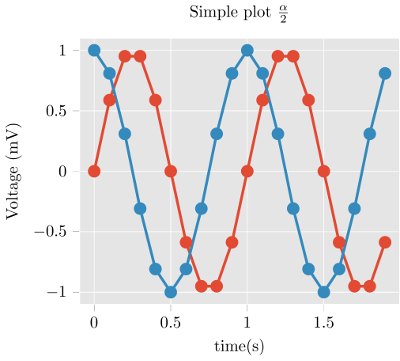
可直接原生嵌入於 LaTeX 或 ConTeXt 文件中。
matplot2tikz 的輸出為 PGFPlots,這是一個 TeX 函式庫,建立於 PGF/TikZ 之上, 以座標軸、資料等方式描述圖形。因此,matplot2tikz 的輸出
- 保留更多資訊,
- 更容易理解,且
- 更容易編輯
import matplotlib.pyplot as plt
import numpy as npplt.style.use("ggplot")
t = np.arange(0.0, 2.0, 0.1)
s = np.sin(2 np.pi t)
s2 = np.cos(2 np.pi t)
plt.plot(t, s, "o-", lw=4.1)
plt.plot(t, s2, "o-", lw=4.1)
plt.xlabel("time (s)")
plt.ylabel("Voltage (mV)")
plt.title("Simple plot $\\frac{\\alpha}{2}$")
plt.grid(True)
import matplot2tikz
matplot2tikz.save("test.tex")
--> (see above) gives
\begin{tikzpicture}\definecolor{chocolate2267451}{RGB}{226,74,51}
\definecolor{dimgray85}{RGB}{85,85,85}
\definecolor{gainsboro229}{RGB}{229,229,229}
\definecolor{steelblue52138189}{RGB}{52,138,189}
\begin{axis}[
axis background/.style={fill=gainsboro229},
axis line style={white},
tick align=outside,
tick pos=left,
title={Simple plot \(\displaystyle \frac{\alpha}{2}\)},
x grid style={white},
xlabel=\textcolor{dimgray85}{time (s)},
xmajorgrids,
xmin=-0.095, xmax=1.995,
xtick style={color=dimgray85},
y grid style={white},
ylabel=\textcolor{dimgray85}{Voltage (mV)},
ymajorgrids,
ymin=-1.1, ymax=1.1,
ytick style={color=dimgray85}
]
\addplot [line width=1.64pt, chocolate2267451, mark=*, mark size=3, mark options={solid}]
table {%
0 0
% [...]
1.9 -0.587785252292473
};
\addplot [line width=1.64pt, steelblue52138189, mark=*, mark size=3, mark options={solid}]
table {%
0 1
% [...]
1.9 0.809016994374947
};
\end{axis}
\end{tikzpicture}
get_tikz_code() 而不是 save()。)調整圖表非常簡單,可以作為你的 TeX 工作流程的一部分完成。 極佳的 PGFPlots 手冊 提供了許多讓你的圖表看起來更棒的範例。
當然,並非所有由 matplotlib 產生的圖形都能無錯誤地轉換。 特別是,3D 圖無法運作。
安裝
matplot2tikz 可於 Python 軟體套件索引 取得,因此只需執行
pip install matplot2tikz進行安裝。
使用方法
- 如常生成您的 matplotlib 圖表。
- 取代
pyplot.show(),請呼叫 matplot2tikz
python
    import matplot2tikz    matplot2tikz.save("mytikz.tex")
    # or
    matplot2tikz.save("mytikz.tex", flavor="context")
` 將 TikZ 檔案儲存為
。- 將
mytikz.tex 的內容加入您的 TeX 原始碼中。最方便的方法之一是
使用
`latex
\input{/path/to/mytikz}
` 同時請確保在文件的標頭中已包含 PGFPlots 套件及正確的 Unicode 支援:
latex
    \usepackage[utf8]{inputenc}
    \usepackage{pgfplots}
    \DeclareUnicodeCharacter{2212}{−}
    \usepgfplotslibrary{groupplots,dateplot}
    \usetikzlibrary{patterns,shapes.arrows}
    \pgfplotsset{compat=newest}
` or:
latex
    \setupcolors[state=start]
    \usemodule[tikz]
    \usemodule[pgfplots]
    \usepgfplotslibrary[groupplots,dateplot]
    \usetikzlibrary[patterns,shapes.arrows]
    \pgfplotsset{compat=newest}
    \unexpanded\def\startgroupplot{\groupplot}
    \unexpanded\def\stopgroupplot{\endgroupplot}
` 您也可以通過以下方式獲取程式碼:
python
    import matplot2tikz    matplot2tikz.Flavors.latex.preamble()
    # or
    matplot2tikz.Flavors.context.preamble()
`- [選用] 在匯出至 tikz 之前,使用
指令清理圖形。
`python
import matplotlib.pyplot as plt
import numpy as np # ... do your plotting
import matplot2tikz
matplot2tikz.clean_figure()
matplot2tikz.save("test.tex")
`
此指令會移除在座標軸範圍之外的點,簡化曲線,並針對指定的目標解析度降低點的密度。matplot2tikz 與 tikzplotlib 比較
這個 matplot2tikz 函式庫源自於 tikzplotlib
專案。
建立新函式庫的原因是 tikzplotlib 已不再維護,且僅有 tikzplotlib 的唯一擁有者能進行維護。
如果您需要使用已依賴 tikzplotlib 的第三方程式碼,建議將 tikzplotlib 的依賴改為 matplot2tikz。
如果這不可行,可於匯入第三方程式碼之前加入以下程式碼作為替代方案:
`
   import sys
   import matplot2tikz
   sys.modules["tikzplotlib"] = matplot2tikz
   # Do other imports, e.g., using
import my_third_party_library
# If tikzplotlib is used in this library, it will automatically use matplot2tikz instead.
`如果您正在從 tikzplotlib 更新自己的腳本,您可以簡單地使用導入別名:
python
   import matplot2tikz as tikzplotlib
`貢獻指南
如果您遇到錯誤、希望參與貢獻、有 matplot2tikz 的精彩範例,或者只是想了解更多資訊,請造訪
matplot2tikz 的 GitHub 頁面。
若要參與貢獻,請按照以下步驟:
- 下載 git 儲存庫,例如使用
。
- 建立虛擬環境,例如使用
python -m venv venv。
啟動虛擬環境(例如在 Windows 上, venv\Scripts\activate)。
使用 pip install uv 安裝 uv,然後使用 uv pip install tox-uv 安裝 tox-uv。
主分支是受保護的,這表示您不能直接推送更改到此分支。
因此,如果您要進行更改,請在獨立分支上操作。例如,可以使用
git checkout -b feature/my_awesome_new_feature 建立新分支。
- 在推送更改前,請確保程式碼符合檢查規則並且所有測試皆通過。執行
tox。這會進行程式碼檢查並執行所有測試腳本。若要手動執行這些步驟,請使用以下指令:
執行 tox -e lint。您也可以手動執行檢查指令:
(僅需一次) uv pip install -r requirements-lint.txt
ruff format . --check(移除 --check 參數即可讓 ruff 執行格式化)
ruff check .
mypy .
執行 tox -e py310。
執行 tox -e py311。
執行 tox -e py312。
執行 tox -e py313。
執行 tox -e py314。
執行 tox -e combine-test-reports
透過 /reports/coverage_html/index.html 的覆蓋率報告檢查所有測試是否涵蓋全部內容。 注意:目前並非所有程式碼都被測試涵蓋。理想狀態下,所有程式碼都應被涵蓋,但目前請確保所有 新增 程式碼均有測試。
- 推送更改到 GitHub。如果一切正常且您希望將更改合併到
main
   分支,請建立 pull request。
   理想狀態下,至少有一位審查者在合併前審查此 pull request。
請注意,目前只有「程式碼擁有者」可以將拉取請求合併到
main` 分支。這是為了
確保不是每個人都能(即使是無意間)破壞主程式碼。如果你想成為「程式碼擁有者」,
請告訴我們!授權
matplot2tikz 以 MIT 授權條款 發佈。
--- Tranlated By Open Ai Tx | Last indexed: 2026-04-04 ---