🌐 Language
matplot2tikz
The artist formerly known as tikzplotlib.





This is matplot2tikz, a Python tool for converting matplotlib figures into PGFPlots (PGF/TikZ) figures like
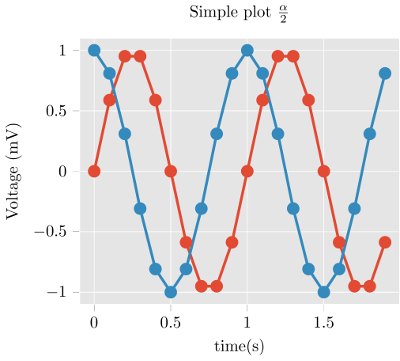
for native inclusion into LaTeX or ConTeXt documents.
The output of matplot2tikz is in PGFPlots, a TeX library that sits on top of PGF/TikZ and describes graphs in terms of axes, data etc. Consequently, the output of matplot2tikz
- retains more information,
- can be more easily understood, and
- is more easily editable
import matplotlib.pyplot as plt
import numpy as npplt.style.use("ggplot")
t = np.arange(0.0, 2.0, 0.1)
s = np.sin(2 np.pi t)
s2 = np.cos(2 np.pi t)
plt.plot(t, s, "o-", lw=4.1)
plt.plot(t, s2, "o-", lw=4.1)
plt.xlabel("time (s)")
plt.ylabel("Voltage (mV)")
plt.title("Simple plot $\\frac{\\alpha}{2}$")
plt.grid(True)
import matplot2tikz
matplot2tikz.save("test.tex")
--> (see above) gives
\begin{tikzpicture}\definecolor{chocolate2267451}{RGB}{226,74,51}
\definecolor{dimgray85}{RGB}{85,85,85}
\definecolor{gainsboro229}{RGB}{229,229,229}
\definecolor{steelblue52138189}{RGB}{52,138,189}
\begin{axis}[
axis background/.style={fill=gainsboro229},
axis line style={white},
tick align=outside,
tick pos=left,
title={Simple plot \(\displaystyle \frac{\alpha}{2}\)},
x grid style={white},
xlabel=\textcolor{dimgray85}{time (s)},
xmajorgrids,
xmin=-0.095, xmax=1.995,
xtick style={color=dimgray85},
y grid style={white},
ylabel=\textcolor{dimgray85}{Voltage (mV)},
ymajorgrids,
ymin=-1.1, ymax=1.1,
ytick style={color=dimgray85}
]
\addplot [line width=1.64pt, chocolate2267451, mark=*, mark size=3, mark options={solid}]
table {%
0 0
% [...]
1.9 -0.587785252292473
};
\addplot [line width=1.64pt, steelblue52138189, mark=*, mark size=3, mark options={solid}]
table {%
0 1
% [...]
1.9 0.809016994374947
};
\end{axis}
\end{tikzpicture}
get_tikz_code() instead of save() if you want the code as a string.)Tweaking the plot is straightforward and can be done as part of your TeX work flow. The fantastic PGFPlots manual contains great examples of how to make your plot look even better.
Of course, not all figures produced by matplotlib can be converted without error. Notably, 3D plots don't work.
Installation
matplot2tikz is available from the Python Package Index, so simply do
pip install matplot2tikzto install.
Usage
- Generate your matplotlib plot as usual.
- Instead of
pyplot.show(), invoke matplot2tikz by
python
    import matplot2tikz    matplot2tikz.save("mytikz.tex")
    # or
    matplot2tikz.save("mytikz.tex", flavor="context")
` to store the TikZ file as
.- Add the contents of
mytikz.tex into your TeX source code. A convenient way of doing
so is via
`latex
\input{/path/to/mytikz}
` Also make sure that the packages for PGFPlots and proper Unicode support are
included in the header of your document:
latex
    \usepackage[utf8]{inputenc}
    \usepackage{pgfplots}
    \DeclareUnicodeCharacter{2212}{−}
    \usepgfplotslibrary{groupplots,dateplot}
    \usetikzlibrary{patterns,shapes.arrows}
    \pgfplotsset{compat=newest}
` or:
latex
    \setupcolors[state=start]
    \usemodule[tikz]
    \usemodule[pgfplots]
    \usepgfplotslibrary[groupplots,dateplot]
    \usetikzlibrary[patterns,shapes.arrows]
    \pgfplotsset{compat=newest}
    \unexpanded\def\startgroupplot{\groupplot}
    \unexpanded\def\stopgroupplot{\endgroupplot}
` You can also get the code via:
python
    import matplot2tikz    matplot2tikz.Flavors.latex.preamble()
    # or
    matplot2tikz.Flavors.context.preamble()
`
- [Optional] Clean up the figure before exporting to tikz using the
clean_figure
command.
`python
import matplotlib.pyplot as plt
import numpy as np # ... do your plotting
import matplot2tikz
matplot2tikz.clean_figure()
matplot2tikz.save("test.tex")
` The command will remove points that are outside the axes limits, simplify curves and
reduce point density for the specified target resolution.
matplot2tikz vs. tikzplotlib
This matplot2tikz library originated from the tikzplotlib
project.
The reason a new library has been created is because tikzplotlib is no longer maintained and
maintenance could only be done by the single owner of the tikzplotlib library.
If you need to use third-party code that already depends on tikzplotlib, it is suggested to change
the tikzplotlib dependency to matplot2tikz.
If this is not possible, a workaround is to put the following code before importing the
third-party code:
   import sys
   import matplot2tikz
   sys.modules["tikzplotlib"] = matplot2tikz
   # Do other imports, e.g., using
import my_third_party_library
# If tikzplotlib is used in this library, it will automatically use matplot2tikz instead.
`If you are updating your own scripts from tikzplotlib, you can simply use an import alias:
python
   import matplot2tikz as tikzplotlib
`
Contributing
If you experience bugs, would like to contribute, have nice examples of what matplot2tikz
can do, or if you are just looking for more information, then please visit
matplot2tikz's GitHub page.
For contributing, follow these steps:
- Download the git repository, e.g., using
git clone git@github.com:ErwindeGelder/matplot2tikz.git.
- Create a virtual environment, e.g., using
python -m venv venv.
Activate the virtual environment (e.g., on Windows, venv\Scripts\activate).
Install uv using pip install uv and then tox-uv using uv pip install tox-uv.
The main branch is protected, meaning that you cannot directly push changes to this branch.
Therefore, if you want to make changes, do so in a seperate branch. For example, you can create
a new branch using git checkout -b feature/my_awesome_new_feature.
- Before pushing changes, ensure that the code adheres to the linting rules and that the tests are
successful. Run tox. This does a linting check and runs all test scripts. To manually perform
these steps, use the following commands:
- Run
tox -e lint. You can do the linting commands manually using:
(One time) uv pip install -r requirements-lint.txt
ruff format . --check (remove the --check flag to let ruff do the formatting)
ruff check .
mypy .
Run tox -e py310.
Run tox -e py311.
Run tox -e py312.
Run tox -e py313.
Run tox -e py314.
Run tox -e combine-test-reports
Check if the tests covered everything using the coverage report in
/reports/coverage_html/index.html. NOTE: Currently, now all code is covered. Ideally, all code is covered, but for now, ensure that
all new code is covered by the testing.
- Push changes to GitHub. If everything is OK and you want to merge your changes to the
main
   branch, create a pull request.
   Ideally, there is at least one reviewer who reviews the pull request before the merge.
Note that currently only "Code owners" can merge pull requests onto the
main` branch. This is to
ensure that not everyone can break the main code (even unintentionally). If you want to be a "Code
owner", let us know!License
matplot2tikz is published under the MIT license.
--- Tranlated By Open Ai Tx | Last indexed: 2026-04-04 ---