Obsidian Orgmode CM6
사용법
기본적으로 org 파일은 사이드바에 표시되지 않습니다.
표시하려면 obsidian 설정의 파일 및 링크 섹션으로 이동하여 모든 파일 확장자 감지를 선택해야 합니다.
금고에 org 파일을 만들려면 현재 obsidian 외부에서 만들어야 합니다. obsidian은 비마크다운 파일 생성을 허용하지 않기 때문입니다.
이미 org 파일이 없다면, 다음 내용을 가진 todo.org라는 파일을 만들어 보세요:
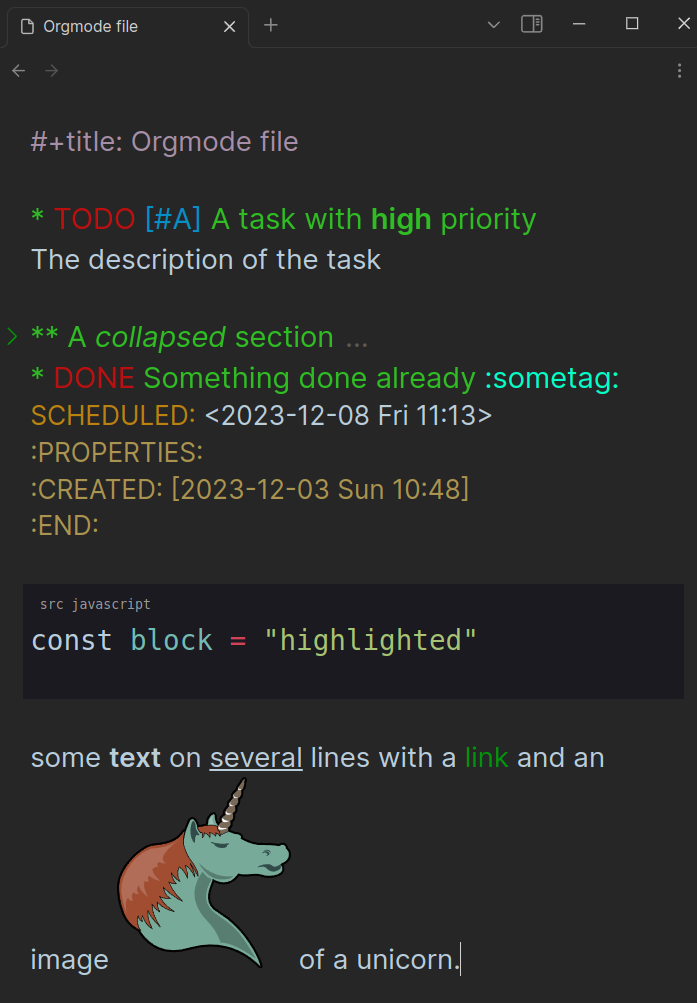
TODO [#A] A task with high* priorityThe description of the task
- A collapsed section
You cannot see the description when collapsed- DONE something done already :sometag:
SCHEDULED: <2023-12-08 Fri 11:13>
:PROPERTIES:
:CREATED: [2023-12-03 Sun 10:48]
:END:a [[https://github.com/BBazard/obsidian-orgmode-cm6][link]]
#+begin_src javascript
const block = "highlighted"
#+end_src
지원 기능
Orgmode 편집기
- 실시간 미리보기
- 구문 강조 (덮어쓸 수 있는 css 클래스 포함)
- 설정에서 사용자 정의 가능한 할 일 키워드
- 접기 (요소의 첫 번째 줄 배경 영역을 클릭하여 접기)
- 위키 링크 (
[[unicorn]]는 금고 내 어디서든 unicorn.org 파일을 열거나 unicorn.md로 대체) - 인라인 이미지 (
[[myimage.png]]는 금고에 이미지가 존재하면 표시) - ID 링크 (
[[id:12345]]는 금고 내 어떤 org 파일의 속성 서랍에 위치한 일치하는 :ID: 헤딩으로 리디렉션) - Vim 지원 (Obsidian에서 활성화 시)
- 소스 블록 강조 (지원 언어: c, c++, css, html, java, javascript, json, php, python, rust, sass, xml)
Orgmode 파서 (구문 강조)
Org Syntax 따름
- [x] 헤딩 (중첩, COMMENT 헤딩 미지원)
- [x] 섹션 (제로 섹션 포함)
- [x] 텍스트 마크업 (굵게, 기울임, 밑줄 등)
- [x] 링크 (일반 링크, 꺾쇠 링크, 일반 링크)
- [x] 마크업과 링크 조합
- [x] 주석 라인
- [x] 키워드 라인
- [x] 계획 라인
- [x] 속성 서랍
- [x] 소규모 블록 (소스 블록 제외 미서식)
- [ ] 동적 블록 (Obsidian이 플러그인에서 임의 실행을 허용하지 않아 불가능)
- [ ] 서랍
- [ ] 목록 및 체크박스
- [ ] 수평선
- [ ] 타임스탬프
- [ ] 시계
- [ ] 일기 Sexp
- [ ] 각주
- [ ] 표
- [ ] 라텍스
- [ ] : 고정 너비 라인 (대신 블록 사용 가능)
구현 세부사항
- orgmode 파일은 마크다운 파일에 사용되는 것과 별도의 codemirror 6 인스턴스로 처리됩니다. 즉, 플러그인은 마크다운 파일에 작동하는 모든 기능을 다시 구현해야 합니다.
- 파서는 orgmode 파일을 읽고 맞춤 토크나이저가 포함된 lezer 문법을 사용하여 구문 노드 트리를 만듭니다. 이 접근법은 Emacs의 정규 표현식 기반 방법보다 토큰을 더 정밀하게 매칭할 수 있게 합니다. 예를 들어, 계획 라인은 섹션 중간이 아닌 헤딩 다음에만 매칭됩니다.
- 겹치는 토큰은 유효하지 않은 것으로 간주됩니다. 예를 들어:
one _two three four_. Emacs는 정규 표현식을 사용하여one _two three를 볼드로,_two three four_를 밑줄로 처리합니다. 반면 lezer 파서는one _two three*를 볼드로,four_를 일반 텍스트로 간주하여 텍스트 마크업 범위를 자체 구문 노드로 만들 수 있게 합니다. - 헤딩 레벨(인라인태스크 없음)이나 텍스트 마크업의 줄 수에 제한이 없습니다.
마크다운 파일에서 orgmode 작업 표시
이 기능은 불안정하며 향후 호환성에 영향을 주는 방식으로 변경될 가능성이 높습니다.
현재는 TODO와 DONE만 처리됩니다.
https://github.com/BBazard/obsidian-orgmode-cm6/assets/10139245/b071b2c8-b56e-4050-8fcf-02a922fdd1c0
필터링을 위해 orgzly 검색 표현식이 지원됩니다 (구현됨: s, d, c, i, it, ad).
``orgmode-tasks
filepath: Orgmode/Orgmode file.org
query: it.todo or it.done
``
git clone https://github.com/bbazard/obsidian-orgmode-cm6
cd obsidian-orgmode-cm6
npm install
npm run build
npm test
cp main.js styles.css manifest.json "$OBSIDIAN_VAULT"/.obsidian/plugins/obsidian-orgmode-cm6/
개발
--- Tranlated By Open Ai Tx | Last indexed: 2026-07-10 ---